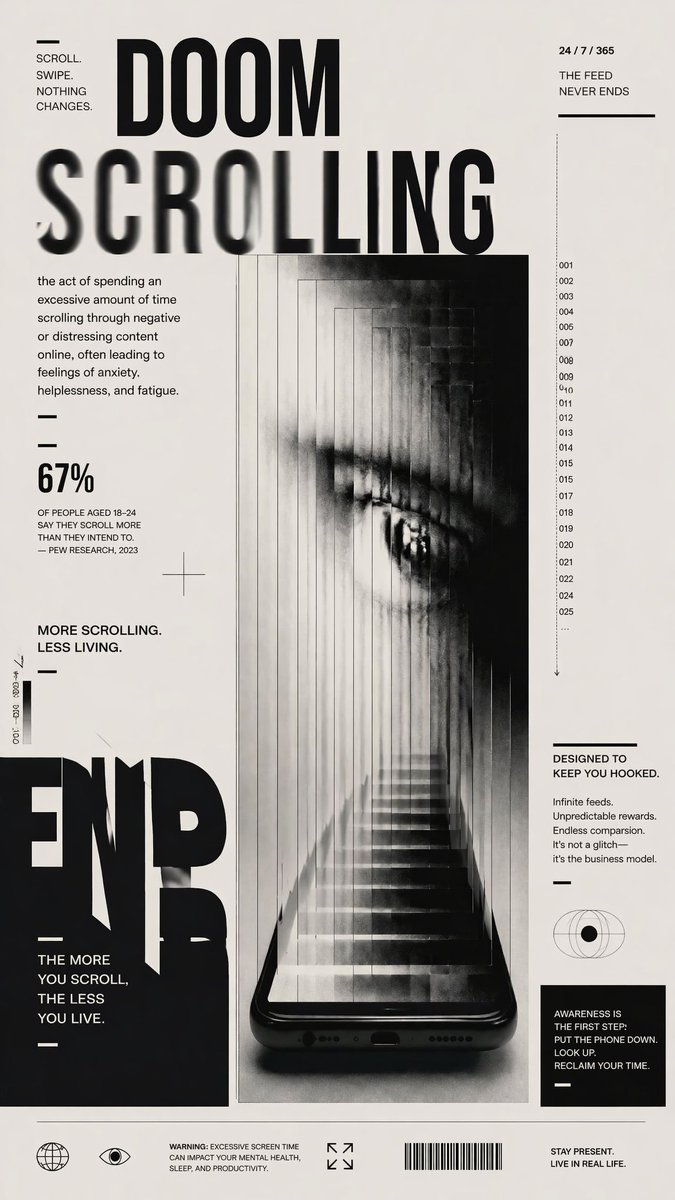
Doomscrolling Editorial Poster
A monochrome brutalist poster about social media addiction, ideal for awareness campaigns, magazine-style graphics, or conceptual editorial art.
This is a GPT Image 2 prompt case for Graphic & Poster. Use the copy-ready prompt below to generate similar visuals, and review Awesome GPT Image 2 Prompts attribution plus commercial-use rights before reuse.
Free 1K preview
Generate one preview image instantly, no sign-up required.
Prompt
Copy-ready prompt
A stark black-and-white editorial anti-tech poster on an off-white background, designed like a modern brutalist magazine cover about digital addiction. The composition is vertical and highly typographic, with one central surreal image and multiple blocks of small text. At the top center, huge bold condensed sans-serif text reads DOOM on one line and SCROLLING below it, with the word SCROLLING stretched across the page and partially motion-blurred or smeared horizontally. In the upper left corner, a tiny text block reads “SCROLL. SWIPE. NOTHING CHANGES.” with a short horizontal line above it. In the upper right corner, small text reads “24 / 7 / 365” above “THE FEED NEVER ENDS” with a horizontal divider line below. On the left side under the title, add a definition paragraph in small editorial text: “the act of spending an excessive amount of time scrolling through negative or distressing content online, often leading to feelings of anxiety, helplessness, and fatigue.” Beneath that, include 2 short horizontal divider lines, then a large statistic reading “67%” followed by smaller text: “OF PEOPLE AGED 18–24 SAY THEY SCROLL MORE THAN THEY INTEND TO. — PEW RESEARCH, 2023”. Below that, another statement reads “MORE SCROLLING. LESS LIVING.” with a divider line beneath. The center of the poster features a glossy black smartphone standing vertically at the bottom center, seen front-on, with the bottom speaker holes and charging port visible. Emerging from the phone screen is a long impossible staircase receding upward into a narrow tunnel made of repeated translucent vertical panels, creating a claustrophobic corridor. Within the tunnel, a giant grayscale human eye appears in the upper half, partially obscured by haze, vertical slicing, and ghosted repetitions, as if trapped inside the feed. The central image should feel eerie, dreamlike, oppressive, and cinematic, with soft fog, high contrast, photocopy grain, subtle motion smear, and layered transparency. Along the right side of the central image, add a narrow vertical numbered index with exactly 24 visible entries: 001, 002, 003, 004, 005, 007, 008, 009, 010, 011, 012, 013, 014, 015, 017, 018, 019, 020, 021, 022, 024, 025, 026, and an ellipsis, plus a thin downward arrow underneath. In the right column, add a text block titled “DESIGNED TO KEEP YOU HOOKED.” followed by 4 short lines: “Infinite feeds. Unpredicted rewards. Endless comparison. It’s not a glitch— it’s the business model.” Below that place a simple eye/globe icon, then a black rectangular box containing the message: “AWARENESS IS THE FIRST STEP: PUT THE PHONE DOWN. LOOK UP. RECLAIM YOUR TIME.” On the lower left, place a massive cropped black word fragment reading END near the bottom edge, with another stacked statement beside it: “THE MORE YOU SCROLL, THE LESS YOU LIVE.” Add tiny vertical microtext near the left margin for editorial flavor. Across the bottom footer, place 4 icon/text groups: a globe icon, an eye icon, a small warning text block reading “WARNING: EXCESSIVE SCREEN TIME CAN IMPACT YOUR MENTAL HEALTH, SLEEP, AND PRODUCTIVITY.”, an expand-corners icon, a barcode, and a final statement on the far right reading “STAY PRESENT. LIVE IN REAL LIFE.” Use minimalist Swiss-grid alignment, generous negative space, sharp black typography, subtle distressed print texture, and a high-fashion poster aesthetic.
Best for
- - Graphic & Poster visual exploration
- - Image generation and reference-image edits
- - Reusable briefs that keep source attribution visible
Change these parts
- - Subject, product, character, or scene
- - Aspect ratio, camera, lighting, and background
- - Brand, text, color, and output constraints
Recommended model and settings
- - Model: gpt-image-2
- - Input mode: Text to Image
- - Aspect ratio: source
- - Commercial status: review original source
How to use this prompt
- 1. Copy the prompt and preserve its structure for the first test.
- 2. Replace the subject, context, and publishing channel.
- 3. Change one camera, lighting, or style variable per iteration.
- 4. Inspect the output, source, text, and rights before reuse.
Limitations, source, and reuse cautions
- - Generated output is an editable draft, not factual, legal, or rights evidence.
- - Review the linked source, people, brands, logos, text, and third-party media before commercial use.
More cases in this category
Prioritized by category, input mode compatibility, quality, and lower risk.





Reuse and source notes
Use this prompt safely after previewing the case.
- 1.Copy the prompt or open it directly in Dovoo with the generation button.
- 2.Adjust variables, aspect ratio, and reference images for your own use case.
- 3.Before publishing or paid usage, verify source rights, attribution requirements, and brand or likeness risks.
Can I use this prompt commercially?
Commercial-use status is allowed. Review the original source, license, brand constraints, and legal requirements before paid usage.
Where does this case come from?
This case is imported from Awesome GPT Image 2 Prompts; keep attribution visible and check the source URL before reuse.