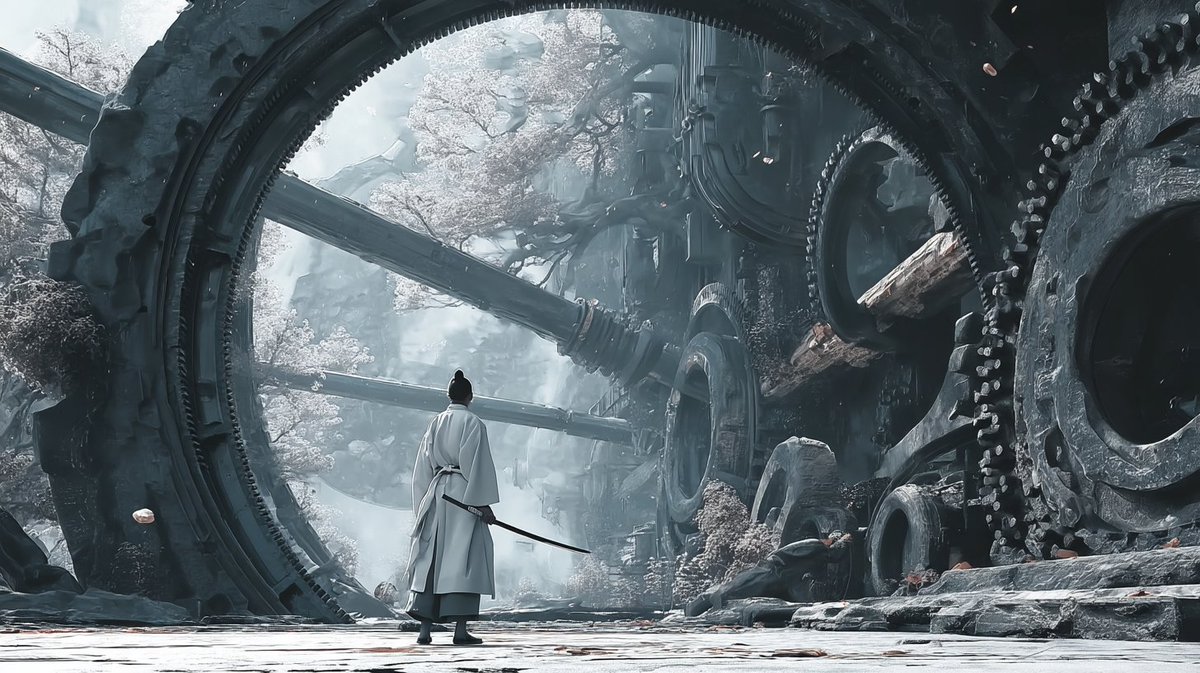
Reference-Based Cinematic World Expansion
This prompt turns a single reference scene into a new but stylistically consistent cinematic worldbuilding image, useful for expanding a concept into broader settings for films, games, or visual development.
This is a GPT Image 2 prompt case for Illustration & Art. Use the copy-ready prompt below to generate similar visuals, and review Awesome GPT Image 2 Prompts attribution plus commercial-use rights before reuse.
Free 1K preview
Generate one preview image instantly, no sign-up required.
Free text preview doesn’t preserve reference-image consistency.
Prompt
Copy-ready prompt
Using the provided reference image as the visual civilization seed, expand it into a new cinematic world scene that keeps the same grand East Asian fantasy design language, monumental scale, intricate architecture-first worldbuilding, and ultra-detailed realism, but shift the setting from a luminous cloud palace into an ancient mechanical ruin on the ground. Replace the gilded celestial temple environment with colossal circular ring structures, giant embedded gears, heavy industrial stone-and-metal architecture, broken conduits, and overgrown ruins with pale flowering trees. Change the mood to cold, misty, desaturated blue-gray lighting with soft atmospheric fog, while preserving the epic, awe-inspiring worldbuilding feel from the reference. Add 1 lone wandering swordsman seen from behind in the foreground, wearing flowing white robes and carrying a sheathed sword, centered beneath the largest ring to emphasize scale. Make it feel like a frame from a high-budget fantasy film, with extremely rich environmental detail and a cohesive visual language derived from the reference image.
Best for
- - Illustration & Art visual exploration
- - Image generation and reference-image edits
- - Reusable briefs that keep source attribution visible
Change these parts
- - Subject, product, character, or scene
- - Aspect ratio, camera, lighting, and background
- - Brand, text, color, and output constraints
Recommended model and settings
- - Model: gpt-image-2
- - Input mode: Image to Image
- - Aspect ratio: source
- - Commercial status: review original source
How to use this prompt
- 1. Copy the prompt and preserve its structure for the first test.
- 2. Replace the subject, context, and publishing channel.
- 3. Change one camera, lighting, or style variable per iteration.
- 4. Inspect the output, source, text, and rights before reuse.
Limitations, source, and reuse cautions
- - Generated output is an editable draft, not factual, legal, or rights evidence.
- - Review the linked source, people, brands, logos, text, and third-party media before commercial use.
More cases in this category
Prioritized by category, input mode compatibility, quality, and lower risk.

Reuse and source notes
Use this prompt safely after previewing the case.
- 1.Copy the prompt or open it directly in Dovoo with the generation button.
- 2.Adjust variables, aspect ratio, and reference images for your own use case.
- 3.Before publishing or paid usage, verify source rights, attribution requirements, and brand or likeness risks.
Can I use this prompt commercially?
Commercial-use status is allowed. Review the original source, license, brand constraints, and legal requirements before paid usage.
Where does this case come from?
This case is imported from Awesome GPT Image 2 Prompts; keep attribution visible and check the source URL before reuse.