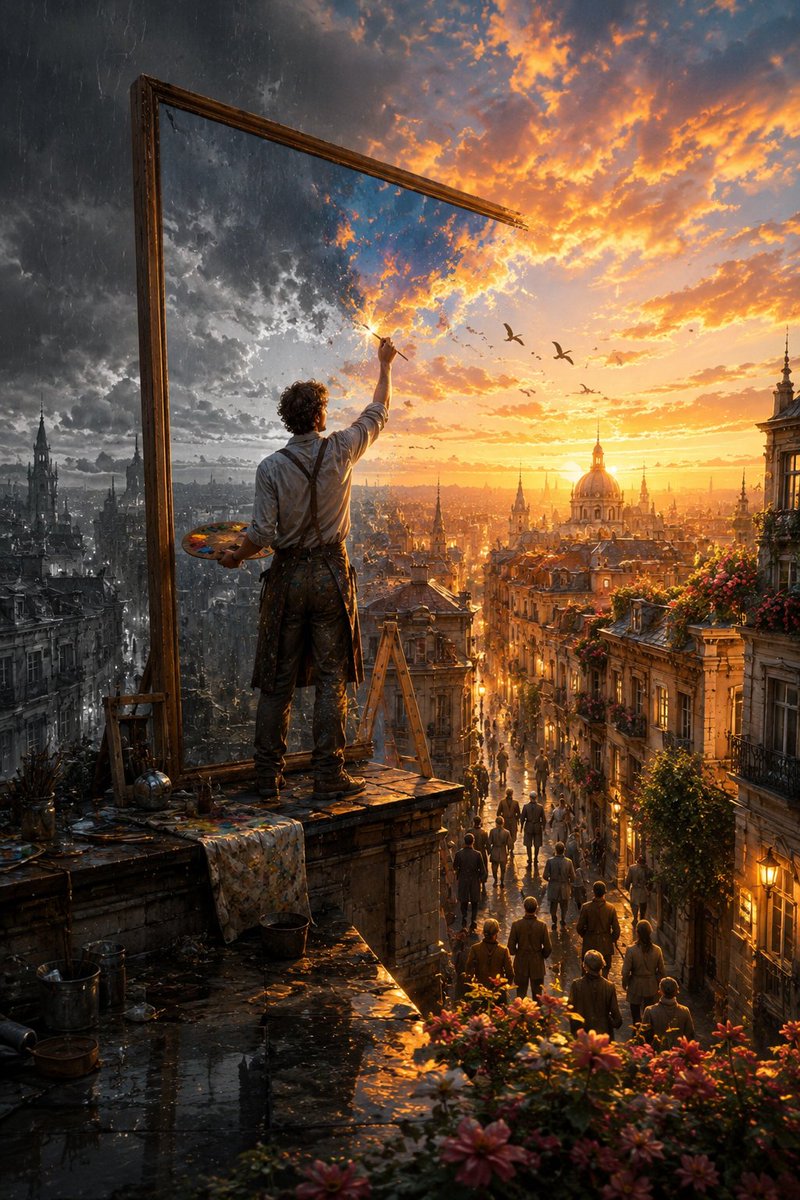
The Painter Who Finished the Sky
An epic cinematic fantasy prompt describing an artist transforming a dark, rainy world into a golden sunset through a magical canvas.
This is a GPT Image 2 prompt case for Illustration & Art. Use the copy-ready prompt below to generate similar visuals, and review Awesome GPT Image 2 Prompts attribution plus commercial-use rights before reuse.
Free 1K preview
Generate one preview image instantly, no sign-up required.
Free text preview doesn’t preserve reference-image consistency.
Prompt
Copy-ready prompt
Create a breathtaking cinematic fantasy scene titled “{argument name="scene title" default="The Painter Who Finished the Sky"}.” At sunset, a {argument name="artist description" default="lone artist"} stands high on the rooftop of an {argument name="location" default="old European city"}, viewed mostly from behind, holding a wooden painter’s palette in one hand and a fine paintbrush raised toward the sky in the other. Beside him rises an enormous antique wooden canvas frame, several times taller than the artist. But there is no ordinary canvas inside it—the frame is mysteriously connected directly to reality itself. Create a dramatic visual transformation across the scene. On the left side, the world is unfinished: cold, desaturated and rainy. Heavy charcoal storm clouds cover the sky, rain falls over monochrome historic buildings, wet rooftops reflect dim light, balconies are empty and the entire city feels quiet and lifeless. Exactly where the artist’s brush touches the sky, reality begins transforming. A luminous burst of golden paint-like energy spreads naturally outward from the brushstroke. Dark clouds gradually become magnificent glowing sunset clouds in gold, amber, peach and soft blue. Color flows from the sky down through the city as though reality itself is being painted. Historic buildings regain warm natural colors. Windows begin glowing. Flowers bloom across balconies. Green vines appear along old stone walls. Birds emerge naturally from the painted sky and fly into the real world. Warm sunlight pours dramatically through the streets below and reflects across rain-soaked cobblestones. The right half of the city is now completely transformed into an extraordinary golden-hour world filled with warmth, life and beauty, while the far left remains cold and monochrome. The boundary between the two worlds should feel magical and organic—not like a simple split-screen effect. Individual brushstrokes, particles of light and subtle trails of pigment should visibly transition into real clouds, architecture, flowers and sunlight. Far below, small groups of people have stopped in the streets and on balconies, looking upward in wonder as they realize the sky and city are being transformed above them. The artist is carefully painting one final tiny unfinished patch of darkness near the top of the sky. Composition: epic vertical cinematic framing, artist prominent in the foreground, enormous frame creating strong visual geometry, sprawling European city extending deep into the background, dramatic sense of scale and atmospheric perspective. Lighting: spectacular golden-hour sunlight contrasted against cool storm light, volumetric rays, wet reflections, subtle mist, realistic atmospheric haze. Style: sophisticated cinematic fantasy realism, photorealistic textures, emotionally powerful visual style.Prompt variables
Editable argument placeholders found in the prompt, with their default values.
Best for
- - Illustration & Art visual exploration
- - Image generation and reference-image edits
- - Reusable briefs that keep source attribution visible
Change these parts
- - Subject, product, character, or scene
- - Aspect ratio, camera, lighting, and background
- - Brand, text, color, and output constraints
Recommended model and settings
- - Model: gpt-image-2
- - Input mode: Image to Image
- - Aspect ratio: source
- - Commercial status: review original source
How to use this prompt
- 1. Copy the prompt and preserve its structure for the first test.
- 2. Replace the subject, context, and publishing channel.
- 3. Change one camera, lighting, or style variable per iteration.
- 4. Inspect the output, source, text, and rights before reuse.
Limitations, source, and reuse cautions
- - Generated output is an editable draft, not factual, legal, or rights evidence.
- - Review the linked source, people, brands, logos, text, and third-party media before commercial use.
More cases in this category
Prioritized by category, input mode compatibility, quality, and lower risk.



Reuse and source notes
Use this prompt safely after previewing the case.
- 1.Copy the prompt or open it directly in Dovoo with the generation button.
- 2.Adjust variables, aspect ratio, and reference images for your own use case.
- 3.Before publishing or paid usage, verify source rights, attribution requirements, and brand or likeness risks.
Can I use this prompt commercially?
Commercial-use status is allowed. Review the original source, license, brand constraints, and legal requirements before paid usage.
Where does this case come from?
This case is imported from Awesome GPT Image 2 Prompts; keep attribution visible and check the source URL before reuse.