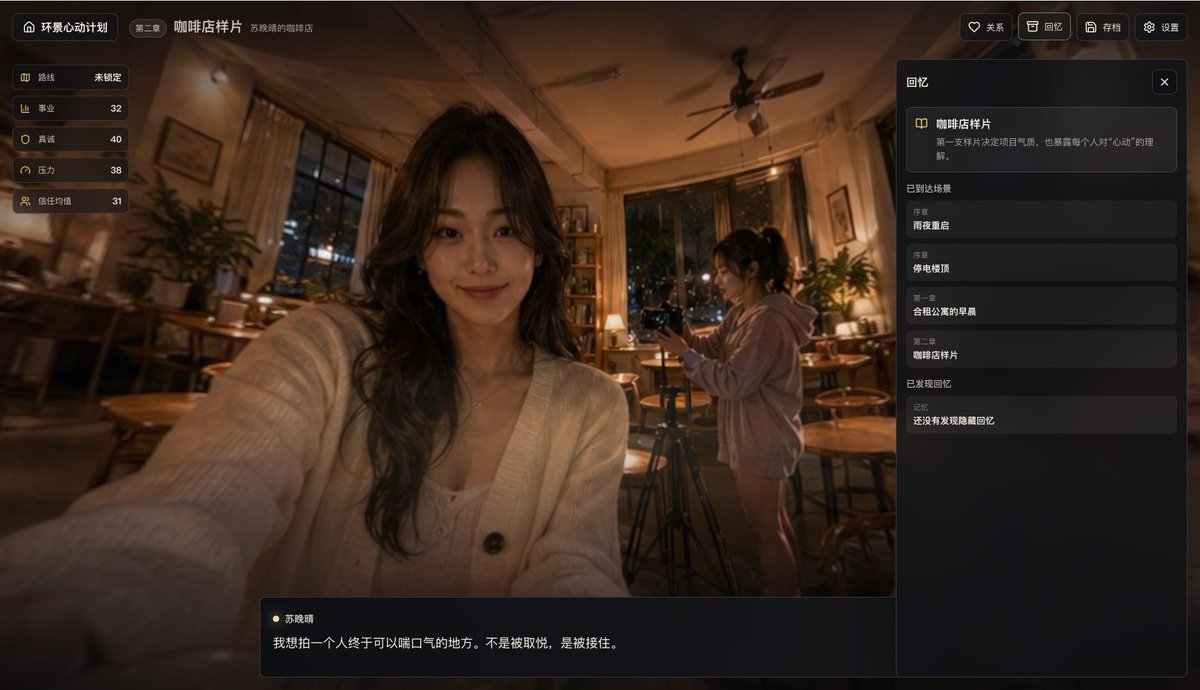
Cinematic Cafe Visual Novel UI
A photorealistic nighttime coffee shop scene presented as a stylish Chinese narrative game screenshot, useful for mockups of visual novels, interactive story apps, or cinematic UI concepts.
This is a GPT Image 2 prompt case for Anime & Game. Use the copy-ready prompt below to generate similar visuals, and review Awesome GPT Image 2 Prompts attribution plus commercial-use rights before reuse.
Free 1K preview
Generate one preview image instantly, no sign-up required.
Prompt
Copy-ready prompt
{
  "type": "cinematic narrative game interface screenshot",
  "theme": "warm, introspective coffee shop memory scene with visual novel UI overlay",
  "setting": {
    "location": "cozy independent cafe at night",
    "lighting": "dim amber tungsten lighting, soft practical lamps, warm highlights, deep shadows",
    "atmosphere": "quiet, nostalgic, emotionally reflective, slightly cinematic realism",
    "background_details": [
      "large windows with night city lights visible outside",
      "wooden tables and chairs scattered through the cafe",
      "potted plants near the windows and corners",
      "bookshelf or display shelf in the back",
      "ceiling fan centered overhead",
      "curtains framing the windows"
    ]
  },
  "composition": {
    "camera": "slightly wide-angle selfie perspective from the seated foreground subject",
    "framing": "foreground woman occupies the center-left with her arm extended toward the camera, second woman stands mid-right operating a camera on a tripod, UI panels overlay the full screen",
    "depth": "shallow to moderate depth with soft environmental blur and strong focus on the overall scene mood"
  },
  "subjects": {
    "count": 2,
    "characters": [
      {
        "role": "foreground protagonist",
        "gender_presentation": "young woman",
        "position": "center-left foreground",
        "pose": "holding the camera or phone in a selfie-like pose with one arm extended toward the viewer",
        "appearance": {
          "hair": "long wavy dark hair",
          "outfit": "soft white knit cardigan with buttons over a light inner top",
          "accessories": "subtle necklace"
        }
      },
      {
        "role": "background companion",
        "gender_presentation": "young woman",
        "position": "mid-right background",
        "pose": "standing beside a tripod, looking down at or adjusting a camera",
        "appearance": {
          "hair": "dark hair tied in a ponytail",
          "outfit": "oversized light-colored hoodie and shorts or bare legs visible"
        }
      }
    ]
  },
  "style": {
    "rendering": "photorealistic cinematic game screenshot",
    "color_palette": "warm browns, amber gold, soft black, muted cream",
    "mood": "gentle, intimate, slice-of-life, memory-like",
    "ui_style": "sleek dark translucent modern game UI with rounded rectangles and subtle gold accents"
  },
  "layout": {
    "sections": [
      {
        "title": "Left Status Bar",
        "position": "top-left vertical panel",
        "count": 5,
        "labels": [
          "route",
          "career",
          "sincerity",
          "pressure",
          "trust average"
        ]
      },
      {
        "title": "Top Navigation",
        "position": "top edge",
        "count": 6,
        "labels": [
          "Panoramic Heartbeat Project",
          "Chapter 2",
          "Coffee Shop Sample",
          "Relationships",
          "Memories",
          "Archive"
        ]
      },
      {
        "title": "Right-side Memory Panel",
        "position": "right sidebar",
        "count": 3,
        "labels": [
          "Coffee Shop Sample",
          "Arrived at the scene",
          "Memories found"
        ]
      },
      {
        "title": "Arrived at the scene",
        "position": "inside right sidebar middle",
        "count": 4,
        "labels": [
          "Prologue",
          "Reunion on a rainy night",
          "Prologue",
          "Rooftop during a blackout",
          "Chapter 1",
          "Morning in a shared apartment",
          "Chapter 2",
          "Coffee Shop Sample"
        ]
      },
      {
        "title": "Bottom Dialogue Box",
        "position": "bottom center-left",
        "count": 2,
        "labels": [
          "Su Xiaoching",
          "I want to photograph a place where a person can finally breathe a sigh of relief. Not to be pleased, but to be caught."
        ]
      }
    ],
    "centerpiece": "foreground selfie-like portrait inside the cafe with a second person filming in the background"
  },
  "text": {
    "language": "Chinese interface text",
    "preserve_visible_text": true
  },
  "customization": {
    "chapter": "{argument name=\"chapter label\" default=\"Chapter 2\"}",
    "scene title": "{argument name=\"scene title\" default=\"Coffee Shop Sample\"}",
    "character name": "{argument name=\"character name\" default=\"Su Xiaoching\"}",
    "dialogue": "{argument name=\"quote\" default=\"I want to photograph a place where a person can finally breathe a sigh of relief. Not to be pleased, but to be caught.\"}",
    "interface title": "{argument name=\"interface title\" default=\"Panoramic Heartbeat Project\"}"
  },
  "quality": "high-detail, polished, premium indie narrative game screenshot, realistic lighting, cohesive UI design"
}
Prompt variables
Editable argument placeholders found in the prompt, with their default values.
Best for
- - Anime & Game visual exploration
- - Image generation and reference-image edits
- - Reusable briefs that keep source attribution visible
Change these parts
- - Subject, product, character, or scene
- - Aspect ratio, camera, lighting, and background
- - Brand, text, color, and output constraints
Recommended model and settings
- - Model: gpt-image-2
- - Input mode: Text to Image
- - Aspect ratio: source
- - Commercial status: review original source
How to use this prompt
- 1. Copy the prompt and preserve its structure for the first test.
- 2. Replace the subject, context, and publishing channel.
- 3. Change one camera, lighting, or style variable per iteration.
- 4. Inspect the output, source, text, and rights before reuse.
Limitations, source, and reuse cautions
- - Generated output is an editable draft, not factual, legal, or rights evidence.
- - Review the linked source, people, brands, logos, text, and third-party media before commercial use.
More cases in this category
Prioritized by category, input mode compatibility, quality, and lower risk.


Reuse and source notes
Use this prompt safely after previewing the case.
- 1.Copy the prompt or open it directly in Dovoo with the generation button.
- 2.Adjust variables, aspect ratio, and reference images for your own use case.
- 3.Before publishing or paid usage, verify source rights, attribution requirements, and brand or likeness risks.
Can I use this prompt commercially?
Commercial-use status is allowed. Review the original source, license, brand constraints, and legal requirements before paid usage.
Where does this case come from?
This case is imported from Awesome GPT Image 2 Prompts; keep attribution visible and check the source URL before reuse.