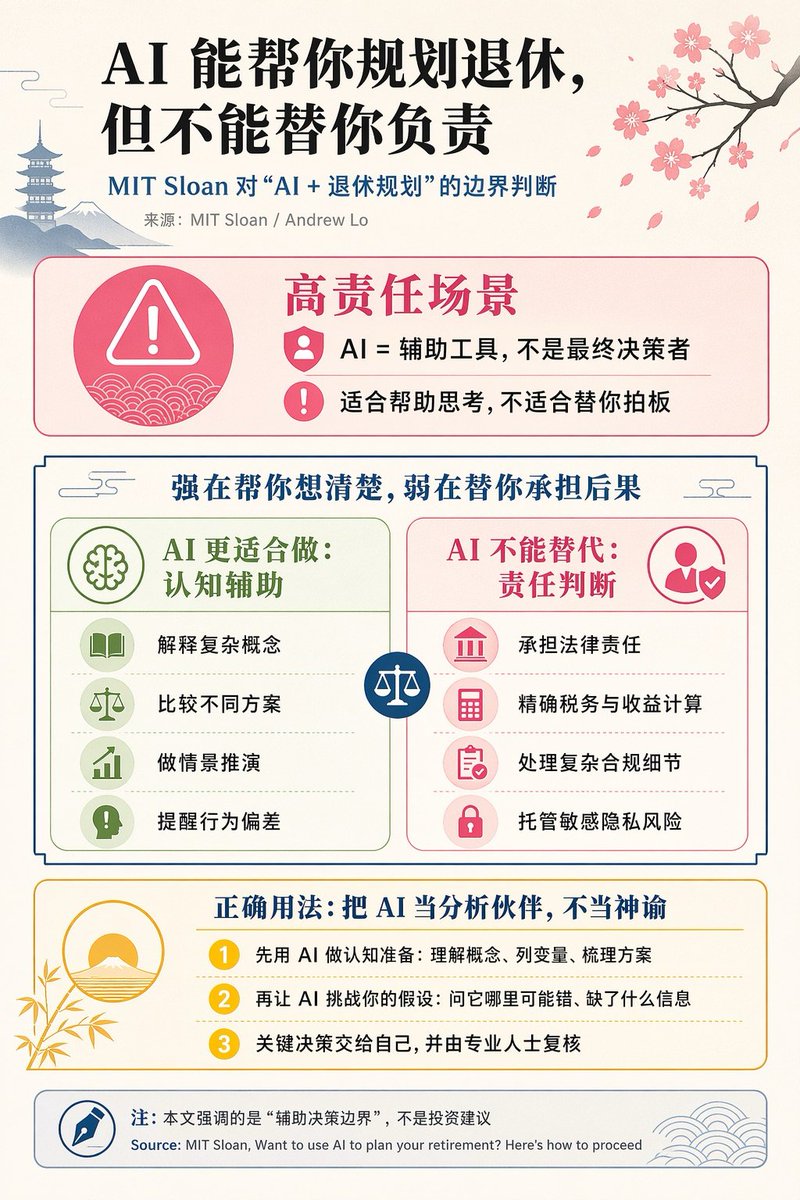
Chinese AI Retirement Planning Infographic
This prompt generates a polished Chinese editorial infographic about the limits of AI in retirement planning, suitable for social media posts, business education, or thought-leadership visuals.
This is a GPT Image 2 prompt case for Graphic & Poster. Use the copy-ready prompt below to generate similar visuals, and review Awesome GPT Image 2 Prompts attribution plus commercial-use rights before reuse.
Free 1K preview
Generate one preview image instantly, no sign-up required.
Prompt
Copy-ready prompt
{
  "type": "editorial Chinese infographic poster",
  "topic": "AI and retirement planning boundaries",
  "style": "clean academic magazine infographic, flat vector icons, soft textured off-white paper background, balanced Chinese editorial typography, minimal Japanese-inspired decorative motifs",
  "canvas": {
    "orientation": "portrait",
    "aspect_ratio": "3:4"
  },
  "palette": {
    "background": "warm ivory",
    "primary_text": "black",
    "secondary_text": "deep blue",
    "accent_red": "rose pink",
    "accent_green": "muted olive green",
    "accent_yellow": "golden yellow",
    "accent_blue": "navy blue",
    "line_color": "soft gray-blue"
  },
  "headline": {
    "text": "{argument name=\"headline text\" default=\"AI can help you plan for retirement, but it can't take responsibility for you.\"}",
    "position": "top left",
    "font": "bold Chinese serif or Song-style display",
    "large": true
  },
  "subheadline": {
    "text": "MIT Sloan's judgment on the boundaries of \"AI + Retirement Planning\".",
    "position": "below headline",
    "color": "deep blue",
    "font": "bold Chinese sans-serif"
  },
  "source_line": {
    "text": "Source: MIT Sloan / Andrew Lo",
    "position": "below subheadline",
    "color": "gray"
  },
  "layout": {
    "sections": [
      {
        "title": "High-Responsibility Scenarios",
        "position": "upper middle",
        "count": 2,
        "shape": "rounded rectangle with pink border and pale pink fill",
        "icon_count": 3,
        "labels": [
          "AI = Assistive Tool, Not the Final Decision-Maker.",
          "Suitable for helping you think, not for making decisions for you."
        ],
        "left_icon": "large pink warning triangle inside circle over wave pattern",
        "item_icons": [
          "person badge",
          "exclamation mark"
        ]
      },
      {
        "title": "Strong at helping you clarify your thoughts, weak at taking responsibility for the consequences.",
        "position": "center",
        "count": 2,
        "shape": "large framed comparison panel",
        "subsections": [
          {
            "title": "AI is better suited for: cognitive assistance",
            "position": "left",
            "count": 4,
            "color": "green",
            "labels": [
              "Explaining complex concepts",
              "Comparing different options",
              "Conduct scenario simulations",
              "Alert to behavioral deviations"
            ],
            "icons": [
              "book",
              "balance scale",
              "upward chart",
              "exclamation in speech bubble"
            ]
          },
          {
            "title": "AI cannot replace: responsibility judgment",
            "position": "right",
            "count": 4,
            "color": "pink-red",
            "labels": [
              "Bear legal responsibility",
              "Accurate tax and revenue calculation",
              "Handle complex compliance details",
              "Manage sensitive privacy risks"
            ],
            "icons": [
              "courthouse",
              "calculator",
              "clipboard",
              "lock"
            ]
          }
        ],
        "center_icon": "blue circle with white balance scale"
      },
      {
        "title": "Correct usage: Treat AI as an analytical partner, not an oracle",
        "position": "lower middle",
        "count": 3,
        "shape": "rounded rectangle with yellow border and pale cream fill",
        "labels": [
          "First, use AI for cognitive preparation: understand concepts, list variables, and organize solutions",
          "Then, let AI challenge your assumptions: ask it where it might be wrong or what information is missing",
          "Make key decisions yourself, and have them reviewed by professionals."
        ],
        "left_illustration": "yellow rising sun over stylized landscape with bamboo leaves",
        "step_markers": "three yellow numbered circles: 1, 2, 3"
      },
      {
        "title": "Note: This article emphasizes the \"decision-making boundary assistance\", not investment advice.",
        "position": "bottom",
        "count": 1,
        "shape": "rounded rectangle with blue-gray border",
        "labels": [
          "Source: MIT Sloan, Want to use AI to plan your retirement? Here’s how to proceed"
        ],
        "left_icon": "blue fountain pen nib in circle",
        "right_decoration": "gray-blue wave pattern"
      }
    ],
    "decorations": {
      "count": 5,
      "items": [
        "top right cherry blossom branch with pink flowers and falling petals",
        "top left pagoda silhouette",
        "top left distant mountain silhouette",
        "small cloud-line motifs near upper corners of comparison section",
        "subtle wave patterns inside circular icons and lower right footer"
      ]
    }
  },
  "composition": "ample margins, all text in Chinese except the English source line at bottom, strong hierarchy from headline to colored content boxes, symmetrical comparison layout in the middle, polished social-media-ready infographic",
  "rendering": "sharp vector infographic, crisp text, subtle paper grain, no photorealism"
}
Prompt variables
Editable argument placeholders found in the prompt, with their default values.
Best for
- - Graphic & Poster visual exploration
- - Image generation and reference-image edits
- - Reusable briefs that keep source attribution visible
Change these parts
- - Subject, product, character, or scene
- - Aspect ratio, camera, lighting, and background
- - Brand, text, color, and output constraints
Recommended model and settings
- - Model: gpt-image-2
- - Input mode: Text to Image
- - Aspect ratio: source
- - Commercial status: review original source
How to use this prompt
- 1. Copy the prompt and preserve its structure for the first test.
- 2. Replace the subject, context, and publishing channel.
- 3. Change one camera, lighting, or style variable per iteration.
- 4. Inspect the output, source, text, and rights before reuse.
Limitations, source, and reuse cautions
- - Generated output is an editable draft, not factual, legal, or rights evidence.
- - Review the linked source, people, brands, logos, text, and third-party media before commercial use.
More cases in this category
Prioritized by category, input mode compatibility, quality, and lower risk.






Reuse and source notes
Use this prompt safely after previewing the case.
- 1.Copy the prompt or open it directly in Dovoo with the generation button.
- 2.Adjust variables, aspect ratio, and reference images for your own use case.
- 3.Before publishing or paid usage, verify source rights, attribution requirements, and brand or likeness risks.
Can I use this prompt commercially?
Commercial-use status is allowed. Review the original source, license, brand constraints, and legal requirements before paid usage.
Where does this case come from?
This case is imported from Awesome GPT Image 2 Prompts; keep attribution visible and check the source URL before reuse.