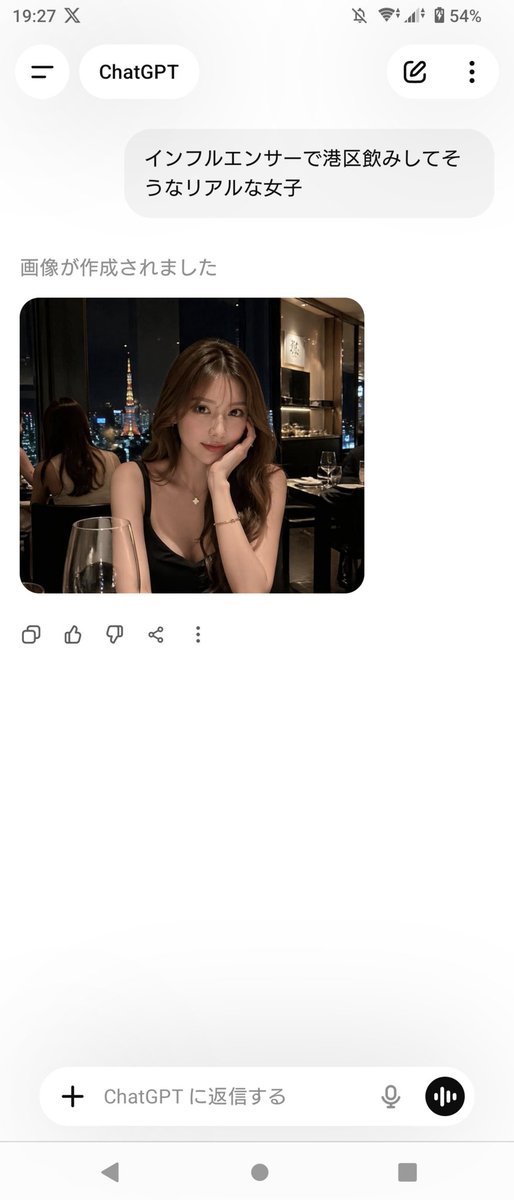
ChatGPT App Screenshot With Generated Portrait
This prompt generates a realistic Android screenshot of the ChatGPT Japanese mobile app displaying a photorealistic nightlife portrait image, useful for social media mockups or UI demonstrations.
This is a GPT Image 2 prompt case for Other Inspiration. Use the copy-ready prompt below to generate similar visuals, and review Awesome GPT Image 2 Prompts attribution plus commercial-use rights before reuse.
Free 1K preview
Generate one preview image instantly, no sign-up required.
Free text preview doesn’t preserve reference-image consistency.
Prompt
Copy-ready prompt
A realistic smartphone screenshot of the ChatGPT mobile app in Japanese on an Android device, shown full screen in portrait orientation with a clean light theme. The status bar at the top shows the time 19:27, network and battery icons, and 54% battery. The header has a back-style menu icon on the left, a rounded tab labeled ChatGPT, and 2 icons on the right: an edit pencil icon and a vertical three-dot menu. In the chat area, include 1 user message bubble in Japanese reading "インフルエンサーで港区飲みしてそうなリアルな女子". Below it, show the assistant status text "画像が作成されました" and then 1 generated image card with rounded corners. The generated image is a photorealistic night restaurant portrait of a glamorous young Japanese woman seated indoors by a window with Tokyo Tower visible outside, wearing a black spaghetti-strap dress, long wavy brown hair, a delicate necklace, and a bracelet, leaning her face on one hand at a candlelit dinner table with a wine glass in the foreground; the setting feels upscale, dimly lit, and influencer-like, with a mirror behind her reflecting the back of her head and the city view. Blur or mosaic the woman’s face for privacy. Beneath the image, show 5 action icons in a row: copy, thumbs up, thumbs down, share, and more. At the bottom, include the message input bar with a plus icon on the left, placeholder text "ChatGPT に返信する", a microphone icon, and a circular voice button on the right. Also show the Android navigation bar with 3 controls at the very bottom. Keep the overall composition exactly like a casual app screenshot, minimal, spacious, and authentic.
Best for
- - Other Inspiration visual exploration
- - Image generation and reference-image edits
- - Reusable briefs that keep source attribution visible
Change these parts
- - Subject, product, character, or scene
- - Aspect ratio, camera, lighting, and background
- - Brand, text, color, and output constraints
Recommended model and settings
- - Model: gpt-image-2
- - Input mode: Image to Image
- - Aspect ratio: source
- - Commercial status: review original source
How to use this prompt
- 1. Copy the prompt and preserve its structure for the first test.
- 2. Replace the subject, context, and publishing channel.
- 3. Change one camera, lighting, or style variable per iteration.
- 4. Inspect the output, source, text, and rights before reuse.
Limitations, source, and reuse cautions
- - Generated output is an editable draft, not factual, legal, or rights evidence.
- - Review the linked source, people, brands, logos, text, and third-party media before commercial use.
More cases in this category
Prioritized by category, input mode compatibility, quality, and lower risk.
Reuse and source notes
Use this prompt safely after previewing the case.
- 1.Copy the prompt or open it directly in Dovoo with the generation button.
- 2.Adjust variables, aspect ratio, and reference images for your own use case.
- 3.Before publishing or paid usage, verify source rights, attribution requirements, and brand or likeness risks.
Can I use this prompt commercially?
Commercial-use status is allowed. Review the original source, license, brand constraints, and legal requirements before paid usage.
Where does this case come from?
This case is imported from Awesome GPT Image 2 Prompts; keep attribution visible and check the source URL before reuse.