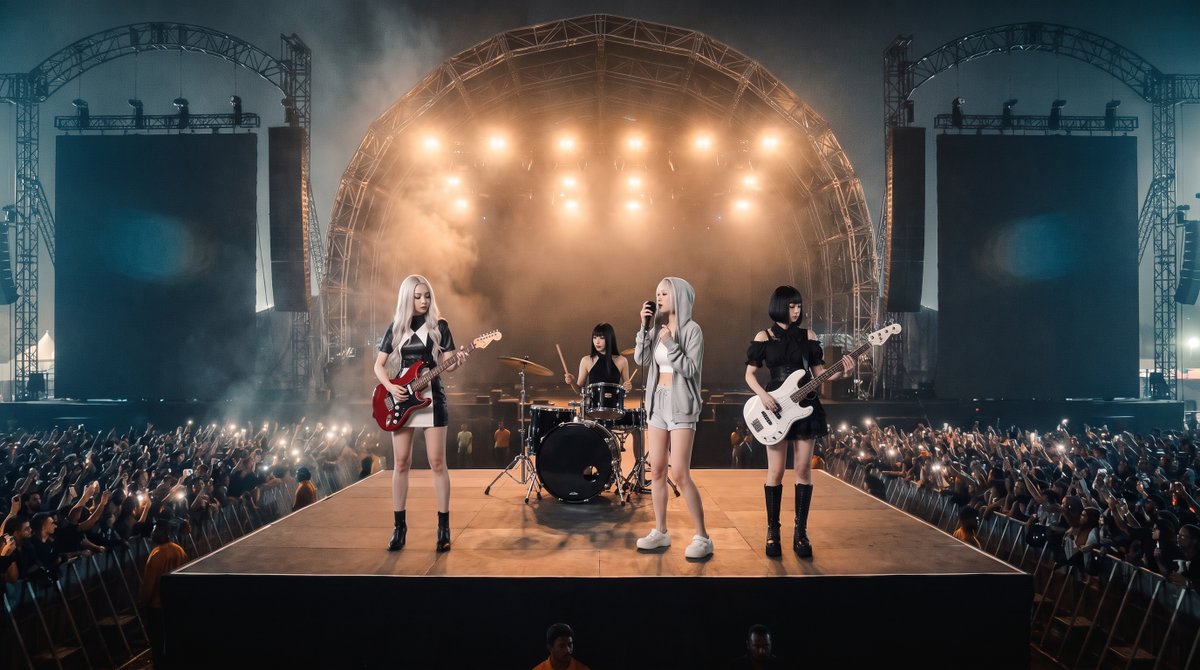
Photorealistic Festival Band Performance
Creates a realistic live rock festival shot by adding a four-member band onto the referenced nighttime outdoor stage venue.
This is a GPT Image 2 prompt case for Other Inspiration. Use the copy-ready prompt below to generate similar visuals, and review Awesome GPT Image 2 Prompts attribution plus commercial-use rights before reuse.
Free 1K preview
Generate one preview image instantly, no sign-up required.
Free text preview doesn’t preserve reference-image consistency.
Prompt
Copy-ready prompt
Using REFERENCE_0 as the live outdoor rock festival location reference, create a photorealistic concert performance shot from the front-center audience angle. Preserve the same nighttime festival venue, large arched main stage, two tall side screen towers, smoky blue-orange lighting, dense cheering crowd, phone lights, and the long runway/catwalk perspective from the reference.

Add a 4-member female rock band performing on the front catwalk: 1 blonde electric guitarist on the left with a red guitar, 1 drummer centered slightly behind at a black drum kit, 1 blonde lead vocalist at center-front holding a microphone, and 1 black-haired bassist on the right with a white bass. Make them full-body, realistically integrated into the stage scale and lighting, with natural shadows on the platform.

Style: ultra-realistic live concert photography, cinematic wide-angle composition, high dynamic range, atmospheric smoke, warm backlights from the stage rig, cool blue night ambience, sharp crowd detail without looking artificial.

Constraints: keep the venue layout and lighting mood consistent with the reference image; do not make a 2x2 grid; output one single panoramic concert image; no text, logos, captions, or watermarks.
Best for
- - Other Inspiration visual exploration
- - Image generation and reference-image edits
- - Reusable briefs that keep source attribution visible
Change these parts
- - Subject, product, character, or scene
- - Aspect ratio, camera, lighting, and background
- - Brand, text, color, and output constraints
Recommended model and settings
- - Model: gpt-image-2
- - Input mode: Image to Image
- - Aspect ratio: source
- - Commercial status: review original source
How to use this prompt
- 1. Copy the prompt and preserve its structure for the first test.
- 2. Replace the subject, context, and publishing channel.
- 3. Change one camera, lighting, or style variable per iteration.
- 4. Inspect the output, source, text, and rights before reuse.
Limitations, source, and reuse cautions
- - Generated output is an editable draft, not factual, legal, or rights evidence.
- - Review the linked source, people, brands, logos, text, and third-party media before commercial use.
More cases in this category
Prioritized by category, input mode compatibility, quality, and lower risk.


Reuse and source notes
Use this prompt safely after previewing the case.
- 1.Copy the prompt or open it directly in Dovoo with the generation button.
- 2.Adjust variables, aspect ratio, and reference images for your own use case.
- 3.Before publishing or paid usage, verify source rights, attribution requirements, and brand or likeness risks.
Can I use this prompt commercially?
Commercial-use status is allowed. Review the original source, license, brand constraints, and legal requirements before paid usage.
Where does this case come from?
This case is imported from Awesome GPT Image 2 Prompts; keep attribution visible and check the source URL before reuse.