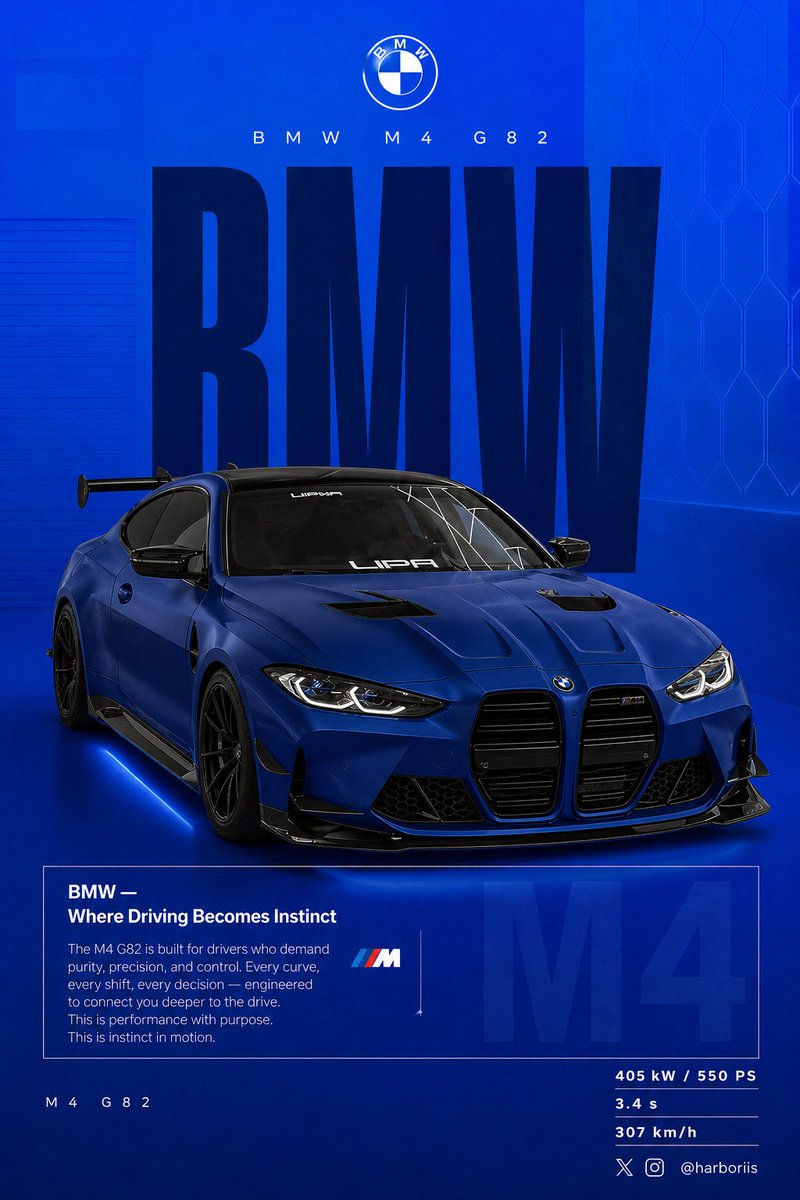
BMW Performance Social Poster
A detailed instruction for a graphic BMW social poster, maintaining car and composition details from a reference image with a specific blue theme.
This is a GPT Image 2 prompt case for Graphic & Poster. Use the copy-ready prompt below to generate similar visuals, and review Awesome GPT Image 2 Prompts attribution plus commercial-use rights before reuse.
Free 1K preview
Generate one preview image instantly, no sign-up required.
Free text preview doesn’t preserve reference-image consistency.
Prompt
Copy-ready prompt
Create a 4:5 vertical social poster in ultra high resolution, 8K print quality sharpness. Use the {argument name="car model" default="BMW car"} from the reference image as the main subject and use the background structure/composition from the reference image, but transform it into a BMW themed design. Replace all black tones with a flat {argument name="background color" default="high-saturation BMW blue"} background. Keep the same layout, spacing, visual balance, and poster composition from the reference image. Background should use a smooth gradient from slightly lighter electric blue at the top to deep navy blue at the bottom. Add subtle grain texture (2 to 3%) and faint rectangular overlays (2 to 4% opacity). Keep it clean, graphic, premium, and non-realistic. Add a soft contact shadow under the car. Use the same BMW from the reference image, changing only the {argument name="paint finish" default="matte frozen blue"} or deep metallic navy. Keep the original body shape, wheels, stance, and design details from the reference image. Show the car in a rear 3/4 perspective matching the reference image angle exactly. Use a slightly elevated camera angle. Position the car slightly right of center. Include visible carbon roof, aggressive rear diffuser, sharp controlled reflections, and subtle brake details. Keep composition identical to the reference image: Top: branding Middle: giant type Center: car overlapping text Bottom: editorial block and specs Typography: Primary text: “BMW” Ultra condensed bold sans serif, tall vertical scaling like the reference poster. Color deep navy or near black. Static text with no distortion. Acts as structural backdrop. Secondary header: “BMW M4 G82” Thin font with wide tracking. Logo area: BMW roundel centered above. Editorial block: Headline: “BMW — Where Driving Becomes Instinct” Body copy focused on: driver connection control performance precision Use the same boxed editorial layout as the reference image. Background faded text: “M4” large scale with 3 to 5% opacity behind the box. Bottom left: “ M4 G82” Bottom right specs: 405 kW / 550 PS 3.4 s 307 km/h Lighting should be clean studio lighting with sharp but controlled highlights. Color grading should use deep blues, high contrast, clean blacks. Camera lens: 50mm, slightly elevated rear 3/4 angle. Mood: Performance. Precision. Driver focus. Add Bottom-right watermark: harboriis , with small x and Instagram logoPrompt variables
Editable argument placeholders found in the prompt, with their default values.
Best for
- - Graphic & Poster visual exploration
- - Image generation and reference-image edits
- - Reusable briefs that keep source attribution visible
Change these parts
- - Subject, product, character, or scene
- - Aspect ratio, camera, lighting, and background
- - Brand, text, color, and output constraints
Recommended model and settings
- - Model: gpt-image-2
- - Input mode: Image to Image
- - Aspect ratio: source
- - Commercial status: review original source
How to use this prompt
- 1. Copy the prompt and preserve its structure for the first test.
- 2. Replace the subject, context, and publishing channel.
- 3. Change one camera, lighting, or style variable per iteration.
- 4. Inspect the output, source, text, and rights before reuse.
Limitations, source, and reuse cautions
- - Generated output is an editable draft, not factual, legal, or rights evidence.
- - Review the linked source, people, brands, logos, text, and third-party media before commercial use.
More cases in this category
Prioritized by category, input mode compatibility, quality, and lower risk.




Reuse and source notes
Use this prompt safely after previewing the case.
- 1.Copy the prompt or open it directly in Dovoo with the generation button.
- 2.Adjust variables, aspect ratio, and reference images for your own use case.
- 3.Before publishing or paid usage, verify source rights, attribution requirements, and brand or likeness risks.
Can I use this prompt commercially?
Commercial-use status is allowed. Review the original source, license, brand constraints, and legal requirements before paid usage.
Where does this case come from?
This case is imported from Awesome GPT Image 2 Prompts; keep attribution visible and check the source URL before reuse.