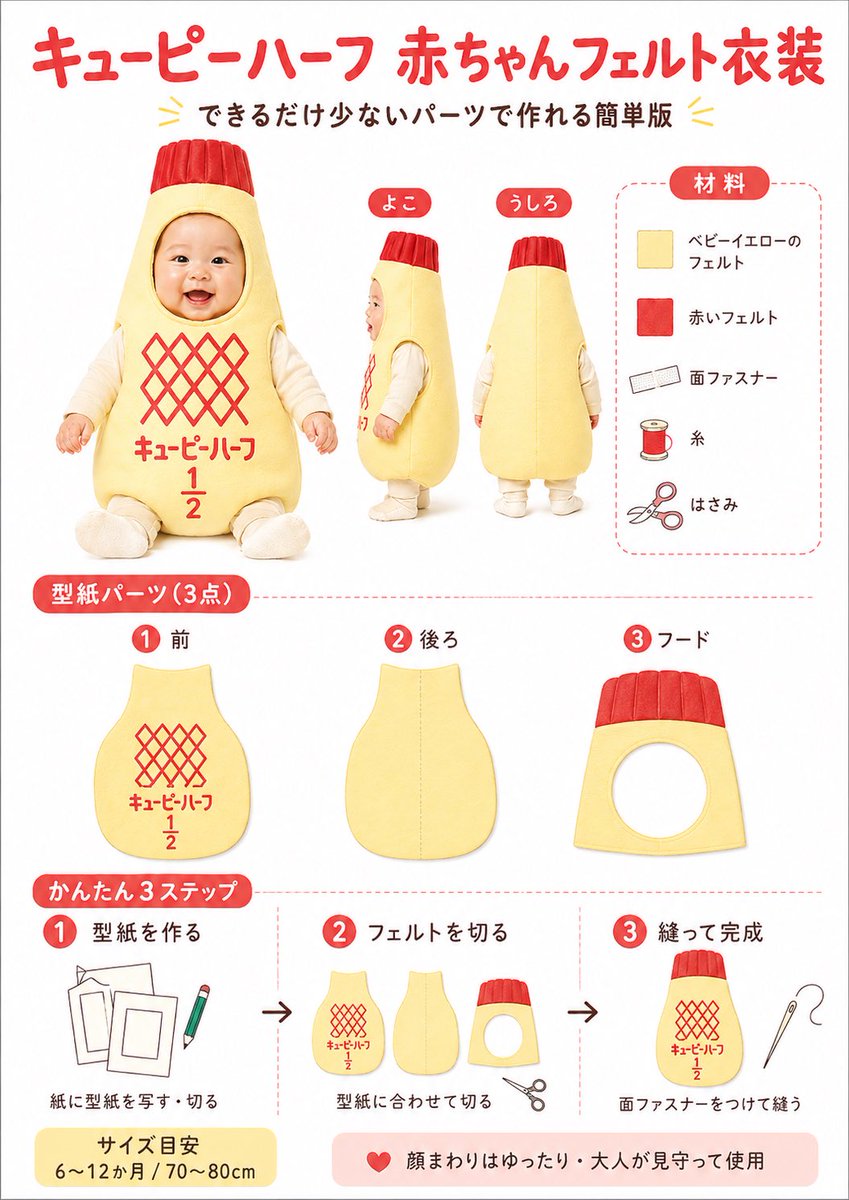
Japanese Baby Felt Costume DIY Sheet
This generates a cute Japanese-style craft infographic showing materials, pattern pieces, and three simple steps for making a baby felt costume inspired by Kewpie Half packaging.
This is a GPT Image 2 prompt case for Graphic & Poster. Use the copy-ready prompt below to generate similar visuals, and review Awesome GPT Image 2 Prompts attribution plus commercial-use rights before reuse.
Free 1K preview
Generate one preview image instantly, no sign-up required.
Prompt
Copy-ready prompt
{
  "customization": {
    "accent_color": "{argument name=\"accent color\" default=\"bright red\"}",
    "main_color": "{argument name=\"main costume color\" default=\"pale baby yellow\"}",
    "product_theme": "{argument name=\"product theme\" default=\"Kewpie Half-style baby costume\"}",
    "size_note": "{argument name=\"size note\" default=\"6〜12か月 / 70〜80cm\"}"
  },
  "design_details": {
    "colors": {
      "accent_black": "dark brown-black text",
      "background": "white",
      "primary_red": "bright warm red",
      "primary_yellow": "soft baby-yellow"
    },
    "graphic_elements": "red numbered circles, rounded red section tabs, light red dashed divider lines, small decorative yellow chevrons around the subtitle",
    "typography": "rounded bold Japanese display font for headers, simple clean sans-serif Japanese text for labels"
  },
  "headline": {
    "main": "{argument name=\"headline text\" default=\"キューピーハーフ 赤ちゃんフェルト衣装\"}",
    "sub": "できるだけ少ないパーツで作れる簡単版"
  },
  "image_goal": "create a cute, easy-to-follow Japanese craft tutorial poster for a baby felt costume inspired by a mayonnaise bottle, suitable for social media sharing, blog thumbnails, or printable DIY instructions",
  "layout": {
    "footer_notes": [
      "サイズ目安 6〜12か月 / 70〜80cm",
      "顔まわりはゆったり・大人が見守って使用"
    ],
    "sections": [
      {
        "count": 3,
        "details": "a baby wearing a padded pale yellow bottle-shaped felt costume with a red ribbed cap-like hood top, Show every face clearly with natural, detailed facial features, cream long-sleeve inner clothing, seated front view plus standing side and back views; front has a red diamond lattice logo area and red Japanese text with a large 1 over 2 fraction",
        "labels": [
          "front",
          "side",
          "back"
        ],
        "position": "upper left to center",
        "title": "main costume views"
      },
      {
        "count": 5,
        "details": "vertical materials list inside a rounded dashed border, each item paired with a simple icon: pale yellow felt square, red felt square, hook-and-loop fastener strip, spool of thread, scissors",
        "labels": [
          "ベビーイエローのフェルト",
          "赤いフェルト",
          "面ファスナー",
          "Sewing thread",
          "はさみ"
        ],
        "position": "top-right",
        "title": "Materials"
      },
      {
        "count": 3,
        "details": "three pattern pieces shown separately: front body panel with red lattice and text print, back body panel plain with center seam guide, hood panel with circular face opening and red ribbed top band",
        "labels": [
          "1 Front piece",
          "2 後ろ",
          "3 フード"
        ],
        "position": "middle row",
        "title": "型紙パーツ (3点)"
      },
      {
        "count": 3,
        "details": "step 1 shows paper templates and a pencil, step 2 shows the three cut felt parts and scissors, step 3 shows the finished costume body with a sewing needle; black arrows between each step",
        "labels": [
          "1 型紙を作る",
          "2 フェルトを切る",
          "3 縫って完成"
        ],
        "position": "bottom row",
        "title": "かんたん3ステップ"
      }
    ]
  },
  "style": "clean infographic poster, bright white background, soft studio lighting, friendly handmade craft aesthetic, red and pale yellow color scheme, rounded Japanese labels, neat product-sheet layout",
  "subject": "DIY felt baby costume styled like Kewpie Half mayonnaise packaging",
  "type": "Japanese craft instruction poster"
}
Prompt variables
Editable argument placeholders found in the prompt, with their default values.
Best for
- - Graphic & Poster visual exploration
- - Image generation and reference-image edits
- - Reusable briefs that keep source attribution visible
Change these parts
- - Subject, product, character, or scene
- - Aspect ratio, camera, lighting, and background
- - Brand, text, color, and output constraints
Recommended model and settings
- - Model: gpt-image-2
- - Input mode: Text to Image
- - Aspect ratio: source
- - Commercial status: review original source
How to use this prompt
- 1. Copy the prompt and preserve its structure for the first test.
- 2. Replace the subject, context, and publishing channel.
- 3. Change one camera, lighting, or style variable per iteration.
- 4. Inspect the output, source, text, and rights before reuse.
Limitations, source, and reuse cautions
- - Generated output is an editable draft, not factual, legal, or rights evidence.
- - Review the linked source, people, brands, logos, text, and third-party media before commercial use.
More cases in this category
Prioritized by category, input mode compatibility, quality, and lower risk.




Reuse and source notes
Use this prompt safely after previewing the case.
- 1.Copy the prompt or open it directly in Dovoo with the generation button.
- 2.Adjust variables, aspect ratio, and reference images for your own use case.
- 3.Before publishing or paid usage, verify source rights, attribution requirements, and brand or likeness risks.
Can I use this prompt commercially?
Commercial-use status is allowed. Review the original source, license, brand constraints, and legal requirements before paid usage.
Where does this case come from?
This case is imported from Awesome GPT Image 2 Prompts; keep attribution visible and check the source URL before reuse.