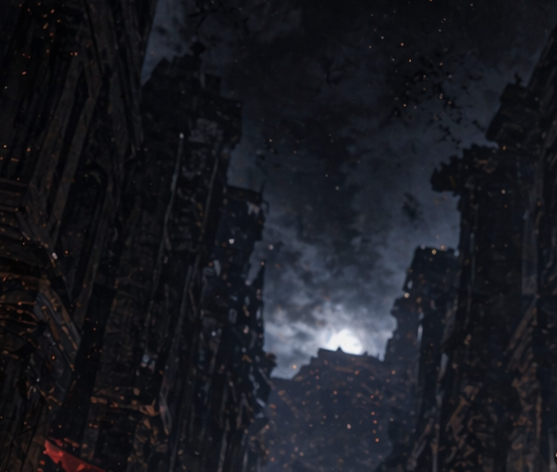
Apocalyptic Ruined City Street
This prompt generates a dark cinematic concept-art scene of a devastated urban street with collapsing buildings, smoke, and drifting embers, suitable for dystopian or post-apocalyptic visuals.
This is a GPT Image 2 prompt case for Anime & Game. Use the copy-ready prompt below to generate similar visuals, and review Awesome GPT Image 2 Prompts attribution plus commercial-use rights before reuse.
Free 1K preview
Generate one preview image instantly, no sign-up required.
Prompt
Copy-ready prompt
A dark, apocalyptic city street at night, viewed from ground level looking upward through a narrow canyon of ruined tall buildings on both sides. The architecture is heavily damaged and partially collapsed, with jagged silhouettes, broken facades, and blackened gothic-industrial details fading into shadow. A dense column of smoke and stormy cloud fills the center of the sky, backlit by a cold pale glow near the horizon, creating a dramatic high-contrast focal point. The overall palette is nearly monochrome deep navy, charcoal, black, and muted steel blue, with scattered tiny orange ember-like specks drifting through the air across the whole scene. The mood is bleak, ominous, and cinematic, like a post-disaster wasteland or bombed urban ruin. Painterly digital concept art, soft atmospheric haze, heavy texture, subtle film-grain feel, no people, no vehicles, no readable signs, wide composition, high detail in the ruined structures, strong vertical framing from the buildings, and a foreboding smoky sky dominating the upper half.
Best for
- - Anime & Game visual exploration
- - Image generation and reference-image edits
- - Reusable briefs that keep source attribution visible
Change these parts
- - Subject, product, character, or scene
- - Aspect ratio, camera, lighting, and background
- - Brand, text, color, and output constraints
Recommended model and settings
- - Model: gpt-image-2
- - Input mode: Text to Image
- - Aspect ratio: source
- - Commercial status: review original source
How to use this prompt
- 1. Copy the prompt and preserve its structure for the first test.
- 2. Replace the subject, context, and publishing channel.
- 3. Change one camera, lighting, or style variable per iteration.
- 4. Inspect the output, source, text, and rights before reuse.
Limitations, source, and reuse cautions
- - Generated output is an editable draft, not factual, legal, or rights evidence.
- - Review the linked source, people, brands, logos, text, and third-party media before commercial use.
More cases in this category
Prioritized by category, input mode compatibility, quality, and lower risk.


Reuse and source notes
Use this prompt safely after previewing the case.
- 1.Copy the prompt or open it directly in Dovoo with the generation button.
- 2.Adjust variables, aspect ratio, and reference images for your own use case.
- 3.Before publishing or paid usage, verify source rights, attribution requirements, and brand or likeness risks.
Can I use this prompt commercially?
Commercial-use status is allowed. Review the original source, license, brand constraints, and legal requirements before paid usage.
Where does this case come from?
This case is imported from Awesome GPT Image 2 Prompts; keep attribution visible and check the source URL before reuse.