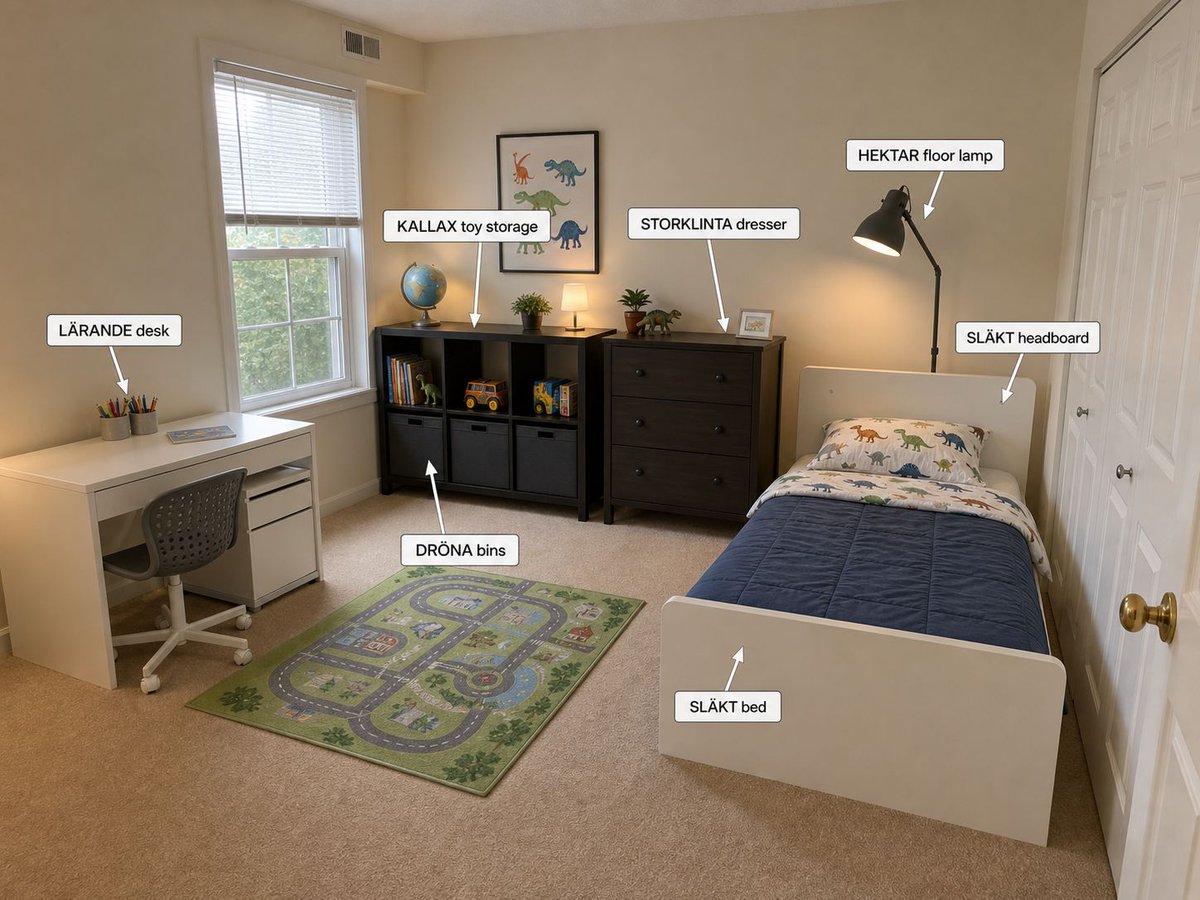
Annotated IKEA Kids Bedroom Design
Creates a photorealistic children’s bedroom concept with labeled IKEA furniture for interior planning or shopping inspiration.
This is a GPT Image 2 prompt case for Interior & Architecture. Use the copy-ready prompt below to generate similar visuals, and review Awesome GPT Image 2 Prompts attribution plus commercial-use rights before reuse.
This prompt is designed for multiple reference images. We will open Dovoo with the prompt and the available preview image; add the remaining references in Dovoo before generating.
Free 1K preview
Generate one preview image instantly, no sign-up required.
Free text preview doesn’t preserve reference-image consistency.
Prompt
Copy-ready prompt
Goal: Create a photorealistic wide-angle interior design visualization of a small child’s bedroom decorated with IKEA furniture, including annotation callouts naming each new item.

Canvas: Landscape 4:3 image, photographed from the doorway or front-right corner of the room with a slightly elevated eye-level perspective, showing the entire bedroom from left desk area to right bed and closet doors.

Room details: Beige walls, beige carpet, white trim, a large window with white blinds on the left wall, white double closet doors on the right wall, warm natural daylight mixed with soft lamp light. Keep the room tidy, realistic, and practical for a young child.

Layout and furniture: On the far left wall place a white {argument name="desk model" default="LÄRANDE desk"} with a gray rolling desk chair, pencil cups, and a small book or tablet on top. Under the window and along the back wall place a black cube storage unit labeled {argument name="toy storage model" default="KALLAX toy storage"}, filled with exactly 3 gray fabric bins across the bottom row, books, toy vehicles, and small toys. Above the toy storage hang a framed dinosaur print. To the right of the toy storage place a dark wood {argument name="dresser model" default="STORKLINTA dresser"} with exactly 3 large drawers, small plants, a framed photo, and a small lamp on top. On the right side place a white twin {argument name="bed model" default="SLÄKT bed"} with a white headboard, blue quilt, dinosaur-patterned pillow and sheets, positioned lengthwise toward the viewer. Place a black arched floor lamp behind the bed near the dresser. Add a green children’s road-map play rug centered on the carpet between the desk, storage, and bed.

Annotation callouts: Add exactly 7 white rounded-rectangle labels with black text and thin gray borders, each with a white arrow pointing to the relevant item. The labels must read exactly: 1) “LÄRANDE desk” pointing to the desk, 2) “KALLAX toy storage” pointing to the black cube storage, 3) “DRÖNA bins” pointing to the gray fabric bins, 4) “STORKLINTA dresser” pointing to the dresser, 5) “HEKTAR floor lamp” pointing to the black floor lamp, 6) “SLÄKT headboard” pointing to the white headboard, 7) “SLÄKT bed” pointing to the footboard or bed frame.

Visual style: Realistic smartphone interior photo with clean AI home-staging polish, warm cozy lighting, accurate perspective, subtle shadows, readable labels, no people, no clutter, no watermark.
Prompt variables
Editable argument placeholders found in the prompt, with their default values.
Best for
- - Interior & Architecture visual exploration
- - Image generation and reference-image edits
- - Reusable briefs that keep source attribution visible
Change these parts
- - Subject, product, character, or scene
- - Aspect ratio, camera, lighting, and background
- - Brand, text, color, and output constraints
Recommended model and settings
- - Model: gpt-image-2
- - Input mode: Multi Image to Image
- - Aspect ratio: source
- - Commercial status: review original source
How to use this prompt
- 1. Copy the prompt and preserve its structure for the first test.
- 2. Replace the subject, context, and publishing channel.
- 3. Change one camera, lighting, or style variable per iteration.
- 4. Inspect the output, source, text, and rights before reuse.
Limitations, source, and reuse cautions
- - Generated output is an editable draft, not factual, legal, or rights evidence.
- - Review the linked source, people, brands, logos, text, and third-party media before commercial use.
More cases in this category
Prioritized by category, input mode compatibility, quality, and lower risk.
Reuse and source notes
Use this prompt safely after previewing the case.
- 1.Copy the prompt or open it directly in Dovoo with the generation button.
- 2.Adjust variables, aspect ratio, and reference images for your own use case.
- 3.Before publishing or paid usage, verify source rights, attribution requirements, and brand or likeness risks.
Can I use this prompt commercially?
Commercial-use status is allowed. Review the original source, license, brand constraints, and legal requirements before paid usage.
Where does this case come from?
This case is imported from Awesome GPT Image 2 Prompts; keep attribution visible and check the source URL before reuse.