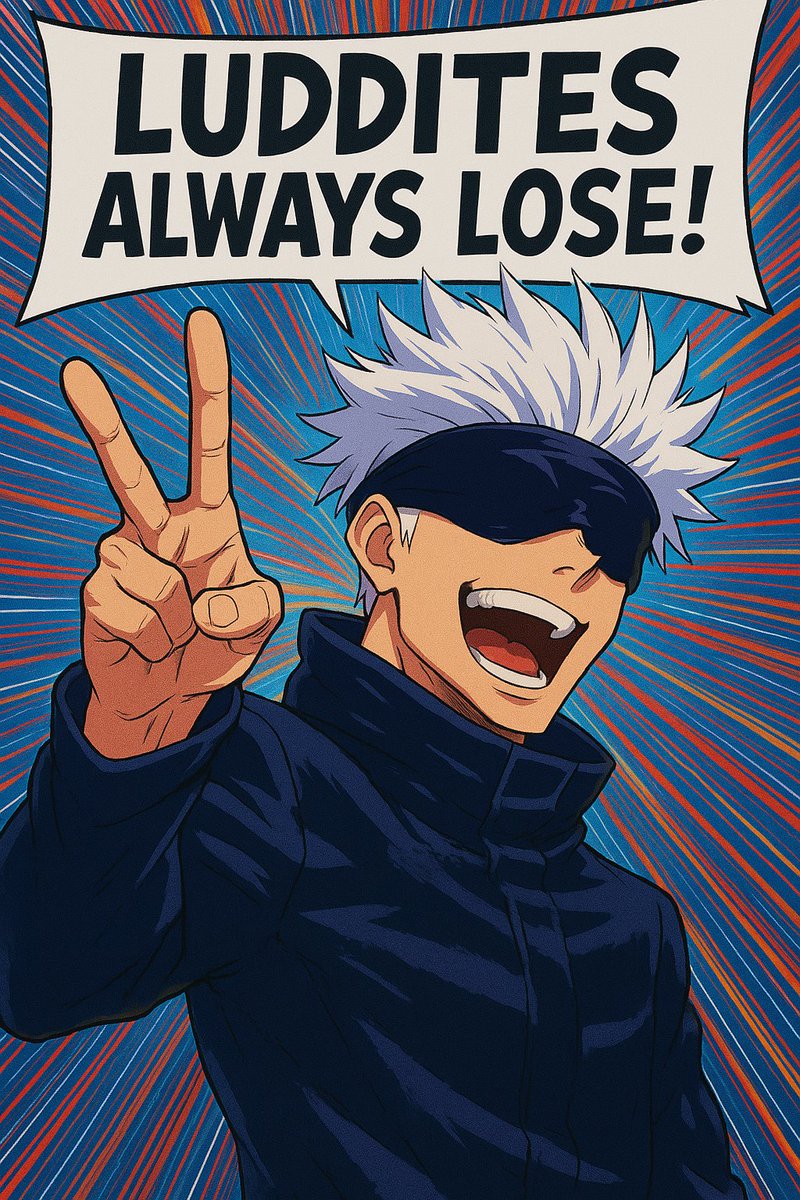
Anime Pop-Art Protest Poster
This prompt generates a bold vertical anime poster with a censored-faced character, peace sign gesture, and oversized slogan bubble for meme art, social posts, or graphic poster experiments.
This is a GPT Image 2 prompt case for Anime & Game. Use the copy-ready prompt below to generate similar visuals, and review Awesome GPT Image 2 Prompts attribution plus commercial-use rights before reuse.
Free 1K preview
Generate one preview image instantly, no sign-up required.
Prompt
Copy-ready prompt
A bold anime pop-art poster of a tall white-haired male sorcerer in a dark navy high-collar coat, shown from the waist up, facing forward in a confident pose with his left hand raised close to the camera making a peace sign. Show every face clearly with natural, detailed facial features, while his spiky silver-white hair fans outward dramatically above a dark blindfold or visor. Place a huge comic speech bubble across the top with the exact text {argument name="headline text" default="LUDDITES ALWAYS LOSE!"} in heavy black all-caps sans-serif lettering. Use a vivid blue background filled with dense red and orange radial speed lines exploding outward from behind the character, creating a dynamic manga cover feel. Emphasize thick ink outlines, cel-shaded anime rendering, posterized contrast, and a slightly warped vintage-comic print look. The composition should be vertical, tightly cropped, high energy, rebellious, graphic, and meme-like, with the {argument name="character hair color" default="silver white"} hair, {argument name="coat color" default="dark navy"} coat, and {argument name="background color" default="bright blue with red-orange radial lines"} dominating the palette.Prompt variables
Editable argument placeholders found in the prompt, with their default values.
Best for
- - Anime & Game visual exploration
- - Image generation and reference-image edits
- - Reusable briefs that keep source attribution visible
Change these parts
- - Subject, product, character, or scene
- - Aspect ratio, camera, lighting, and background
- - Brand, text, color, and output constraints
Recommended model and settings
- - Model: gpt-image-2
- - Input mode: Text to Image
- - Aspect ratio: source
- - Commercial status: review original source
How to use this prompt
- 1. Copy the prompt and preserve its structure for the first test.
- 2. Replace the subject, context, and publishing channel.
- 3. Change one camera, lighting, or style variable per iteration.
- 4. Inspect the output, source, text, and rights before reuse.
Limitations, source, and reuse cautions
- - Generated output is an editable draft, not factual, legal, or rights evidence.
- - Review the linked source, people, brands, logos, text, and third-party media before commercial use.
More cases in this category
Prioritized by category, input mode compatibility, quality, and lower risk.


Reuse and source notes
Use this prompt safely after previewing the case.
- 1.Copy the prompt or open it directly in Dovoo with the generation button.
- 2.Adjust variables, aspect ratio, and reference images for your own use case.
- 3.Before publishing or paid usage, verify source rights, attribution requirements, and brand or likeness risks.
Can I use this prompt commercially?
Commercial-use status is allowed. Review the original source, license, brand constraints, and legal requirements before paid usage.
Where does this case come from?
This case is imported from Awesome GPT Image 2 Prompts; keep attribution visible and check the source URL before reuse.