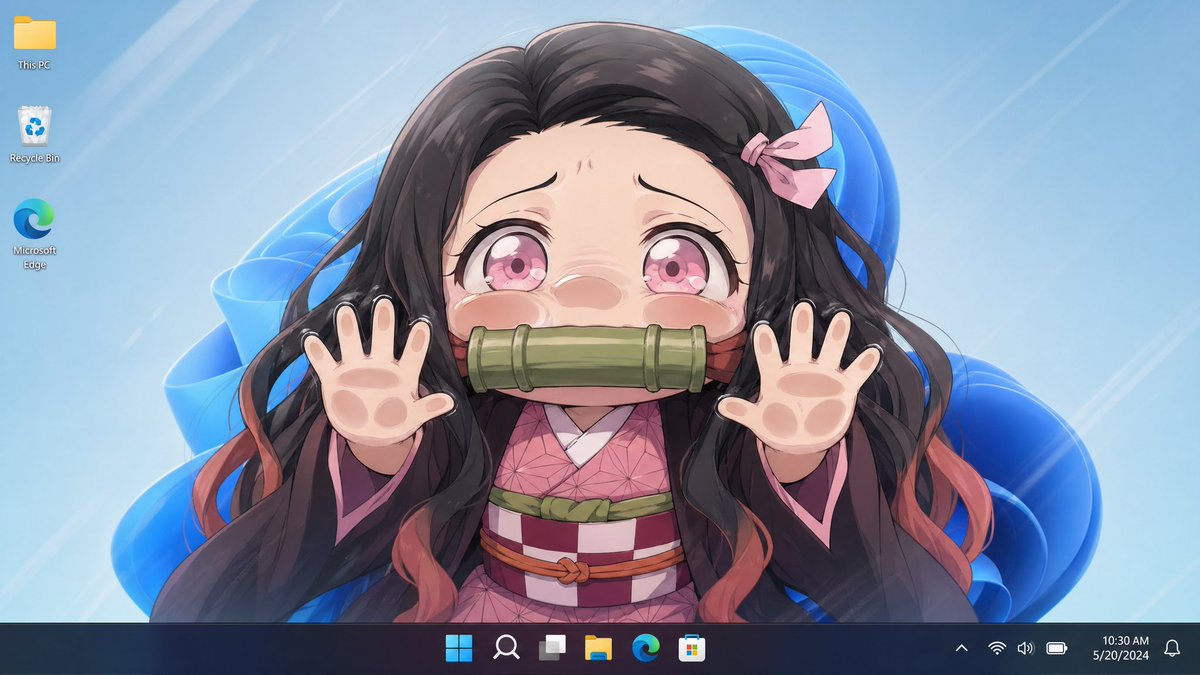
Anime Girl Windows 11 Desktop Wallpaper
This prompt generates a realistic Windows 11 desktop screenshot featuring a censored anime wallpaper character, ideal for social posts comparing image model outputs.
This is a GPT Image 2 prompt case for Anime & Game. Use the copy-ready prompt below to generate similar visuals, and review Awesome GPT Image 2 Prompts attribution plus commercial-use rights before reuse.
Free 1K preview
Generate one preview image instantly, no sign-up required.
Prompt
Copy-ready prompt
A clean Windows 11 desktop screenshot with an anime wallpaper filling the screen. The wallpaper shows a centered upper-body portrait of {argument name="character name" default="Nezuko Kamado"}, facing forward with both hands raised toward the viewer in a playful pawing pose, fingers spread. The face is completely hidden by a large vertically oriented rectangular blur/censor block in the center. She has long flowing {argument name="hair color" default="dark brown to black"} hair with soft reddish-orange tips, a small pale pink ribbon on the right side of her head, and wears a pink geometric-pattern kimono under a dark haori with pink lining and a checkered obi with green and reddish accents. The visible palms are stylized with soft animal-paw pads, one paw on each hand, for a cute hybrid effect. Behind her is a light icy blue wallpaper background with glossy abstract Windows 11 blue ribbon shapes and faint diagonal light streaks. Show exactly 3 desktop icons aligned vertically on the top left: This PC, Recycle Bin, and Microsoft Edge. Add a dark translucent Windows 11 taskbar along the bottom with centered icons, system tray on the right, and the clock reading {argument name="time" default="10:30 AM"} and the date reading {argument name="date" default="5/20/2024"}. The overall look is polished, bright, anime-style, and resembles a real desktop screenshot with the character wallpaper as the main focus.Prompt variables
Editable argument placeholders found in the prompt, with their default values.
Best for
- - Anime & Game visual exploration
- - Image generation and reference-image edits
- - Reusable briefs that keep source attribution visible
Change these parts
- - Subject, product, character, or scene
- - Aspect ratio, camera, lighting, and background
- - Brand, text, color, and output constraints
Recommended model and settings
- - Model: gpt-image-2
- - Input mode: Text to Image
- - Aspect ratio: source
- - Commercial status: review original source
How to use this prompt
- 1. Copy the prompt and preserve its structure for the first test.
- 2. Replace the subject, context, and publishing channel.
- 3. Change one camera, lighting, or style variable per iteration.
- 4. Inspect the output, source, text, and rights before reuse.
Limitations, source, and reuse cautions
- - Generated output is an editable draft, not factual, legal, or rights evidence.
- - Review the linked source, people, brands, logos, text, and third-party media before commercial use.
More cases in this category
Prioritized by category, input mode compatibility, quality, and lower risk.
Reuse and source notes
Use this prompt safely after previewing the case.
- 1.Copy the prompt or open it directly in Dovoo with the generation button.
- 2.Adjust variables, aspect ratio, and reference images for your own use case.
- 3.Before publishing or paid usage, verify source rights, attribution requirements, and brand or likeness risks.
Can I use this prompt commercially?
Commercial-use status is allowed. Review the original source, license, brand constraints, and legal requirements before paid usage.
Where does this case come from?
This case is imported from Awesome GPT Image 2 Prompts; keep attribution visible and check the source URL before reuse.