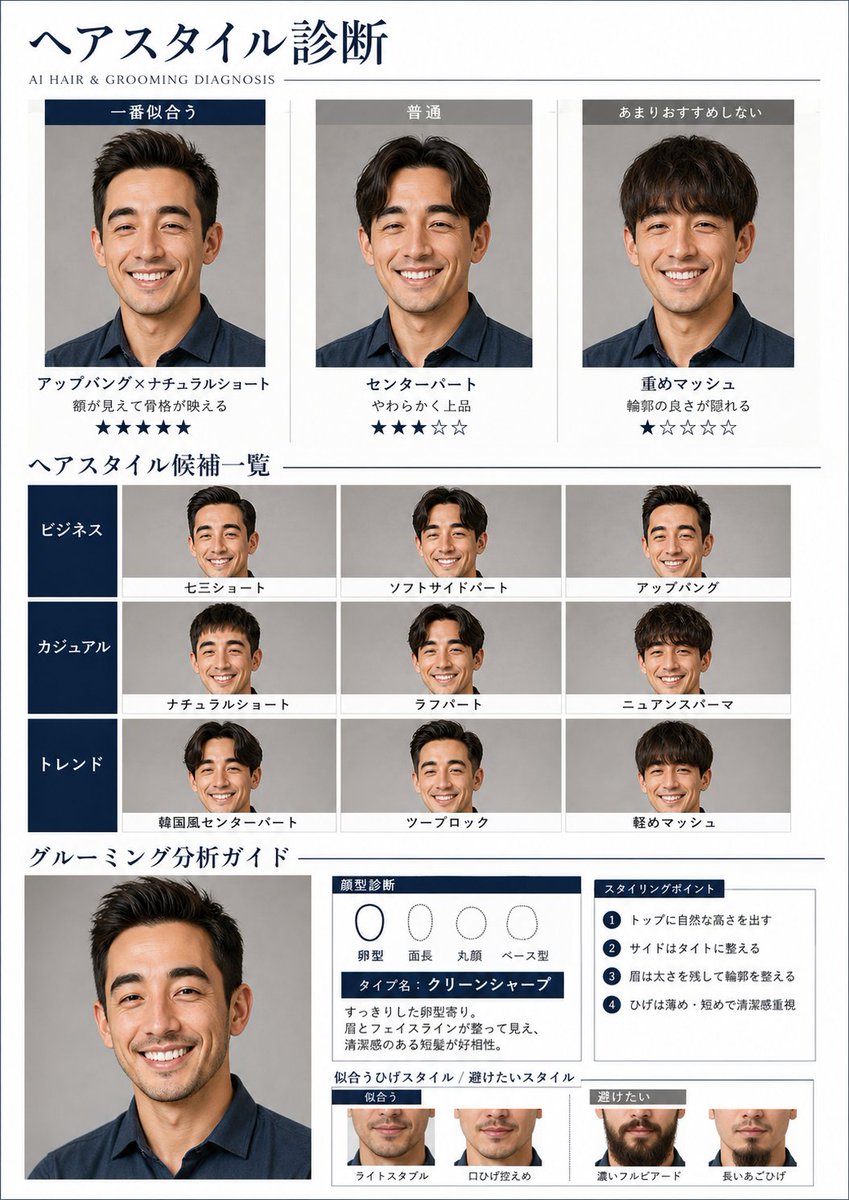
AI Hair and Grooming Diagnosis Report
A detailed prompt for creating a professional grooming diagnostic report, including hairstyle comparisons and face shape analysis based on a reference photo.
This is a GPT Image 2 prompt case for Graphic & Poster. Use the copy-ready prompt below to generate similar visuals, and review Awesome GPT Image 2 Prompts attribution plus commercial-use rights before reuse.
Free 1K preview
Generate one preview image instantly, no sign-up required.
Prompt
Copy-ready prompt
Create a beauty diagnosis visual report that analyzes facial features, bone structure, eyes, eyebrows, lips, hair quality, and face line based on the uploaded {argument name="target" default="male"}'s photo, suggesting suitable hairstyles and grooming.

A4 portrait orientation, sophisticated page design in the style of a Japanese {argument name="gender" default="men's"} visual magazine. White to charcoal base, thin ruled lines, navy/gray accents, and a stylish layout utilizing white space. Include a small English subtitle "AI HAIR & GROOMING DIAGNOSIS".

Maintain the identity of the person's face, naturally changing only the hairstyle, beard, and atmosphere. Do not turn them into a different person.

Composition is as follows:

1. "Hairstyle Diagnosis" at the top
   - 3-column comparison of "Best Fit," "Average," and "Not Recommended"
   - Apply different hairstyles to the same person
   - Display hairstyle names, short reasons, and star ratings

2. List of hairstyle candidates in the middle
   - Categories: Business / Casual / Trend
   - Grid display of small thumbnails
   - Attach short hairstyle names to each thumbnail

3. "Grooming Analysis Guide" at the bottom
   - Larger portrait
   - Face type diagnosis chart (oval, oblong, round, etc.)
   - Type name (e.g., Clean Sharp)
   - Short analysis comments
   - 4 styling points
   - Visual comparison of suitable vs. unsuitable beard styles

Text should be in Japanese, centered on headings, short sentences, and labels. Avoid long text and keep it concise. Include analysis charts, evaluation stars, and style comparison displays. The overall finish should be cool and reliable, like a feature page in an actual men's visual magazine.
Prompt variables
Editable argument placeholders found in the prompt, with their default values.
Best for
- - Graphic & Poster visual exploration
- - Image generation and reference-image edits
- - Reusable briefs that keep source attribution visible
Change these parts
- - Subject, product, character, or scene
- - Aspect ratio, camera, lighting, and background
- - Brand, text, color, and output constraints
Recommended model and settings
- - Model: gpt-image-2
- - Input mode: Text to Image
- - Aspect ratio: source
- - Commercial status: review original source
How to use this prompt
- 1. Copy the prompt and preserve its structure for the first test.
- 2. Replace the subject, context, and publishing channel.
- 3. Change one camera, lighting, or style variable per iteration.
- 4. Inspect the output, source, text, and rights before reuse.
Limitations, source, and reuse cautions
- - Generated output is an editable draft, not factual, legal, or rights evidence.
- - Review the linked source, people, brands, logos, text, and third-party media before commercial use.
More cases in this category
Prioritized by category, input mode compatibility, quality, and lower risk.





Reuse and source notes
Use this prompt safely after previewing the case.
- 1.Copy the prompt or open it directly in Dovoo with the generation button.
- 2.Adjust variables, aspect ratio, and reference images for your own use case.
- 3.Before publishing or paid usage, verify source rights, attribution requirements, and brand or likeness risks.
Can I use this prompt commercially?
Commercial-use status is allowed. Review the original source, license, brand constraints, and legal requirements before paid usage.
Where does this case come from?
This case is imported from Awesome GPT Image 2 Prompts; keep attribution visible and check the source URL before reuse.