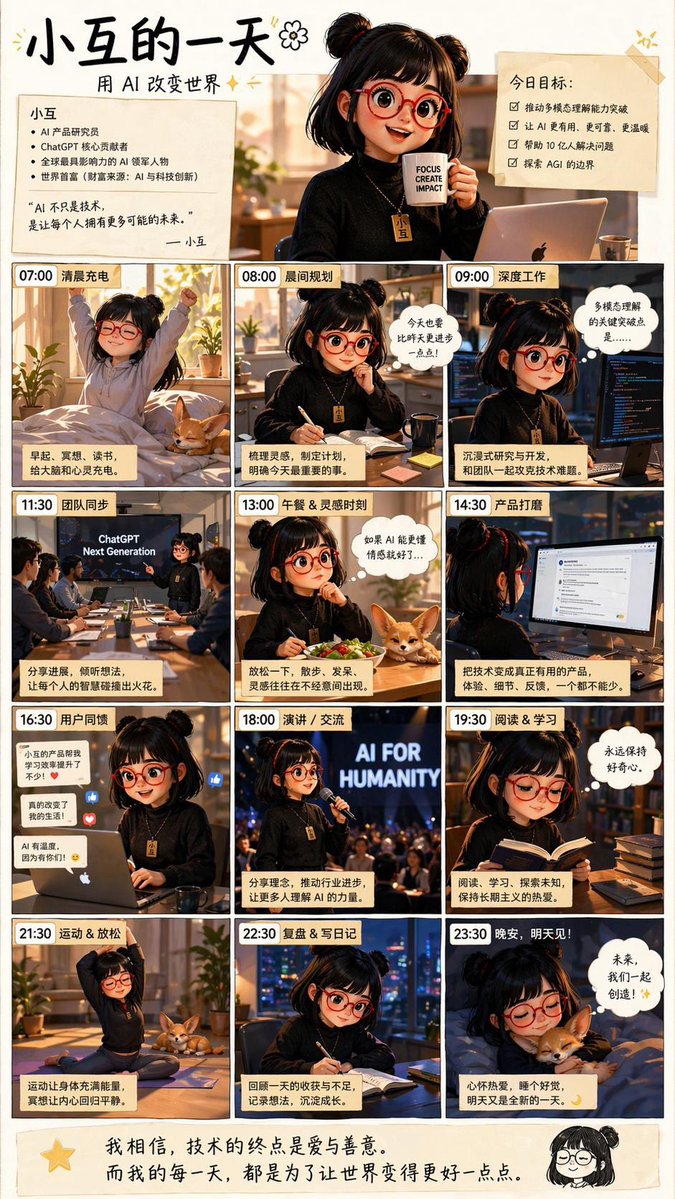
AI Girl Daily Routine Poster
This prompt generates a Chinese anime-style infographic poster showing a young AI creator’s full day in 12 time-stamped scenes, ideal for social media inspiration posts or motivational tech-themed illustrations.
This is a GPT Image 2 prompt case for Anime & Game. Use the copy-ready prompt below to generate similar visuals, and review Awesome GPT Image 2 Prompts attribution plus commercial-use rights before reuse.
Free 1K preview
Generate one preview image instantly, no sign-up required.
Prompt
Copy-ready prompt
{
  "type": "Chinese inspirational comic-style daily routine poster",
  "style": "warm cinematic anime illustration with soft golden indoor lighting, cozy productivity aesthetic, clean black panel borders, handwritten Chinese headline, slightly glossy social-media poster finish",
  "subject": {
    "character": "Young AI developer girl, twin pigtails, shoulder-length black hair, round red glasses, black sweater, a golden necklace with a tag that says 'Bean'.",
    "companion": "small tan corgi appearing in 4 panels",
    "theme": "a full day in the life of an AI-focused girl creating technology for humanity"
  },
  "layout": {
    "format": "vertical poster",
    "grid": {
      "columns": 3,
      "rows": 4,
      "count": 12
    },
    "top_header": {
      "count": 4,
      "elements": [
        "Eye-catching Chinese title “A Day in the Life of Xiaodou”",
        "Subtitle “Changing the World with AI”",
        "Left-side profile card, introducing Xiaodou, containing 5 key points and a short introduction, signed “— Xiaodou”",
        "Right-side goal card, titled “Today’s Goals:”, containing 4 checkbox items"
      ]
    },
    "panels": [
      {
        "time": "07:00",
        "title": "Morning Recharge",
        "description": "girl stretching in bed at sunrise in a cozy bedroom, corgi on the bed, plants by the window, caption card at bottom"
      },
      {
        "time": "08:00",
        "title": "Morning Planning",
        "description": "girl seated at desk writing in a notebook with coffee mug nearby, morning sun through the window, speech bubble above her"
      },
      {
        "time": "09:00",
        "title": "Deep Work",
        "description": "girl coding intensely at a desk with a monitor showing code, dark focused workspace, thought bubble at upper right"
      },
      {
        "time": "11:30",
        "title": "Team Sync",
        "description": "conference room meeting with 6 people total, presentation screen reads \"ChatGPT Next Generation\", girl presenting at front, caption card at bottom"
      },
      {
        "time": "13:00",
        "title": "Lunch & Inspiration Time",
        "description": "girl eating a salad at desk, corgi resting beside the bowl, thought bubble about AI inspiration"
      },
      {
        "time": "14:30",
        "title": "Product Polishing",
        "description": "girl viewed from behind using a desktop monitor with a product interface or chat-style UI open, caption card at bottom"
      },
      {
        "time": "16:30",
        "title": "User Feedback",
        "description": "girl at laptop reading feedback, floating reaction icons and short comment bubbles around her, warm office lighting"
      },
      {
        "time": "18:00",
        "title": "Speech / Communication",
        "description": "girl speaking on stage into a microphone before an audience, large glowing backdrop text \"AI FOR HUMANITY\""
      },
      {
        "time": "19:30",
        "title": "Reading & Learning",
        "description": "girl reading a book at a desk stacked with books, thought bubble expressing curiosity and learning"
      },
      {
        "time": "21:30",
        "title": "Exercise & Relaxation",
        "description": "girl doing a seated yoga stretch on a mat at home, corgi nearby, evening relaxation"
      },
      {
        "time": "22:30",
        "title": "Review & Diary",
        "description": "girl writing in a notebook at night by a window with city lights outside, reflective mood"
      },
      {
        "time": "23:30",
        "title": "Good night, see you tomorrow!",
        "description": "girl asleep in bed hugging the corgi, night scene, speech bubble about the future and creating together"
      }
    ],
    "bottom_footer": {
      "count": 2,
      "elements": [
        "large handwritten Chinese quote across the width about technology ending in love and kindness and making the world better every day",
        "small chibi doodle portrait of the girl at bottom right"
      ]
    }
  },
  "text": {
    "language": "Chinese",
    "headline": "{argument name=\"headline text\" default=\"Little Bean's Day\"}",
    "subtitle": "{argument name=\"subtitle text\" default=\"Changing the World with AI\"}",
    "character_name": "{argument name=\"character name\" default=\"Little Bean\"}",
    "stage_phrase": "{argument name=\"stage backdrop text\" default=\"AI FOR HUMANITY\"}",
    "footer_quote": "{argument name=\"quote\" default=\"I believe the ultimate purpose of technology is love and kindness. And every day, I strive to make the world a little bit better.\"}"
  },
  "composition_notes": "Each panel has a bold time label in the top-left corner and a short Chinese title. Include exactly 12 time-stamped panels, 2 top note cards, 1 main hero portrait at the top center holding a mug, and 1 footer quote area. Keep the palette warm beige, amber, black, and soft cream. The overall mood is optimistic, diligent, intelligent, and wholesome, like a motivational lifestyle infographic for AI creators."
}
Prompt variables
Editable argument placeholders found in the prompt, with their default values.
Best for
- - Anime & Game visual exploration
- - Image generation and reference-image edits
- - Reusable briefs that keep source attribution visible
Change these parts
- - Subject, product, character, or scene
- - Aspect ratio, camera, lighting, and background
- - Brand, text, color, and output constraints
Recommended model and settings
- - Model: gpt-image-2
- - Input mode: Text to Image
- - Aspect ratio: source
- - Commercial status: review original source
How to use this prompt
- 1. Copy the prompt and preserve its structure for the first test.
- 2. Replace the subject, context, and publishing channel.
- 3. Change one camera, lighting, or style variable per iteration.
- 4. Inspect the output, source, text, and rights before reuse.
Limitations, source, and reuse cautions
- - Generated output is an editable draft, not factual, legal, or rights evidence.
- - Review the linked source, people, brands, logos, text, and third-party media before commercial use.
More cases in this category
Prioritized by category, input mode compatibility, quality, and lower risk.


Reuse and source notes
Use this prompt safely after previewing the case.
- 1.Copy the prompt or open it directly in Dovoo with the generation button.
- 2.Adjust variables, aspect ratio, and reference images for your own use case.
- 3.Before publishing or paid usage, verify source rights, attribution requirements, and brand or likeness risks.
Can I use this prompt commercially?
Commercial-use status is allowed. Review the original source, license, brand constraints, and legal requirements before paid usage.
Where does this case come from?
This case is imported from Awesome GPT Image 2 Prompts; keep attribution visible and check the source URL before reuse.