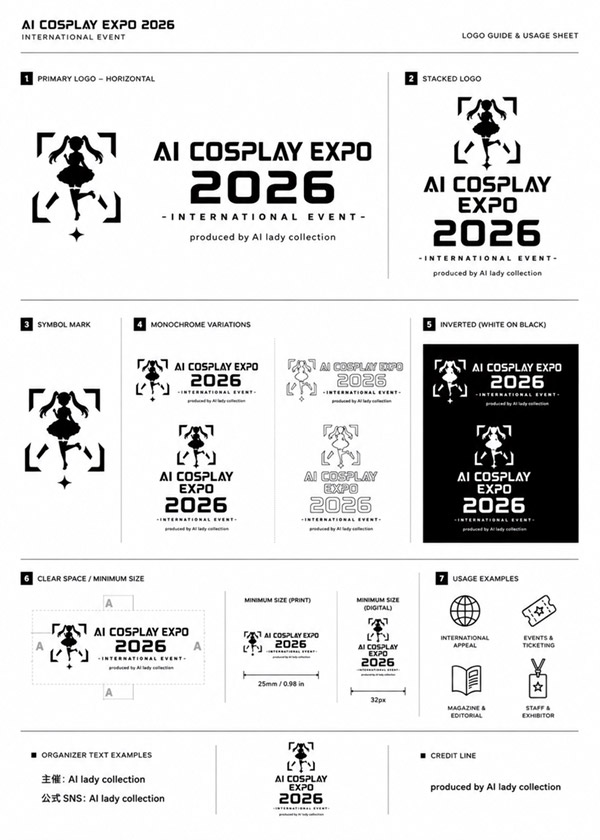
AI Cosplay Expo Logo Guide Sheet
A monochrome brand identity usage sheet for a fictional AI cosplay expo logo, suitable for event branding mockups and style guide presentations.
This is a GPT Image 2 prompt case for 平面海报. Use the copy-ready prompt below to generate similar visuals, and review Awesome GPT Image 2 Prompts attribution plus commercial-use rights before reuse.
Prompt
Copy-ready prompt
目标:为 {argument name="event name" default="AI COSPLAY EXPO 2026"} 创建一份简洁的黑白标志指南及使用手册,并以专业的品牌识别文档形式呈现。

画布:纵向 A4 页面,白色背景,细浅灰色分隔线,宽裕的页边距,呈现清晰的单色矢量风格。使用粗体未来感科技无衬线字体,全大写,高对比度黑色油墨。

页眉:左上角标题为“AI COSPLAY EXPO 2026”,下方附带小字副标题“INTERNATIONAL EVENT”。右上角小标签为“LOGO GUIDE & USAGE SHEET”。一条细水平线将页眉与主要内容分隔开。

核心标志设计:标志主体为一个可爱的动漫风格双马尾 Cosplay 女孩黑色剪影,置于四个断开的直角括号内,下方有一个小菱形闪光点。将其与粗体文字“AI COSPLAY EXPO”及巨大的堆叠数字“2026”组合,并加上小标语“- INTERNATIONAL EVENT -”和制作署名“produced by {argument name="producer name" default="AI lady collection"}”。

布局:使用黑色小方块数字标号和细灰色线条,将页面划分为 7 个编号的品牌指南板块。

板块:
1. “PRIMARY LOGO – HORIZONTAL”:大型水平组合。符号在左,文字在右:“AI COSPLAY EXPO”位于巨大的“2026”上方,标语“- INTERNATIONAL EVENT -”,以及制作署名“produced by AI lady collection”。
2. “STACKED LOGO”:垂直居中组合。符号在顶部,“AI COSPLAY EXPO”分三行堆叠,下方为巨大的“2026”、标语及制作署名。
3. “SYMBOL MARK”:仅包含大型剪影符号的独立展示。
4. “MONOCHROME VARIATIONS”:展示 4 种标志变体:黑色水平标志、灰色/轮廓水平标志、黑色堆叠标志、灰色/轮廓堆叠标志。
5. “INVERTED (WHITE ON BLACK)”:黑色矩形内包含 2 个白色反转标志:顶部为水平标志,下方为堆叠标志。
6. “CLEAR SPACE / MINIMUM SIZE”:左侧展示位于虚线留白框内的水平标志,顶部、左侧、右侧和底部带有“A”间距标记;右侧展示 2 个最小尺寸示例:“MINIMUM SIZE (PRINT)”标注宽度“25mm / 0.98 in”,以及“MINIMUM SIZE (DIGITAL)”标注宽度“32px”。
7. “USAGE EXAMPLES”:展示 4 个带标签的简单轮廓图标:地球图标标注“INTERNATIONAL APPAREL”,票据图标标注“EVENTS & TICKETING”,打开的书本图标标注“MAGAZINE & EDITORIAL”,奖章图标标注“STAFF & EXHIBITOR”。

页脚:底部条带分为三列。左列标题“ORGANIZER TEXT EXAMPLES”,包含两行日式文本:“主催: AI lady collection”和“公式 SNS: AI lady collection”。中列包含标志的小型堆叠版本。右列标题“CREDIT LINE”,包含文字“produced by AI lady collection”。

视觉风格:极简瑞士网格与日式活动品牌手册风格相结合,精确对齐,细灰色分隔线,除黑、白、浅灰外无其他颜色。确保所有文字清晰、锐利且适合印刷。避免添加额外板块、额外图标、水印、渐变、阴影或装饰性背景。
Prompt variables
Editable argument placeholders found in the prompt, with their default values.
More cases in this category
Prioritized by category, input mode compatibility, quality, and lower risk.



Reuse and source notes
Use this prompt safely after previewing the case.
- 1.Copy the prompt or open it directly in Dovoo with the generation button.
- 2.Adjust variables, aspect ratio, and reference images for your own use case.
- 3.Before publishing or paid usage, verify source rights, attribution requirements, and brand or likeness risks.
Can I use this prompt commercially?
Commercial-use status is allowed. Review the original source, license, brand constraints, and legal requirements before paid usage.
Where does this case come from?
This case is imported from Awesome GPT Image 2 Prompts; keep attribution visible and check the source URL before reuse.