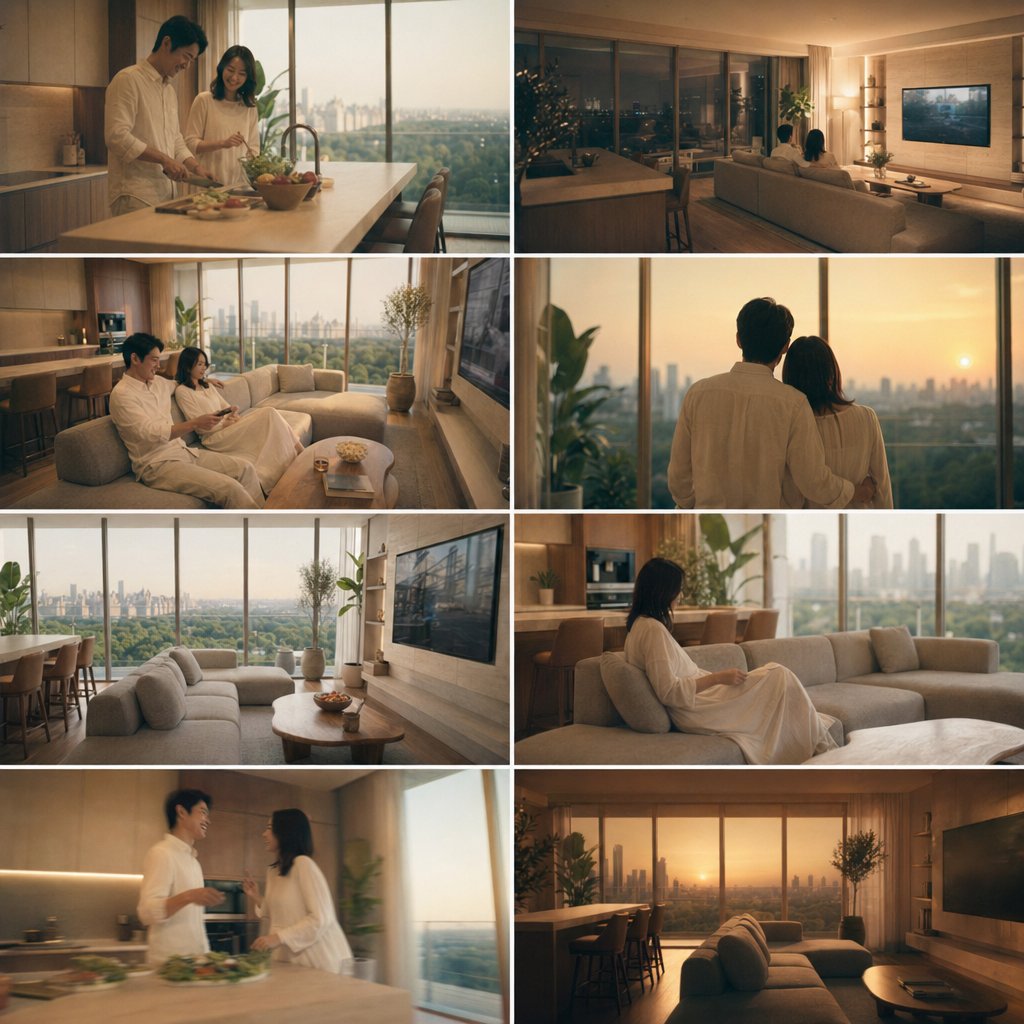
8-Panel Luxury Apartment Couple Collage
This prompt turns a reference couple photo into an eight-scene cinematic interior-design lifestyle collage, useful for visualizing upscale home living and storyboard-style room presentations.
This is a GPT Image 2 prompt case for Interior & Architecture. Use the copy-ready prompt below to generate similar visuals, and review Awesome GPT Image 2 Prompts attribution plus commercial-use rights before reuse.
Free 1K preview
Generate one preview image instantly, no sign-up required.
Prompt
Copy-ready prompt
Using REFERENCE_0 as the couple base, place the same man and woman into a warm, luxurious modern high-rise apartment interior and generate an 8-cut collage storyboard focused on both the people and the interior design. Keep their relationship, approximate age, build, hairstyle, and all-white loungewear feeling consistent, but restage them naturally across the apartment at golden hour into evening. Use a cinematic lifestyle/architectural photography look with soft amber lighting, large floor-to-ceiling windows, expansive city skyline views, beige and wood-toned furnishings, and a calm upscale mood. Arrange the collage as 8 equal panels in a clean grid with thin white dividers. Include exactly these 8 scenes: 1) the couple cooking together at the kitchen island, 2) the couple seen from behind sitting on the sofa watching TV at night, 3) the couple sitting together on the sofa in daylight, 4) the couple standing together from behind looking out the window at sunset, 5) an empty wide shot of the living room and dining area with skyline view, 6) the woman sitting alone on the sofa near the kitchen, 7) the couple talking near the kitchen island, 8) an empty sunset wide shot of the living room with sofa, dining counter, TV wall, and skyline. Prioritize interior styling and spatial continuity, with magazine-like composition and realistic photo textures.
Best for
- - Interior & Architecture visual exploration
- - Image generation and reference-image edits
- - Reusable briefs that keep source attribution visible
Change these parts
- - Subject, product, character, or scene
- - Aspect ratio, camera, lighting, and background
- - Brand, text, color, and output constraints
Recommended model and settings
- - Model: gpt-image-2
- - Input mode: Text to Image
- - Aspect ratio: source
- - Commercial status: review original source
How to use this prompt
- 1. Copy the prompt and preserve its structure for the first test.
- 2. Replace the subject, context, and publishing channel.
- 3. Change one camera, lighting, or style variable per iteration.
- 4. Inspect the output, source, text, and rights before reuse.
Limitations, source, and reuse cautions
- - Generated output is an editable draft, not factual, legal, or rights evidence.
- - Review the linked source, people, brands, logos, text, and third-party media before commercial use.
More cases in this category
Prioritized by category, input mode compatibility, quality, and lower risk.
Reuse and source notes
Use this prompt safely after previewing the case.
- 1.Copy the prompt or open it directly in Dovoo with the generation button.
- 2.Adjust variables, aspect ratio, and reference images for your own use case.
- 3.Before publishing or paid usage, verify source rights, attribution requirements, and brand or likeness risks.
Can I use this prompt commercially?
Commercial-use status is allowed. Review the original source, license, brand constraints, and legal requirements before paid usage.
Where does this case come from?
This case is imported from Awesome GPT Image 2 Prompts; keep attribution visible and check the source URL before reuse.