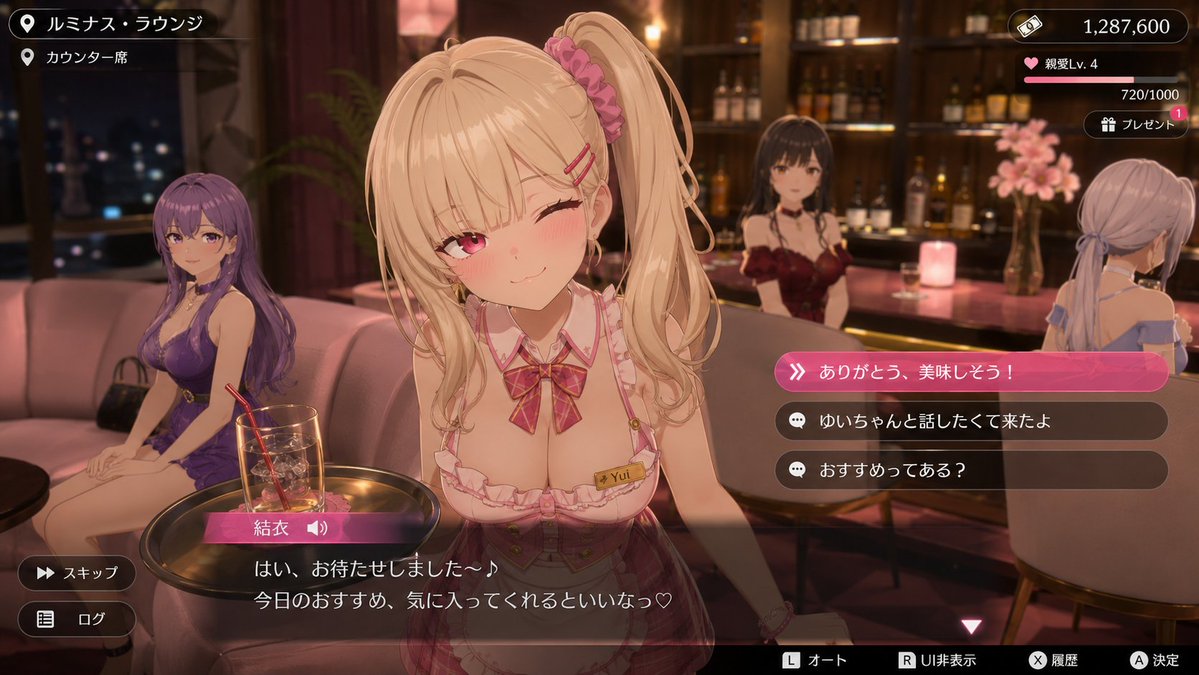
3D Anime RPG Gameplay Screenshot
Generates a realistic gameplay screenshot of a modern 3D anime-style open-world RPG set in a luxury lounge with UI elements and dialogue.
This is a GPT Image 2 prompt case for 动漫游戏. Use the copy-ready prompt below to generate similar visuals, and review Awesome GPT Image 2 Prompts attribution plus commercial-use rights before reuse.
Prompt
Copy-ready prompt
生成一张虚构的现代都市 3D 动漫风格开放世界 RPG 的真实游戏截图。场景设定在 {argument name="location" default="高端休息室风格的社交空间"},在暖光下可以看到吧台和沙发座位。展示一个对话事件场景,主角正穿着 {argument name="outfit" default="可爱的服务生装束并做出相应手势"} 进行服务。其他角色自然地分布在周围,营造出一种迷人且宁静的成人氛围。

角色不应是高清插画,而应是类似于近期 {argument name="game style" default="美少女 3D 游戏"} 事件场景中的卡通渲染 3D 角色模型,具有圆润的面部、简单的皮肤阴影、柔顺的发丝以及带有轻微塑料感的干净 3D 模型纹理。

作为游戏画面,请在底部包含日语对话字幕窗口、角色名称显示、选择 UI,在右上角包含金钱或好感度等状态 UI,并在屏幕边缘包含跳过/日志显示等操作 UI。使对话和选项看起来真实、可爱且略带古怪。图像应看起来像实际的游戏截图,而不是宣传图。整体上,强调一种精致的现代 3D 动漫游戏美学,既治愈、令人心动,又具有成熟的魅力。
Prompt variables
Editable argument placeholders found in the prompt, with their default values.
More cases in this category
Prioritized by category, input mode compatibility, quality, and lower risk.
Reuse and source notes
Use this prompt safely after previewing the case.
- 1.Copy the prompt or open it directly in Dovoo with the generation button.
- 2.Adjust variables, aspect ratio, and reference images for your own use case.
- 3.Before publishing or paid usage, verify source rights, attribution requirements, and brand or likeness risks.
Can I use this prompt commercially?
Commercial-use status is allowed. Review the original source, license, brand constraints, and legal requirements before paid usage.
Where does this case come from?
This case is imported from Awesome GPT Image 2 Prompts; keep attribution visible and check the source URL before reuse.