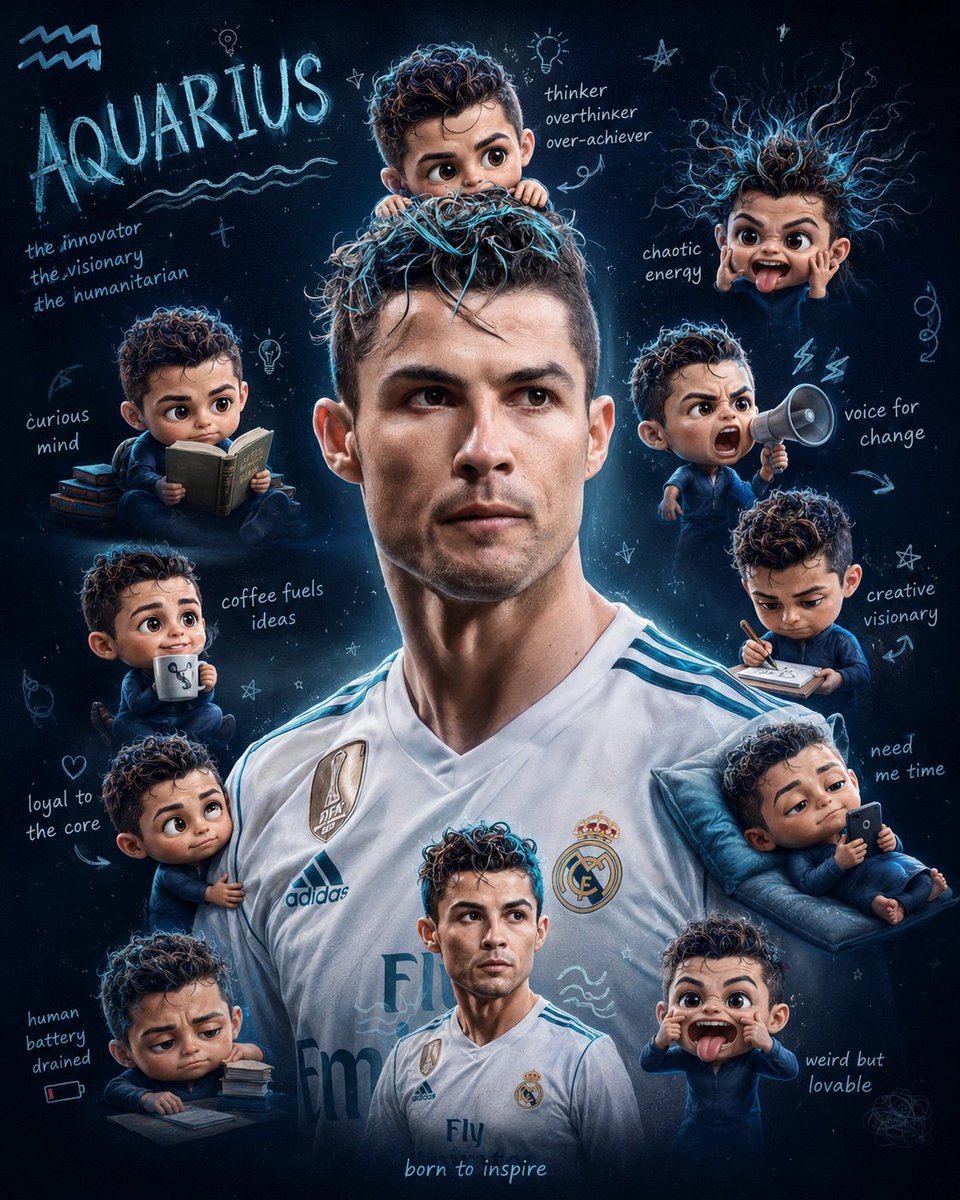
Zodiac Themed Yumi's Cells Poster
Generates a slice-of-life aesthetic poster inspired by Yumi's Cells, featuring a subject surrounded by 3D chibi characters representing zodiac traits.
This is a GPT Image 2 prompt case for Graphic & Poster. Use the copy-ready prompt below to generate similar visuals, and review Awesome GPT Image 2 Prompts attribution plus commercial-use rights before reuse.
Free 1K preview
Generate one preview image instantly, no sign-up required.
Prompt
Copy-ready prompt
I am “{argument name="zodiac sign" default="Your Zodiac Sign"}”

Create a poster inspired by Yumi’s Cells with the same soft, aesthetic, slice-of-life vibe and background style, the zodiac theme is fully reflected in the design. The subject’s face must remain completely unchanged and untouched. In hair, put some minimal highlights in color cyan. Surround the subject with multiple small, raw yet realistic cute chibi-style mini 3D versions of the subject, designed like expressive “cells” with oversized heads.....glossy high-detail finishes, and playful emotions. Each mini character represents traits associated with the zodiac sign and is engaged in different actions: one clinging onto the subject’s arm one cheering with arms raised one reading a book one drinking coffee one lying down using a phone one making a wacky exaggerated face one looking tired or stressed one shouting energetically one sketching face one clinging into subject's head one with messy or chaotic hair energyEach chibi “cell” should visually reflect personality traits of the zodiac sign through their expressions, posture, and behavior. Add one more chibi that has relevance to my face, and copying the pose of the subject. That chibi must be at the center below. Also, change the background into black and grey atmosphere with navy blue.Ratio 4:5
Prompt variables
Editable argument placeholders found in the prompt, with their default values.
Best for
- - Graphic & Poster visual exploration
- - Image generation and reference-image edits
- - Reusable briefs that keep source attribution visible
Change these parts
- - Subject, product, character, or scene
- - Aspect ratio, camera, lighting, and background
- - Brand, text, color, and output constraints
Recommended model and settings
- - Model: gpt-image-2
- - Input mode: Text to Image
- - Aspect ratio: source
- - Commercial status: review original source
How to use this prompt
- 1. Copy the prompt and preserve its structure for the first test.
- 2. Replace the subject, context, and publishing channel.
- 3. Change one camera, lighting, or style variable per iteration.
- 4. Inspect the output, source, text, and rights before reuse.
Limitations, source, and reuse cautions
- - Generated output is an editable draft, not factual, legal, or rights evidence.
- - Review the linked source, people, brands, logos, text, and third-party media before commercial use.
More cases in this category
Prioritized by category, input mode compatibility, quality, and lower risk.
Reuse and source notes
Use this prompt safely after previewing the case.
- 1.Copy the prompt or open it directly in Dovoo with the generation button.
- 2.Adjust variables, aspect ratio, and reference images for your own use case.
- 3.Before publishing or paid usage, verify source rights, attribution requirements, and brand or likeness risks.
Can I use this prompt commercially?
Commercial-use status is allowed. Review the original source, license, brand constraints, and legal requirements before paid usage.
Where does this case come from?
This case is imported from Awesome GPT Image 2 Prompts; keep attribution visible and check the source URL before reuse.