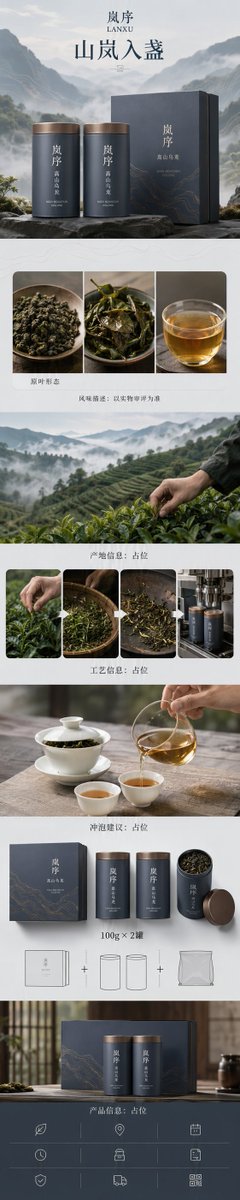
Zen-Style Oolong Tea Ecommerce Detail Page
A meticulous prompt for generating a high-end mobile-first ecommerce detail page for a conceptual tea brand, following a structured customer conversion path with Zen aesthetics.
This is a GPT Image 2 prompt case for Product & Commercial. Use the copy-ready prompt below to generate similar visuals, and review Awesome GPT Image 2 Prompts attribution plus commercial-use rights before reuse.
Free 1K preview
Generate one preview image instantly, no sign-up required.
Prompt
Copy-ready prompt
Design a high-end mobile-first ecommerce detail page for the conceptual brand '{argument name="brand name" default="LANXU"}', targeting a complete conversion path for {argument name="product name" default="High Mountain Oolong Tea"}. The product is a two-can gift set, with each can containing {argument name="net content" default="100g"}.
Strictly maintain consistency: brand 'LANXU', two cylindrical metal tea cans (approx. 135mm height, 78mm diameter) in a rock-grey matte finish with antique copper lids. Vertical brand logo 'LANXU' and product labels must be identical across both cans. Visual system: 'Zen Luxury + Natural Organic', core concept 'Mountain Mist in a Cup'. Color palette: rock grey, mist white, sprout green, amber tea, and oxidized copper. Graphic language: abstract valley contours, thin morning mist, and diffusing tea layers. Typography: modern Songti and clean sans-serif with ample white space.
Layout: approx. 1242px wide, vertical long-form (1:5 ratio). Seven continuous modules:
1. 'Hero Value': two cans with gift box against abstract misty valley, headline 'Mountain Mist in a Cup'.
2. 'Why It's Worth Drinking': macro shots of dry leaves, wet leaves, and clear amber tea, labeled 'Flavor Profile: Subject to actual evaluation'.
3. 'Origin & Raw Material': abstract tea garden slopes and harvesting details, placeholders for origin and altitude.
4. 'Production Process': four steps (Harvest, Withering, Roasting, Packaging) with placeholder names.
5. 'Brewing Experience': realistic scene with white porcelain Gaiwan, pitcher, and pouring tea; placeholders for temperature and time.
6. 'Packaging & Specs': clearly show box, two cans, opened state, and '100g x 2 cans' label.
7. 'Purchase Trust': gift scenario, placeholder specs, and logistics info.
Style: Premium ecommerce art direction combining real commercial photography with refined graphic design. All items must have realistic proportions and contact points. Tea leaves must not float, and mist must not block product visibility.
Only display core text: 'LANXU', 'High Mountain Oolong', 'Mountain Mist in a Cup', 'Original Leaf Form', 'Flavor Profile: Placeholder', 'Origin Info: Placeholder', 'Process Info: Placeholder', 'Brewing Suggestion: Placeholder', '100g x 2 cans', 'Product Info: Placeholder'.
Prompt variables
Editable argument placeholders found in the prompt, with their default values.
Best for
- - Product & Commercial visual exploration
- - Image generation and reference-image edits
- - Reusable briefs that keep source attribution visible
Change these parts
- - Subject, product, character, or scene
- - Aspect ratio, camera, lighting, and background
- - Brand, text, color, and output constraints
Recommended model and settings
- - Model: gpt-image-2
- - Input mode: Text to Image
- - Aspect ratio: source
- - Commercial status: review original source
How to use this prompt
- 1. Copy the prompt and preserve its structure for the first test.
- 2. Replace the subject, context, and publishing channel.
- 3. Change one camera, lighting, or style variable per iteration.
- 4. Inspect the output, source, text, and rights before reuse.
Limitations, source, and reuse cautions
- - Generated output is an editable draft, not factual, legal, or rights evidence.
- - Review the linked source, people, brands, logos, text, and third-party media before commercial use.
More cases in this category
Prioritized by category, input mode compatibility, quality, and lower risk.


Reuse and source notes
Use this prompt safely after previewing the case.
- 1.Copy the prompt or open it directly in Dovoo with the generation button.
- 2.Adjust variables, aspect ratio, and reference images for your own use case.
- 3.Before publishing or paid usage, verify source rights, attribution requirements, and brand or likeness risks.
Can I use this prompt commercially?
Commercial-use status is allowed. Review the original source, license, brand constraints, and legal requirements before paid usage.
Where does this case come from?
This case is imported from Awesome GPT Image 2 Prompts; keep attribution visible and check the source URL before reuse.