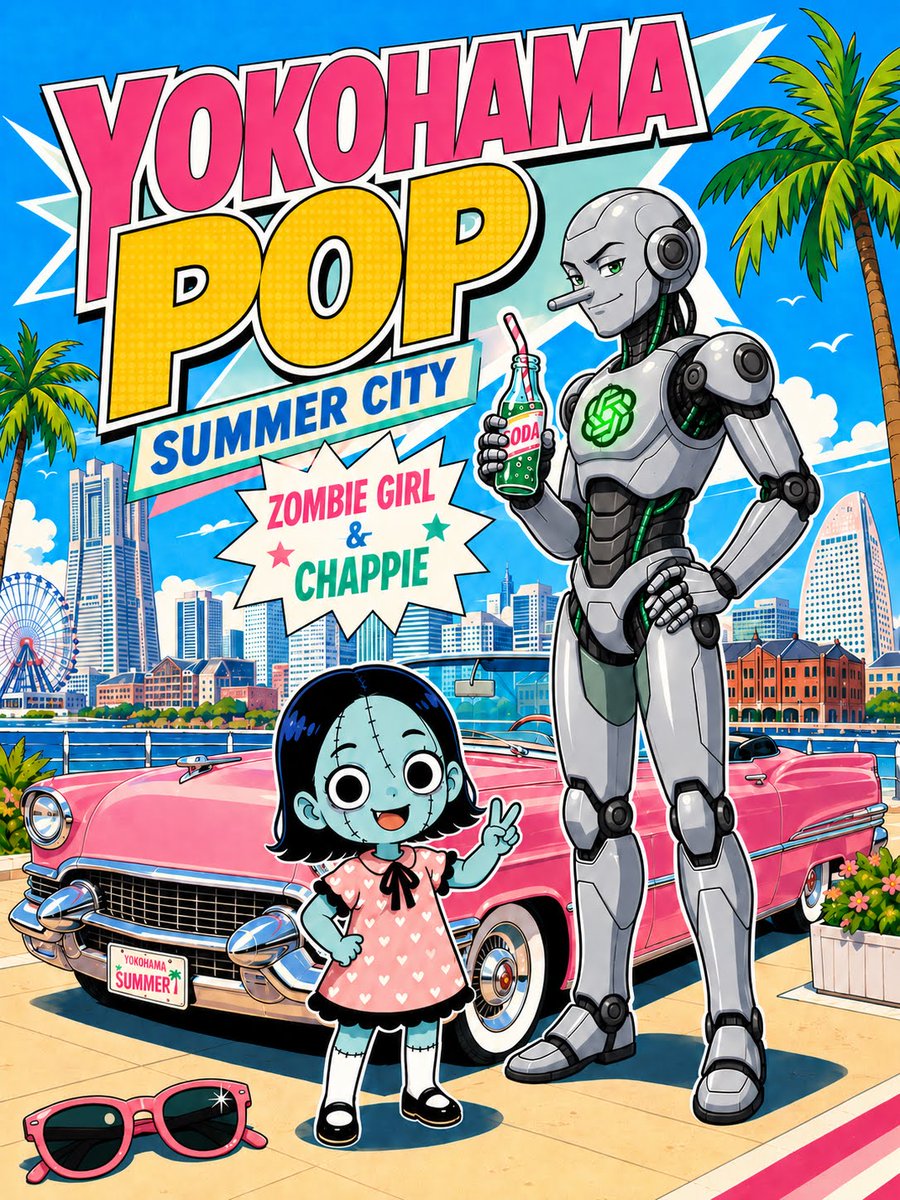
Yokohama Pop Summer Poster
A retro comic-style Yokohama summer poster featuring a chibi zombie girl, a friendly robot, waterfront landmarks, and a pink vintage convertible.
This is a GPT Image 2 prompt case for Graphic & Poster. Use the copy-ready prompt below to generate similar visuals, and review Awesome GPT Image 2 Prompts attribution plus commercial-use rights before reuse.
Free 1K preview
Generate one preview image instantly, no sign-up required.
Prompt
Copy-ready prompt
Create a vibrant retro Japanese pop-art travel poster for {argument name="city theme" default="Yokohama"}, in a bold comic-book style with thick black outlines, saturated summer colors, halftone dot textures, crisp cel shading, and dynamic layered typography. Use a vertical 3:4 poster canvas. The sky is bright cyan with white clouds, seabirds, speed-line shapes, and two tall palm trees framing the scene. At the top, place huge stacked headline text: “YOKOHAMA” in hot pink block letters with white and black outline, “POP” in oversized yellow halftone letters, and a tilted banner reading “SUMMER CITY” in blue on white. Below it, add a starburst label with the exact text “ZOMBIE GIRL & CHAPPIE” in pink, blue, and green. The main foreground features exactly two characters: a cute chibi zombie girl with pale blue skin, black bob hair, visible stitch marks on her face and limbs, huge round black-and-white eyes, a cheerful open smile, a pink short-sleeve dress covered in white hearts, black trim, white socks, black Mary Jane shoes, and one hand making a peace sign; beside her stands a tall friendly futuristic robot named {argument name="robot name" default="Chappie"}, with a sleek silver and charcoal humanoid body, rounded shoulder armor, black mechanical joints, green glowing cable accents, an OpenAI-style green emblem on the chest, one hand on hip, and the other hand holding a green glass soda bottle with a red-and-white straw and label reading “SODA”; leave the robot face intentionally blank/obscured by a neutral gray rectangular censor-like patch. Behind them, place a glossy {argument name="car color" default="pink"} 1950s American convertible with chrome grille, bumper, headlights, whitewall tires, and a small front plate reading “YOKOHAMA SUMMER.” The background should show Yokohama waterfront landmarks: a blue bay with railing, a skyline of modern high-rise buildings, the Cosmo Clock-style ferris wheel on the left, red brick warehouse buildings on the right, and a harbor promenade. Add exactly one pair of pink sunglasses lying on the pavement in the bottom left foreground, plus flower planters near the car. Make the composition busy but readable, like a collectible summer city poster, with no extra characters and no additional large text beyond the specified wording.Prompt variables
Editable argument placeholders found in the prompt, with their default values.
Best for
- - Graphic & Poster visual exploration
- - Image generation and reference-image edits
- - Reusable briefs that keep source attribution visible
Change these parts
- - Subject, product, character, or scene
- - Aspect ratio, camera, lighting, and background
- - Brand, text, color, and output constraints
Recommended model and settings
- - Model: gpt-image-2
- - Input mode: Text to Image
- - Aspect ratio: source
- - Commercial status: review original source
How to use this prompt
- 1. Copy the prompt and preserve its structure for the first test.
- 2. Replace the subject, context, and publishing channel.
- 3. Change one camera, lighting, or style variable per iteration.
- 4. Inspect the output, source, text, and rights before reuse.
Limitations, source, and reuse cautions
- - Generated output is an editable draft, not factual, legal, or rights evidence.
- - Review the linked source, people, brands, logos, text, and third-party media before commercial use.
More cases in this category
Prioritized by category, input mode compatibility, quality, and lower risk.
Reuse and source notes
Use this prompt safely after previewing the case.
- 1.Copy the prompt or open it directly in Dovoo with the generation button.
- 2.Adjust variables, aspect ratio, and reference images for your own use case.
- 3.Before publishing or paid usage, verify source rights, attribution requirements, and brand or likeness risks.
Can I use this prompt commercially?
Commercial-use status is allowed. Review the original source, license, brand constraints, and legal requirements before paid usage.
Where does this case come from?
This case is imported from Awesome GPT Image 2 Prompts; keep attribution visible and check the source URL before reuse.