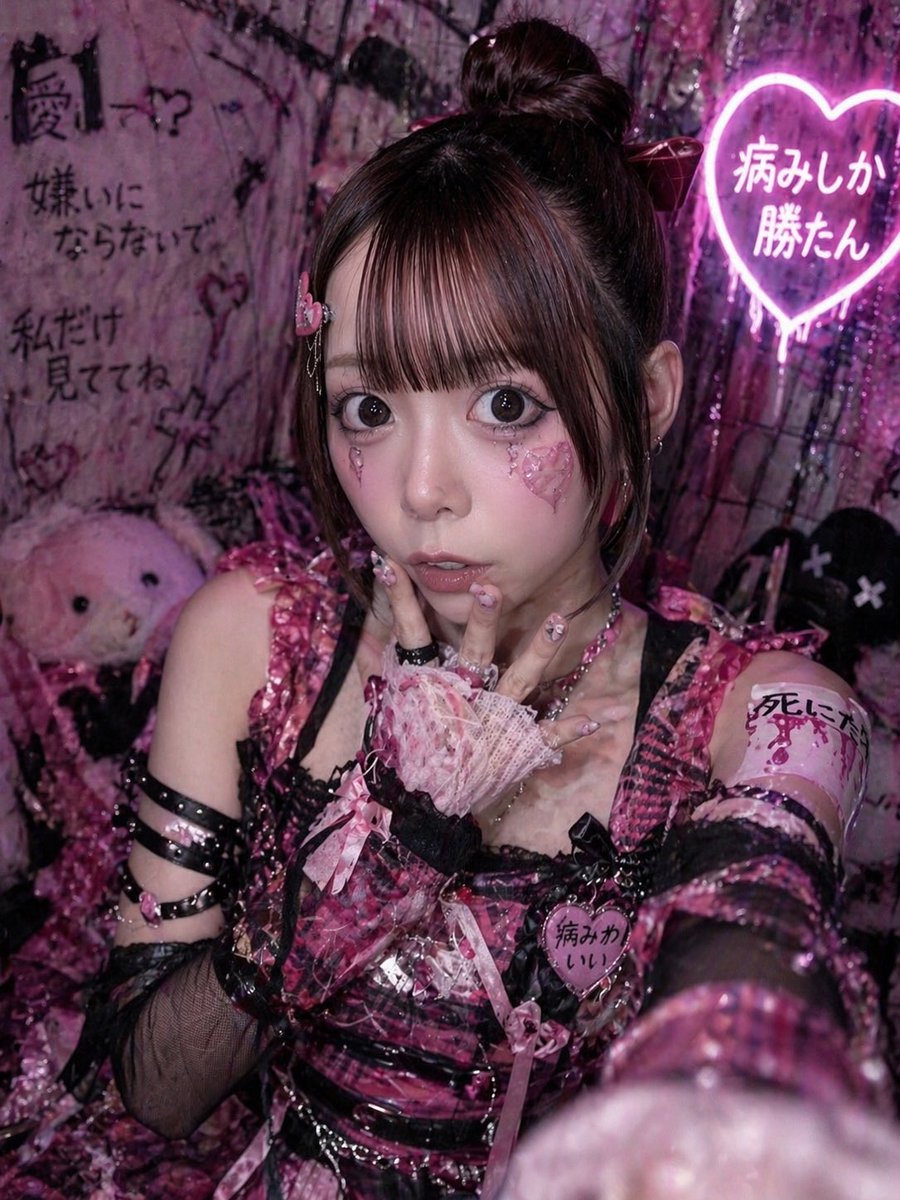
Yami Kawaii Idol Selfie
This prompt generates a moody pink-and-black idol selfie portrait with yami-kawaii fashion and neon Japanese decor, ideal for social media-style character art.
This is a GPT Image 2 prompt case for Portrait & Character. Use the copy-ready prompt below to generate similar visuals, and review Awesome GPT Image 2 Prompts attribution plus commercial-use rights before reuse.
Free 1K preview
Generate one preview image instantly, no sign-up required.
Prompt
Copy-ready prompt
A close-up vertical selfie portrait of a {argument name="idol theme" default="dark yami-kawaii idol"} girl in a cramped neon-pink room, shot with her arm extended toward the camera so one glittery sleeve and hand blur large in the foreground. She wears a highly detailed black-and-hot-pink plaid stage outfit with glossy vinyl straps, lace trim, ribbons, buckles, and layered accessories: a sleeveless bodice, black fishnet detached sleeves, multiple black armbands on one upper arm, pink bows, and a heart-shaped chest badge that reads "病みかわいい". Her hair is dark brown, styled in a high bun with long straight sections framing the sides, decorated with a large ribbon. Her visible hand is posed near her lips in a coy idol gesture, wearing a frilly pink lace fingerless glove, long decorated nails, and chunky rings. Add a pink armband on the upper arm with handwritten Japanese text, and subtle earrings. Show every face clearly with natural, detailed facial features. The background is dense and grungy, filled with black-and-pink graffiti, plastic curtains, plush toys, and distressed decor. Include exactly 4 visible Japanese text elements in the scene: graffiti on the left reading "闇ー?", graffiti below it reading "嫌いにならないで", graffiti further down reading "私だけ見ててね", and a glowing heart-shaped neon sign on the upper right reading "病みしか勝たん". Place 2 plush figures in the background: one pale pink stuffed animal on the left and one black plush with X eyes on the right. Lighting is moody club-style magenta and violet with glossy highlights, giving a chaotic underground idol dressing-room vibe. Ultra-detailed, flashy textures, glitter, lace, vinyl, messy cute-goth atmosphere, high contrast, smartphone selfie composition, portrait orientation.Prompt variables
Editable argument placeholders found in the prompt, with their default values.
Best for
- - Fictional idol social portrait concepts with controlled subculture references
- - Image generation and reference-image edits
- - Reusable briefs that keep source attribution visible
Change these parts
- - Set an adult fictional subject, wardrobe meaning, location, phone-camera behavior, and expression
- - Aspect ratio, camera, lighting, and background
- - Brand, text, color, and output constraints
Recommended model and settings
- - Model: gpt-image-2
- - Input mode: Text to Image
- - Aspect ratio: source
- - Commercial status: review original source
How to use this prompt
- 1. Copy the prompt and preserve its structure for the first test.
- 2. Replace the subject, context, and publishing channel.
- 3. Change one camera, lighting, or style variable per iteration.
- 4. Inspect the output, source, text, and rights before reuse.
Limitations, source, and reuse cautions
- - Avoid real-person likenesses, age ambiguity, self-harm glamorization, and unresearched symbols
- - Review the linked source, people, brands, logos, text, and third-party media before commercial use.
More cases in this category
Prioritized by category, input mode compatibility, quality, and lower risk.

Reuse and source notes
Use this prompt safely after previewing the case.
- 1.Copy the prompt or open it directly in Dovoo with the generation button.
- 2.Adjust variables, aspect ratio, and reference images for your own use case.
- 3.Before publishing or paid usage, verify source rights, attribution requirements, and brand or likeness risks.
Can I use this prompt commercially?
Commercial-use status is allowed. Review the original source, license, brand constraints, and legal requirements before paid usage.
Where does this case come from?
This case is imported from Awesome GPT Image 2 Prompts; keep attribution visible and check the source URL before reuse.