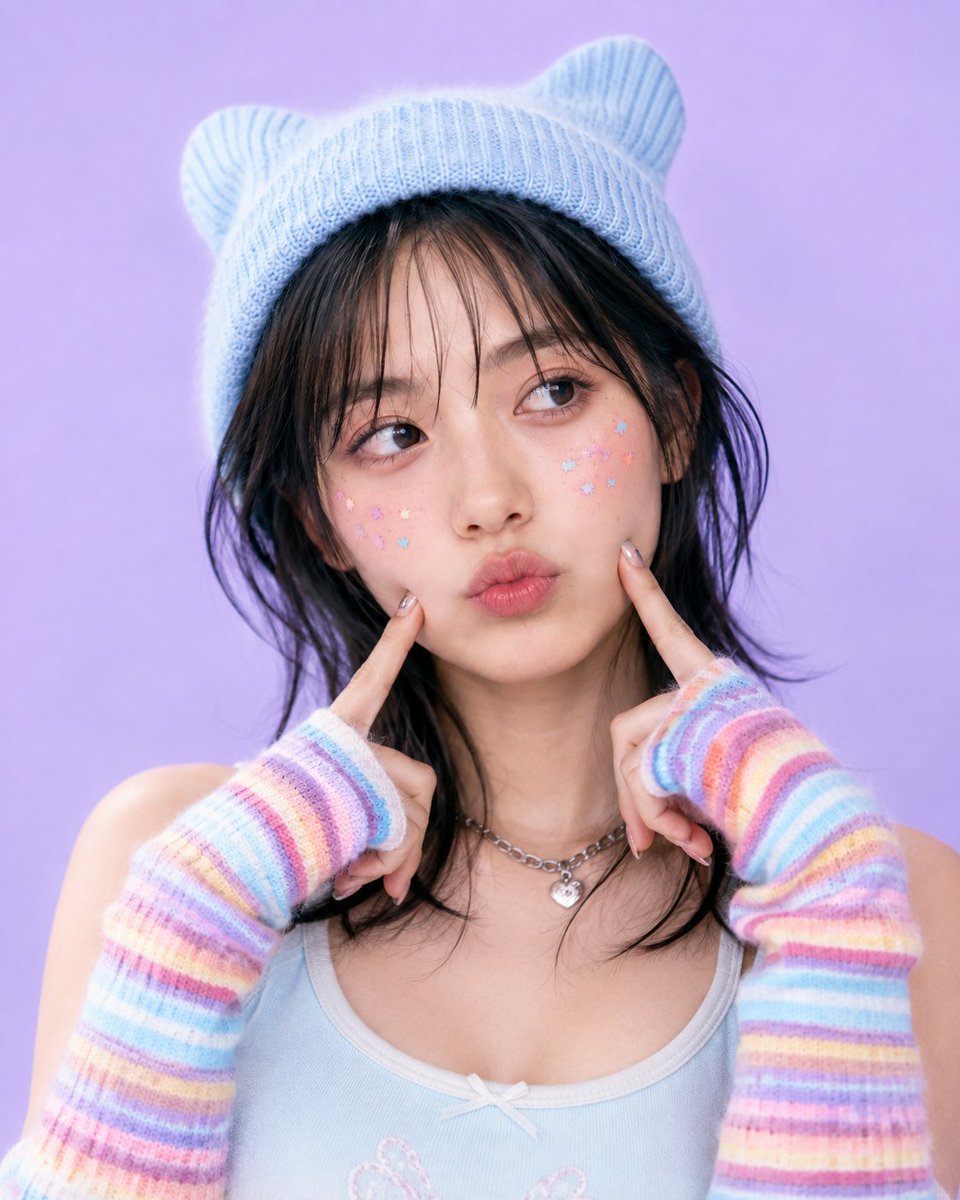
Y2K Kawaii Pastel Portrait
Generates a soft Y2K-inspired pastel studio portrait with cute fashion styling, ideal for profile images or beauty editorials.
This is a GPT Image 2 prompt case for Portrait & Character. Use the copy-ready prompt below to generate similar visuals, and review Awesome GPT Image 2 Prompts attribution plus commercial-use rights before reuse.
Free 1K preview
Generate one preview image instantly, no sign-up required.
Prompt
Copy-ready prompt
Create a square close-up Y2K kawaii studio portrait of a young woman with {argument name="hair color" default="dark black-brown"} slightly messy shoulder-length hair and wispy bangs, looking upward to the side with glossy eyes and a playful duck-face pout. She is centered against a smooth pastel lavender background with soft even lighting and a dreamy beauty-editorial finish. Style her with a pale powder-blue knitted beanie that has two rounded bear-ear bumps, a light blue ribbed camisole with white trim and a tiny bow at the neckline, a silver chain necklace with a small heart charm, and long fuzzy fingerless arm warmers with horizontal pastel rainbow stripes in pink, blue, purple, yellow, and peach. Pose both hands raised symmetrically, index fingers pressing gently into her cheeks. Add small pastel star stickers on both cheeks, about 16 total, scattered in pink, blue, yellow, and lavender. Makeup should be soft and glossy: pink blush, subtle shimmer eyeshadow, defined lashes, natural dewy skin, and shiny pink lips. Use a shallow depth of field, crisp facial detail, soft film-like color grading, high-resolution fashion photography, nostalgic early-2000s Japanese idol portrait mood, cute and polished, no text or watermark.Prompt variables
Editable argument placeholders found in the prompt, with their default values.
Best for
- - Portrait & Character visual exploration
- - Image generation and reference-image edits
- - Reusable briefs that keep source attribution visible
Change these parts
- - Subject, product, character, or scene
- - Aspect ratio, camera, lighting, and background
- - Brand, text, color, and output constraints
Recommended model and settings
- - Model: gpt-image-2
- - Input mode: Text to Image
- - Aspect ratio: source
- - Commercial status: review original source
How to use this prompt
- 1. Copy the prompt and preserve its structure for the first test.
- 2. Replace the subject, context, and publishing channel.
- 3. Change one camera, lighting, or style variable per iteration.
- 4. Inspect the output, source, text, and rights before reuse.
Limitations, source, and reuse cautions
- - Generated output is an editable draft, not factual, legal, or rights evidence.
- - Review the linked source, people, brands, logos, text, and third-party media before commercial use.
More cases in this category
Prioritized by category, input mode compatibility, quality, and lower risk.

Reuse and source notes
Use this prompt safely after previewing the case.
- 1.Copy the prompt or open it directly in Dovoo with the generation button.
- 2.Adjust variables, aspect ratio, and reference images for your own use case.
- 3.Before publishing or paid usage, verify source rights, attribution requirements, and brand or likeness risks.
Can I use this prompt commercially?
Commercial-use status is allowed. Review the original source, license, brand constraints, and legal requirements before paid usage.
Where does this case come from?
This case is imported from Awesome GPT Image 2 Prompts; keep attribution visible and check the source URL before reuse.