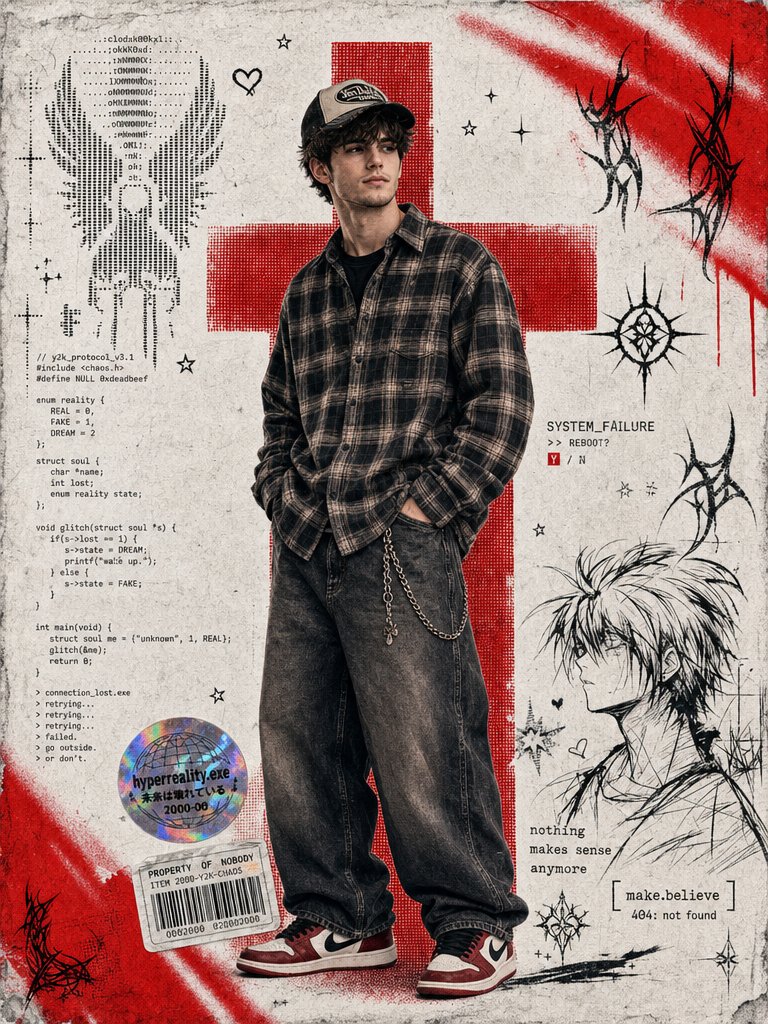
Y2K Cyber-Grunge Collage Poster
A complex streetwear aesthetic poster featuring digital collage elements, ASCII art, halftone graphics, and red airbrush paint.
This is a GPT Image 2 prompt case for Graphic & Poster. Use the copy-ready prompt below to generate similar visuals, and review Awesome GPT Image 2 Prompts attribution plus commercial-use rights before reuse.
Free 1K preview
Generate one preview image instantly, no sign-up required.
Prompt
Copy-ready prompt
Create a vertical {argument name="poster type" default="mixed-media digital collage poster"} in a Y2K cyber-grunge and streetwear aesthetic. The background is a textured, grainy white paper. In the center stands a {argument name="subject" default="young man wearing a loose plaid shirt, oversized wide leg baggy jeans, air Jordan 1s, and a trucker hat"}, with one hand in their pocket. His face is slightly positioned to the left. Behind him is a large, bold {argument name="graphic" default="red halftone cross graphic"}. Add vibrant red airbrush spray paint streaks to the top right and bottom left corners. On the left side of the figure, include a vertical block of ASCII art and computer code. Near the figure's legs, place a holographic sticker and a rectangular barcode sticker. In the bottom right corner, include a rough black ink line-art sketch of an anime-style character alongside small distressed text. Scatter small minimalist stars, hearts, and black cyber-sigilism tribal lines throughout the background. The overall vibe should be edgy, distressed, and reminiscent of a 2000s digital scrapbook.Prompt variables
Editable argument placeholders found in the prompt, with their default values.
Best for
- - Graphic & Poster visual exploration
- - Image generation and reference-image edits
- - Reusable briefs that keep source attribution visible
Change these parts
- - Subject, product, character, or scene
- - Aspect ratio, camera, lighting, and background
- - Brand, text, color, and output constraints
Recommended model and settings
- - Model: gpt-image-2
- - Input mode: Text to Image
- - Aspect ratio: source
- - Commercial status: review original source
How to use this prompt
- 1. Copy the prompt and preserve its structure for the first test.
- 2. Replace the subject, context, and publishing channel.
- 3. Change one camera, lighting, or style variable per iteration.
- 4. Inspect the output, source, text, and rights before reuse.
Limitations, source, and reuse cautions
- - Generated output is an editable draft, not factual, legal, or rights evidence.
- - Review the linked source, people, brands, logos, text, and third-party media before commercial use.
More cases in this category
Prioritized by category, input mode compatibility, quality, and lower risk.
Reuse and source notes
Use this prompt safely after previewing the case.
- 1.Copy the prompt or open it directly in Dovoo with the generation button.
- 2.Adjust variables, aspect ratio, and reference images for your own use case.
- 3.Before publishing or paid usage, verify source rights, attribution requirements, and brand or likeness risks.
Can I use this prompt commercially?
Commercial-use status is allowed. Review the original source, license, brand constraints, and legal requirements before paid usage.
Where does this case come from?
This case is imported from Awesome GPT Image 2 Prompts; keep attribution visible and check the source URL before reuse.