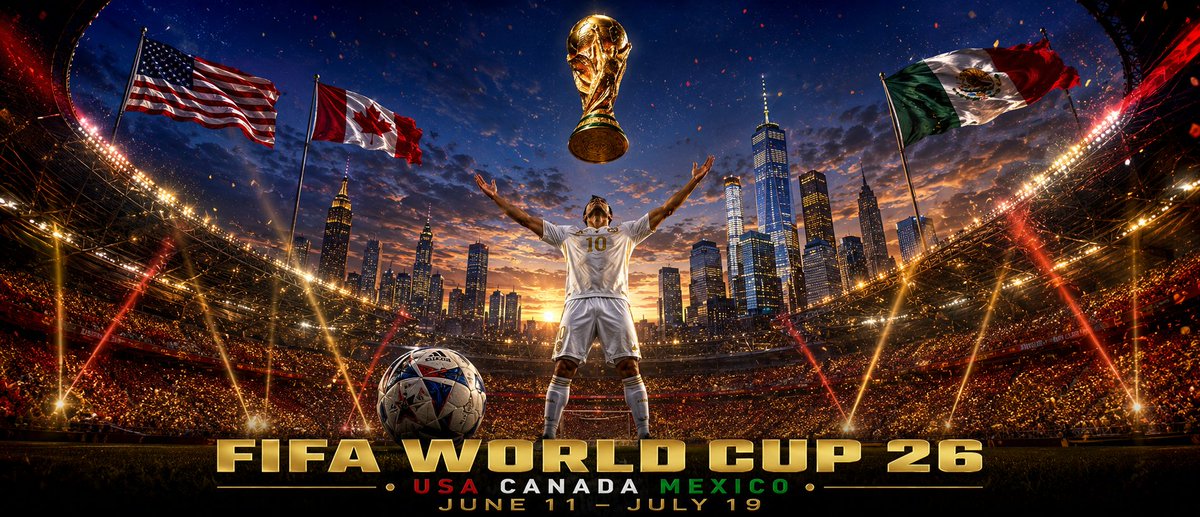
Cinematic World Cup 26 Stadium Poster
A heroic photorealistic soccer event poster featuring a player, trophy, host flags, skyline stadium, and bold World Cup 26 typography.
This is a GPT Image 2 prompt case for Graphic & Poster. Use the copy-ready prompt below to generate similar visuals, and review Awesome GPT Image 2 Prompts attribution plus commercial-use rights before reuse.
Free 1K preview
Generate one preview image instantly, no sign-up required.
Prompt
Copy-ready prompt
Create a cinematic widescreen sports poster for {argument name="event title" default="FIFA WORLD CUP 26"}. Show a packed night stadium viewed from field level with dramatic curved architecture, thousands of glowing spectators, red and gold pyrotechnic streaks, bright stadium floodlights, and a dusk-to-night sky over a New York–style skyline with One World Trade Center centered in the background. In the middle foreground, place a male soccer player seen from behind, wearing a white kit with gold trim and the number {argument name="player number" default="10"} on his back, standing with feet apart and both arms raised triumphantly toward a floating golden World Cup trophy above him. Put a detailed soccer ball on the grass in the lower left foreground. Add exactly three large waving national flags on tall poles across the upper stadium: United States flag on the left, Canada flag left of center, and Mexico flag on the right. Use ultra-detailed photorealistic fantasy sports advertising style, HDR contrast, golden rim lighting, lens flares, sparks, confetti, epic scale, sharp focus, and a red-gold-blue color palette. At the bottom, add bold metallic 3D gold typography reading {argument name="headline text" default="FIFA WORLD CUP 26"}; beneath it add smaller text reading "USA CANADA MEXICO" with USA in red, CANADA in white, MEXICO in green, separated by small gold dots; below that add the date line {argument name="date line" default="JUNE 11 - JULY 19"}. Keep the composition symmetrical and heroic, with the trophy, player, skyline tower, and headline aligned on the vertical center. No extra logos, no watermark, no additional text.Prompt variables
Editable argument placeholders found in the prompt, with their default values.
Best for
- - Graphic & Poster visual exploration
- - Image generation and reference-image edits
- - Reusable briefs that keep source attribution visible
Change these parts
- - Subject, product, character, or scene
- - Aspect ratio, camera, lighting, and background
- - Brand, text, color, and output constraints
Recommended model and settings
- - Model: gpt-image-2
- - Input mode: Text to Image
- - Aspect ratio: source
- - Commercial status: review original source
How to use this prompt
- 1. Copy the prompt and preserve its structure for the first test.
- 2. Replace the subject, context, and publishing channel.
- 3. Change one camera, lighting, or style variable per iteration.
- 4. Inspect the output, source, text, and rights before reuse.
Limitations, source, and reuse cautions
- - Generated output is an editable draft, not factual, legal, or rights evidence.
- - Review the linked source, people, brands, logos, text, and third-party media before commercial use.
More cases in this category
Prioritized by category, input mode compatibility, quality, and lower risk.



Reuse and source notes
Use this prompt safely after previewing the case.
- 1.Copy the prompt or open it directly in Dovoo with the generation button.
- 2.Adjust variables, aspect ratio, and reference images for your own use case.
- 3.Before publishing or paid usage, verify source rights, attribution requirements, and brand or likeness risks.
Can I use this prompt commercially?
Commercial-use status is allowed. Review the original source, license, brand constraints, and legal requirements before paid usage.
Where does this case come from?
This case is imported from Awesome GPT Image 2 Prompts; keep attribution visible and check the source URL before reuse.