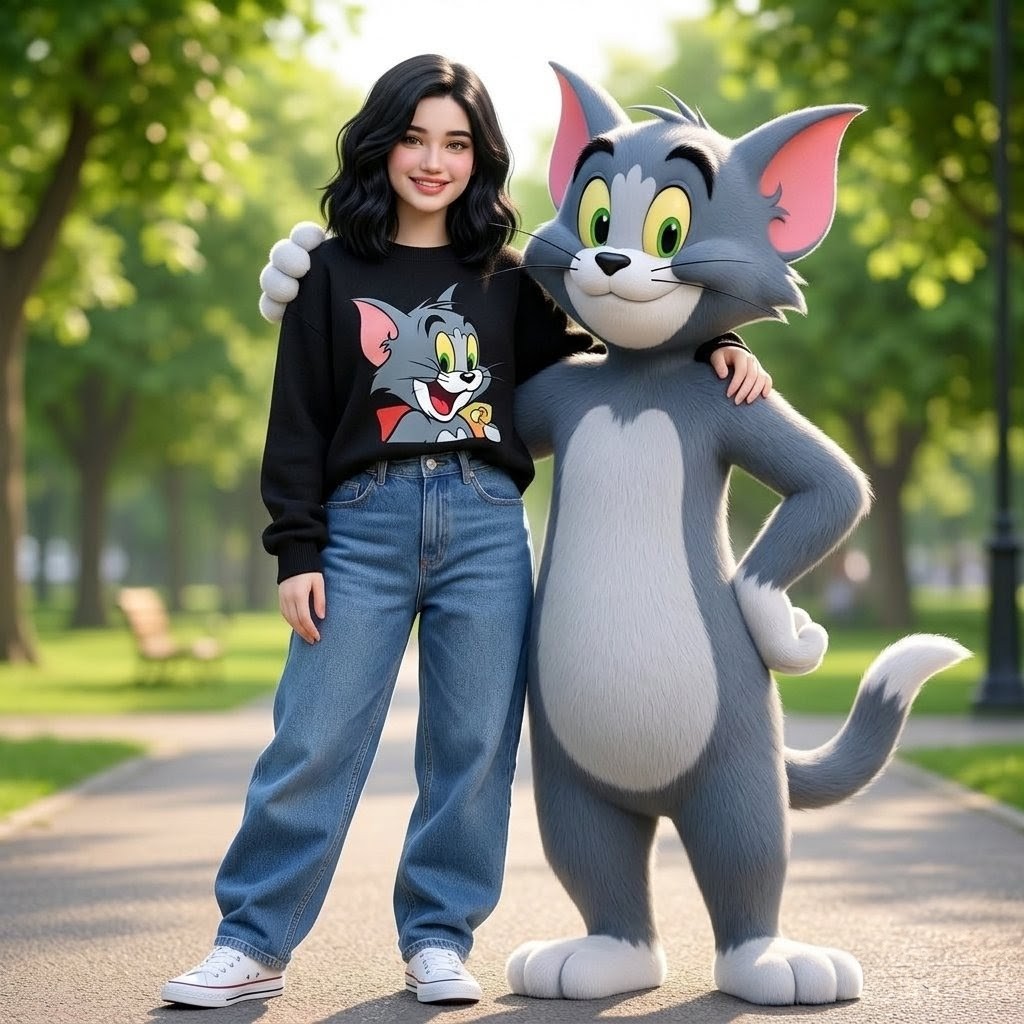
Woman Posing With Life-Size Tom Cat
A square cinematic park portrait of a casually dressed young woman standing arm-in-arm with a life-size Tom Cat character.
This is a GPT Image 2 prompt case for Portrait & Character. Use the copy-ready prompt below to generate similar visuals, and review Awesome GPT Image 2 Prompts attribution plus commercial-use rights before reuse.
Free 1K preview
Generate one preview image instantly, no sign-up required.
Prompt
Copy-ready prompt
Create a refined, full-body park portrait that blends realism with a 3D cartoon style. A young woman with {argument name="hair style" default="shoulder-length wavy black hair"}, sparkling eyes, a warm smile, and a lovely face confidently stands on a paved path in the park in a relaxed and casual pose. She is wearing a comfortable oversized {argument name="sweater color" default="Black"} sweater with a prominent, colorful Tom and Jerry print, paired with loose-fitting, high-waisted blue jeans and clean white canvas shoes. Standing beside her is a life-sized {argument name="cartoon character" default="Tom the cat from *Tom and Jerry*"}, rendered as a high-quality 3D animated character with gray fur, a white belly and paws, pink ears, yellow-green eyes, black eyebrows and whiskers, and a cheerful smile. The character is slightly taller than the woman and affectionately has one hand resting on her shoulder, which she reciprocates by looping her arm through his, presenting a friendly, companionable pose. Background: Lush park, tall trees, soft blurred foliage, warm morning light, benches visible in the distance, and a delicate street lamp on the right. Composition: Centered full-body shot, showing both figures from head to toe in natural proportions, shallow depth of field, cinematic lighting, soft shadows, vibrant and realistic colors, and clear details in clothing and fur. Maintain a warm, charming, and fashionable feel; avoid additional people, text or logos other than the cartoon print, distorted anatomy, or cropped feet.Prompt variables
Editable argument placeholders found in the prompt, with their default values.
Best for
- - Portrait & Character visual exploration
- - Image generation and reference-image edits
- - Reusable briefs that keep source attribution visible
Change these parts
- - Subject, product, character, or scene
- - Aspect ratio, camera, lighting, and background
- - Brand, text, color, and output constraints
Recommended model and settings
- - Model: gpt-image-2
- - Input mode: Text to Image
- - Aspect ratio: source
- - Commercial status: review original source
How to use this prompt
- 1. Copy the prompt and preserve its structure for the first test.
- 2. Replace the subject, context, and publishing channel.
- 3. Change one camera, lighting, or style variable per iteration.
- 4. Inspect the output, source, text, and rights before reuse.
Limitations, source, and reuse cautions
- - Generated output is an editable draft, not factual, legal, or rights evidence.
- - Review the linked source, people, brands, logos, text, and third-party media before commercial use.
More cases in this category
Prioritized by category, input mode compatibility, quality, and lower risk.


Reuse and source notes
Use this prompt safely after previewing the case.
- 1.Copy the prompt or open it directly in Dovoo with the generation button.
- 2.Adjust variables, aspect ratio, and reference images for your own use case.
- 3.Before publishing or paid usage, verify source rights, attribution requirements, and brand or likeness risks.
Can I use this prompt commercially?
Commercial-use status is allowed. Review the original source, license, brand constraints, and legal requirements before paid usage.
Where does this case come from?
This case is imported from Awesome GPT Image 2 Prompts; keep attribution visible and check the source URL before reuse.