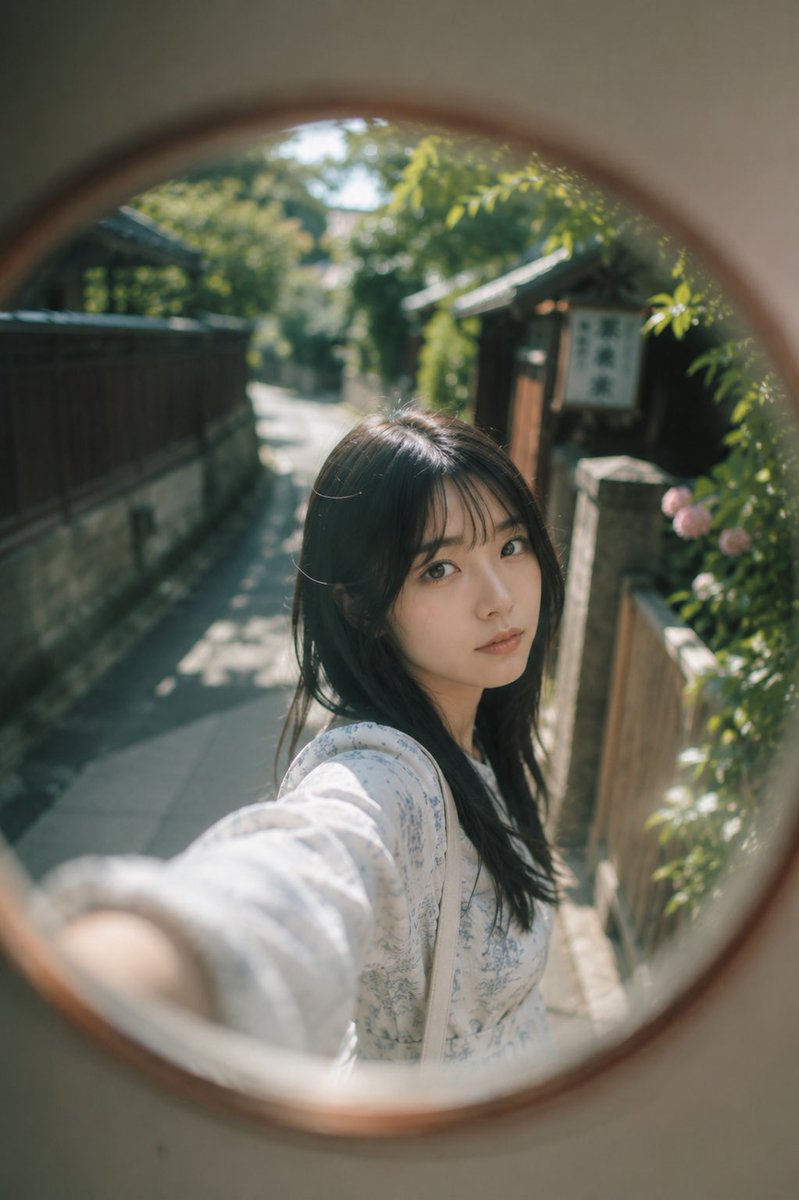
Woman in a Curve Mirror Reflection
A nostalgic and realistic portrait prompt featuring a Japanese woman reflected in a round street mirror in a quiet alley, styled with soft film tones.
This is a GPT Image 2 prompt case for Portrait & Character. Use the copy-ready prompt below to generate similar visuals, and review Awesome GPT Image 2 Prompts attribution plus commercial-use rights before reuse.
Free 1K preview
Generate one preview image instantly, no sign-up required.
Prompt
Copy-ready prompt
Subject: A realistic portrait of a Japanese woman {argument name="reflection object" default="reflected in a round curve mirror"} in a quiet Japanese alley.

Person/Expression: A Japanese woman in her early 20s, {argument name="hair style" default="long black hair"}, thin bangs, natural makeup, transparent skin, calm expression, quietly looking at the camera.

Clothing/Pose: {argument name="outfit" default="A white dress with light blue flowers"}, shoulder bag, natural pose as if taking a selfie with one arm outstretched.

Background/Light: A Japanese residential area with old wooden fences and stone walls, green sunlight filtering through trees, early summer afternoon, soft natural light, background blurred significantly.

Composition/Camera: Composition using reflection from a round curve mirror, wide-angle, slightly looking down angle, centered, shallow depth of field, round bokeh and vignette in the periphery.

Texture/Style: Pale colors, low contrast, soft film tone, natural skin texture, transparent Japanese-style portrait, realistic AI photo.

Negative: Low quality, unnatural hands, distorted face, extra fingers, excessive processing, text, logo, watermark.
Prompt variables
Editable argument placeholders found in the prompt, with their default values.
Best for
- - Portrait & Character visual exploration
- - Image generation and reference-image edits
- - Reusable briefs that keep source attribution visible
Change these parts
- - Subject, product, character, or scene
- - Aspect ratio, camera, lighting, and background
- - Brand, text, color, and output constraints
Recommended model and settings
- - Model: gpt-image-2
- - Input mode: Text to Image
- - Aspect ratio: source
- - Commercial status: review original source
How to use this prompt
- 1. Copy the prompt and preserve its structure for the first test.
- 2. Replace the subject, context, and publishing channel.
- 3. Change one camera, lighting, or style variable per iteration.
- 4. Inspect the output, source, text, and rights before reuse.
Limitations, source, and reuse cautions
- - Generated output is an editable draft, not factual, legal, or rights evidence.
- - Review the linked source, people, brands, logos, text, and third-party media before commercial use.
More cases in this category
Prioritized by category, input mode compatibility, quality, and lower risk.


Reuse and source notes
Use this prompt safely after previewing the case.
- 1.Copy the prompt or open it directly in Dovoo with the generation button.
- 2.Adjust variables, aspect ratio, and reference images for your own use case.
- 3.Before publishing or paid usage, verify source rights, attribution requirements, and brand or likeness risks.
Can I use this prompt commercially?
Commercial-use status is allowed. Review the original source, license, brand constraints, and legal requirements before paid usage.
Where does this case come from?
This case is imported from Awesome GPT Image 2 Prompts; keep attribution visible and check the source URL before reuse.