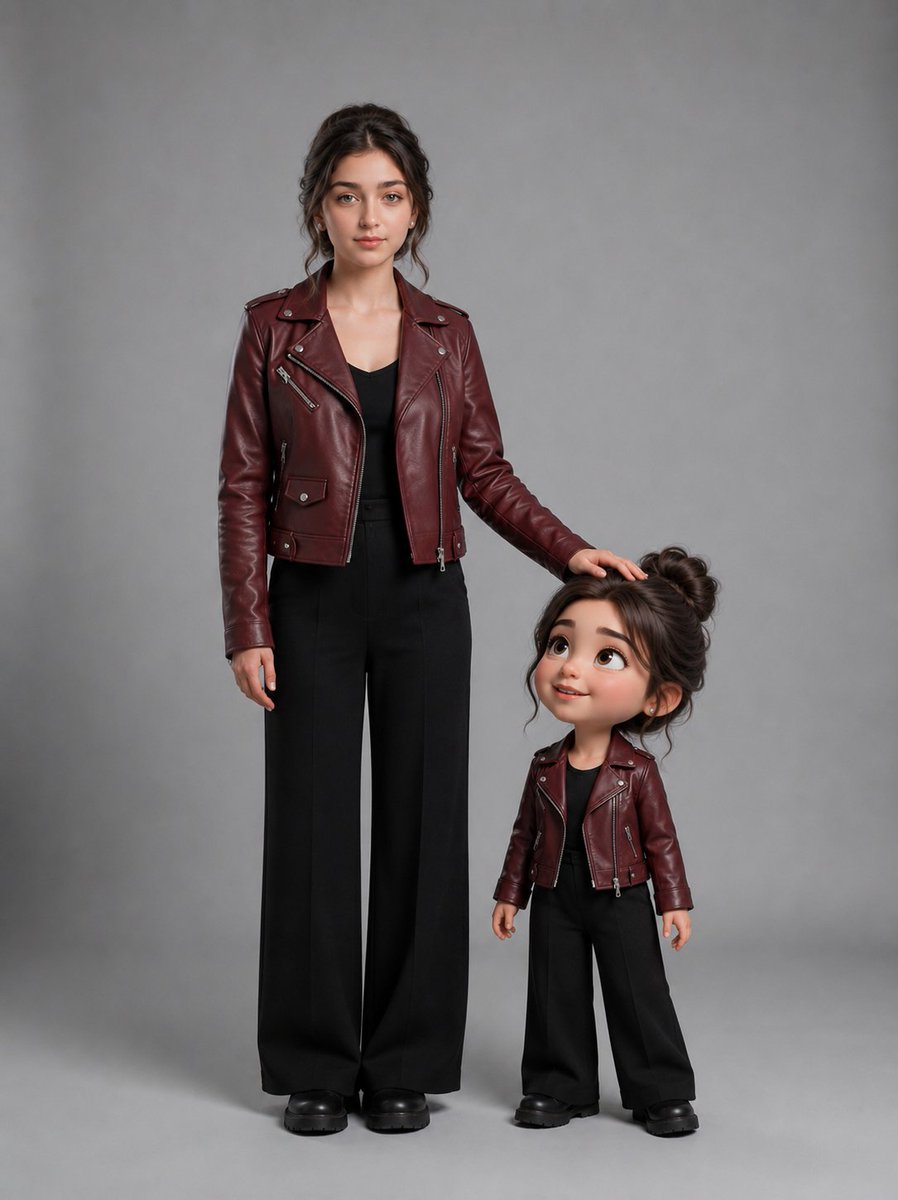
Woman With Matching Chibi Portrait
Generates a photorealistic studio portrait of a woman standing beside a cute miniature chibi version of herself in matching fashion.
This is a GPT Image 2 prompt case for Portrait & Character. Use the copy-ready prompt below to generate similar visuals, and review Awesome GPT Image 2 Prompts attribution plus commercial-use rights before reuse.
Free 1K preview
Generate one preview image instantly, no sign-up required.
Prompt
Copy-ready prompt
Create a photorealistic full-body studio portrait featuring exactly two subjects: one real young woman and one cute miniature 3D chibi version of the same woman standing beside her. The real woman is {argument name="woman age and appearance" default="a young adult woman with fair skin, delicate features, blue-green eyes, full brows, and dark brown hair in a loose messy updo with face-framing tendrils"}; she stands upright on the left, facing the camera with a calm neutral expression. Her right arm rests naturally at her side, and her left hand gently rests on top of the chibi character’s head. The chibi version stands on the right, about knee-to-thigh height compared with the woman, with an oversized head, large glossy expressive eyes, rosy cheeks, a small smiling mouth, and matching dark brown messy-bun hair; she looks upward toward the real woman with a sweet admiring expression. Both subjects wear matching outfits: {argument name="outfit" default="a burgundy leather biker jacket with silver zippers and snaps, a black top, high-waisted wide-leg black trousers, and chunky black shoes"}. Use realistic fabric and leather textures on the real woman and polished stylized 3D toy-like materials on the chibi while keeping the same outfit details. Place them on a seamless {argument name="background color" default="neutral gray"} studio backdrop with a soft floor shadow, centered composition, full bodies visible from head to shoes, vertical portrait framing, soft diffused studio lighting, subtle cinematic realism, high detail, natural skin texture, no text, no watermark, no extra people, no cropped feet.Prompt variables
Editable argument placeholders found in the prompt, with their default values.
Best for
- - Portrait & Character visual exploration
- - Image generation and reference-image edits
- - Reusable briefs that keep source attribution visible
Change these parts
- - Subject, product, character, or scene
- - Aspect ratio, camera, lighting, and background
- - Brand, text, color, and output constraints
Recommended model and settings
- - Model: gpt-image-2
- - Input mode: Text to Image
- - Aspect ratio: source
- - Commercial status: review original source
How to use this prompt
- 1. Copy the prompt and preserve its structure for the first test.
- 2. Replace the subject, context, and publishing channel.
- 3. Change one camera, lighting, or style variable per iteration.
- 4. Inspect the output, source, text, and rights before reuse.
Limitations, source, and reuse cautions
- - Generated output is an editable draft, not factual, legal, or rights evidence.
- - Review the linked source, people, brands, logos, text, and third-party media before commercial use.
More cases in this category
Prioritized by category, input mode compatibility, quality, and lower risk.

Reuse and source notes
Use this prompt safely after previewing the case.
- 1.Copy the prompt or open it directly in Dovoo with the generation button.
- 2.Adjust variables, aspect ratio, and reference images for your own use case.
- 3.Before publishing or paid usage, verify source rights, attribution requirements, and brand or likeness risks.
Can I use this prompt commercially?
Commercial-use status is allowed. Review the original source, license, brand constraints, and legal requirements before paid usage.
Where does this case come from?
This case is imported from Awesome GPT Image 2 Prompts; keep attribution visible and check the source URL before reuse.