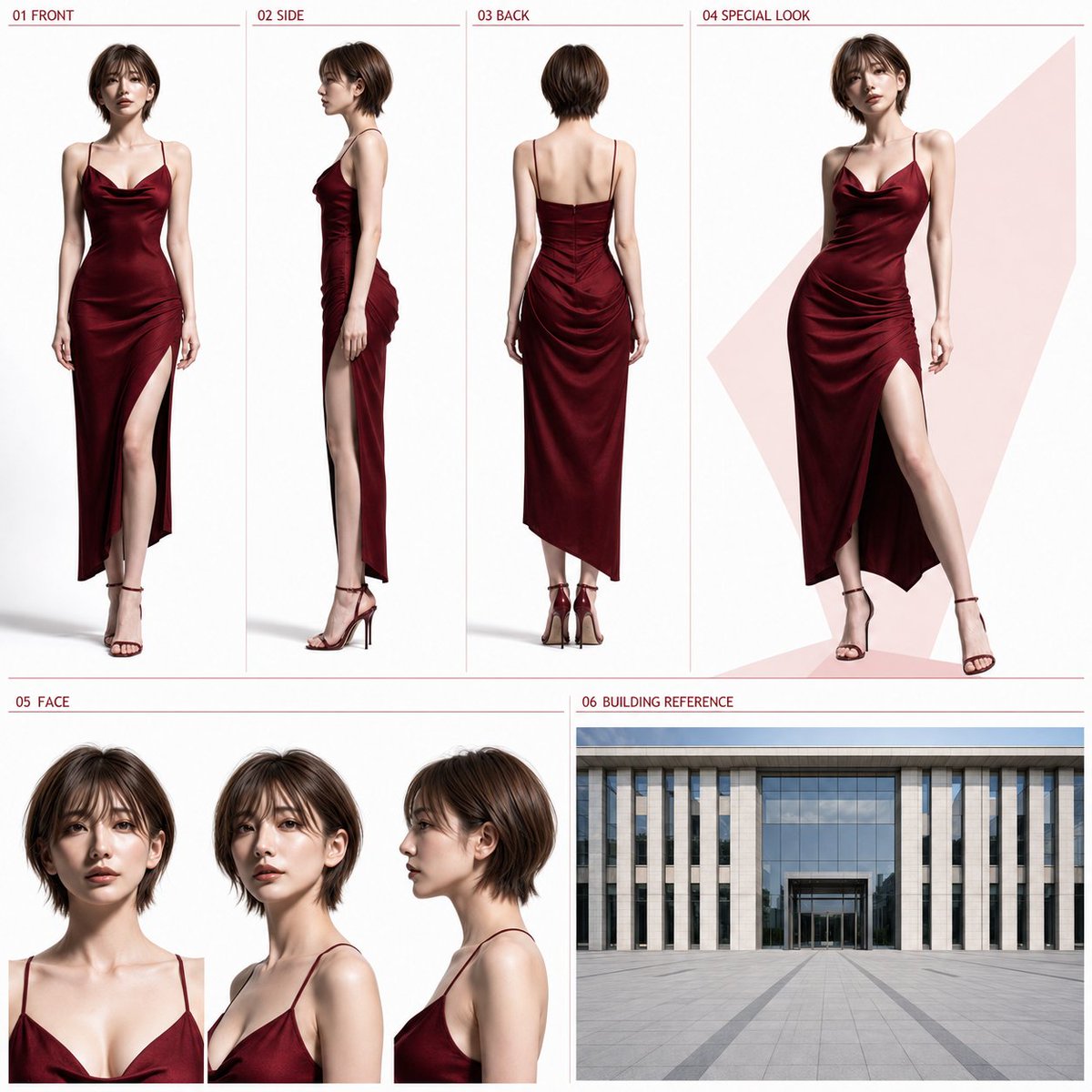
Photorealistic Character Layout Sheet
A complex, structured prompt for creating a professional character sheet with consistent photorealistic views (front, side, back) and building references, ideal for character design and consistency.
This is a GPT Image 2 prompt case for Portrait & Character. Use the copy-ready prompt below to generate similar visuals, and review Awesome GPT Image 2 Prompts attribution plus commercial-use rights before reuse.
Free 1K preview
Generate one preview image instantly, no sign-up required.
Free text preview doesn’t preserve reference-image consistency.
Prompt
Copy-ready prompt
【Input Items】
Clothing Type: [{argument name="clothing type" default="Business / Elegant Date Style"}]
Color Direction: [{argument name="color scheme" default="Navy / Red"}]
If left blank, defaults are "Business" and "Navy".

【Reference Usage】
One full-body reference image attached simultaneously with this instruction.

【Body Text】
Using the attached full-body reference image as the sole person reference, create one 1:1 square high-quality live-action character sheet. If the reference image is live-action, maintain the identity. If it is an illustration, convert it into a natural live-action person while maintaining features. Maintain facial features, hairstyle, hair color, age impression, skin tone, gender impression, height, proportions, body type, and full-body ratio. Do not beautify, rejuvenate, age, change body type, or turn into another person. In principle, only change the clothing and shoes.

【Clothing】
Naturally adapt the specified clothing type to the gender, age, and body type of the reference person.
- Business: Modern and clean business style. A neat and practical outdoor outfit including a jacket.
- Date-ready elegant: An elegant and glamorous outdoor outfit suitable for a date at a restaurant or in the city. The outfit should make the full-body shape easy to see, avoiding uniforms, excessive formal wear, overly long hems, large decorations, complex layering, and brand logos.

【Coloring】
Use the specified colors as the main or central colors of the clothing. A small amount of white, ivory, gray, black, etc., may be added as auxiliary colors, but do not make it multi-colored.
- Navy: Centered on deep navy.
- Red: Centered on deep red, bordeaux, or wine red.

【Overall Layout】
Compose the whole in two tiers: the upper tier about 58% and the lower tier about 42%. Do not change the basic arrangement, order, or ratio.

【Upper Tier: Approx. 58%】
01 FRONT: 22%
02 SIDE: 22%
03 BACK: 22%
04 SPECIAL LOOK: 34%
01-03 must be full-body displays at the same magnification, including everything from the top of the head to the tips of the toes. Unify height, proportions, body type, clothing, shoes, and camera distance, using a natural upright posture without obscuring the body or clothing with arms or hands.
- 01 FRONT: Front full body
- 02 SIDE: Side full body from the exact side
- 03 BACK: Back full body

【04 SPECIAL LOOK】
The same person and same outfit as 01-03, shown in a larger full-body 3/4 view. Use a static pose with slight movement and a natural expression that best conveys the person's charm. Only behind 04, a simple flat color or understated geometric color field using the specified color lightly may be placed.

【Lower Tier: Approx. 42%】
The left 62% is 05 FACE, and the right 38% is 06 BUILDING REFERENCE.

【05 FACE】
Arrange three face views—front, 3/4 angle, and side—in a horizontal row with the same size, same camera distance, and same head position. All three should have natural normal expressions, making it easy to check facial features, eyes, outline, bangs, hairstyle, and age impression.

【06 BUILDING REFERENCE】
Use the entire 06 area as a single wide-angle exterior image that confirms the structure of the building front, entrance, and outdoor plaza in one composition. Clothing type and color direction are not reflected in 06. It should be a neutral building reference unaffected by the person's clothing color, the theme color of 04, or accent colors of the overall sheet. Under bright daytime uniform natural light, depict a clean and modern building front and automatic glass entrance viewed from a wide outdoor plaza. Do not add night views, evening views, warm lighting, lighting effects, strong color direction, or effects that strongly suggest specific uses like hotels, restaurants, or offices. Do not split the interior of 06; compose it as a single frame/single viewpoint image. Do not use collages, multiple views, vertical splits, or different angles side-by-side. Compose with one continuous exterior wall, one ground floor, one continuous ground surface, one building front, and one clear entrance. Clearly depict either a sliding or rotating automatic glass entrance; do not mix different entrance structures.
The lower approx. 30-40% of the 06 area should be a continuous outdoor plaza, and the upper approx. 60-70% the building front. Place the entrance in only one location in the center bottom, with the entrance width roughly 20-30% of the entire 06 area. Use a wide-angle composition where the straight path toward the entrance is clear and the ratio of building, ground, and entrance looks natural. Do not include close-up displays of only the entrance, panoramas that are too far to identify the entrance, multiple entrances, vertically overlapping building fronts, double grounds, complex stairs or terraces, people, cars, or signs.

【Headings】
Use only the following short English notations:
01 FRONT
02 SIDE
03 BACK
04 SPECIAL LOOK
05 FACE
06 BUILDING REFERENCE
Place each heading in the upper left of the corresponding area in a small, unified font, without overlapping important parts of people or buildings. Specified colors may be used sparingly for headings and thin divider lines.

【Common Design】
The background of the sheet excluding 06 BUILDING REFERENCE should be white to very light gray. Secure enough margin so people and areas do not overlap, creating an organized and sophisticated design that can be shared as a standalone image. Character display should only include the specified 4 full-body points and 3 face points, all maintained as the same person and same outfit as the reference image. Do not include thick borders, excessive decoration, long descriptions, lines of dialogue, subtitles, logos, brand names, or watermarks.
Prompt variables
Editable argument placeholders found in the prompt, with their default values.
Best for
- - Portrait & Character visual exploration
- - Image generation and reference-image edits
- - Reusable briefs that keep source attribution visible
Change these parts
- - Subject, product, character, or scene
- - Aspect ratio, camera, lighting, and background
- - Brand, text, color, and output constraints
Recommended model and settings
- - Model: gpt-image-2
- - Input mode: Image to Image
- - Aspect ratio: source
- - Commercial status: review original source
How to use this prompt
- 1. Copy the prompt and preserve its structure for the first test.
- 2. Replace the subject, context, and publishing channel.
- 3. Change one camera, lighting, or style variable per iteration.
- 4. Inspect the output, source, text, and rights before reuse.
Limitations, source, and reuse cautions
- - Generated output is an editable draft, not factual, legal, or rights evidence.
- - Review the linked source, people, brands, logos, text, and third-party media before commercial use.
More cases in this category
Prioritized by category, input mode compatibility, quality, and lower risk.
Reuse and source notes
Use this prompt safely after previewing the case.
- 1.Copy the prompt or open it directly in Dovoo with the generation button.
- 2.Adjust variables, aspect ratio, and reference images for your own use case.
- 3.Before publishing or paid usage, verify source rights, attribution requirements, and brand or likeness risks.
Can I use this prompt commercially?
Commercial-use status is allowed. Review the original source, license, brand constraints, and legal requirements before paid usage.
Where does this case come from?
This case is imported from Awesome GPT Image 2 Prompts; keep attribution visible and check the source URL before reuse.