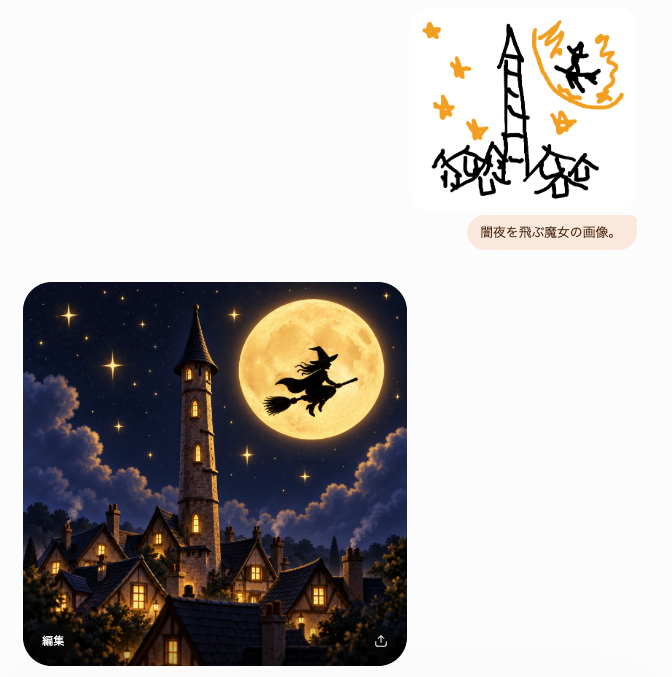
Witch Sketch to Fantasy Result UI
Creates a chat-style UI screenshot where a crude witch doodle prompt becomes a polished moonlit fantasy village image.
This is a GPT Image 2 prompt case for Graphic & Poster. Use the copy-ready prompt below to generate similar visuals, and review Awesome GPT Image 2 Prompts attribution plus commercial-use rights before reuse.
Free 1K preview
Generate one preview image instantly, no sign-up required.
Free text preview doesn’t preserve reference-image consistency.
Prompt
Copy-ready prompt
Goal: Create a minimalist chat-style image generation interface screenshot showing a rough sketch prompt and a polished generated result.

Canvas: Square-ish light gray/off-white background, about 665×677 px, with lots of empty space. Use a clean modern mobile/web UI aesthetic with rounded cards and subtle shadows.

Layout: Place exactly 3 main UI elements: 1 small sketch image card in the upper right, 1 small rounded text prompt bubble directly below it, and 1 large generated image card in the lower left. Leave the left side mostly blank above the large card.

Upper sketch card: A white rounded rectangle with a childlike black-and-orange doodle. The doodle contains exactly 6 orange star shapes, a tall crooked black tower in the center, 3 small black haunted houses along the bottom, an orange full moon in the upper right, and 1 black witch silhouette flying across the moon. Keep the sketch rough, marker-like, playful, and sparse.

Prompt bubble: A pale peach rounded pill below the sketch card containing the Japanese text {argument name="prompt bubble text" default="闇夜を飛ぶ魔女の画像。"} in small dark brown type.

Generated image card: A large rounded-corner square image in the lower left, cinematic fantasy style. Depict a cozy gothic village at night beneath a deep navy starry sky. Include exactly 1 tall stone clock/bell tower with a pointed dark roof near the left-center, exactly 1 enormous glowing golden full moon near the upper right, and exactly 1 black witch silhouette riding a broom in front of the moon. Include clustered steep-roof houses with warm yellow-lit windows in the foreground, soft glowing stars, dramatic moonlit clouds, and dark treetops framing the bottom. The image should feel like a highly polished transformation of the crude sketch.

UI details: On the lower-left corner inside the large generated image, show the small white Japanese label {argument name="edit label" default="Edit"}. On the lower-right corner inside the same image, show a small white share/export icon. No other visible text.

Visual style: High contrast between the simple doodle and the refined result; rounded corners; soft app-interface spacing; no watermark; no extra panels; keep the composition faithful to a generated-image chat result.
Prompt variables
Editable argument placeholders found in the prompt, with their default values.
Best for
- - Graphic & Poster visual exploration
- - Image generation and reference-image edits
- - Reusable briefs that keep source attribution visible
Change these parts
- - Subject, product, character, or scene
- - Aspect ratio, camera, lighting, and background
- - Brand, text, color, and output constraints
Recommended model and settings
- - Model: gpt-image-2
- - Input mode: Image to Image
- - Aspect ratio: source
- - Commercial status: review original source
How to use this prompt
- 1. Copy the prompt and preserve its structure for the first test.
- 2. Replace the subject, context, and publishing channel.
- 3. Change one camera, lighting, or style variable per iteration.
- 4. Inspect the output, source, text, and rights before reuse.
Limitations, source, and reuse cautions
- - Generated output is an editable draft, not factual, legal, or rights evidence.
- - Review the linked source, people, brands, logos, text, and third-party media before commercial use.
More cases in this category
Prioritized by category, input mode compatibility, quality, and lower risk.


Reuse and source notes
Use this prompt safely after previewing the case.
- 1.Copy the prompt or open it directly in Dovoo with the generation button.
- 2.Adjust variables, aspect ratio, and reference images for your own use case.
- 3.Before publishing or paid usage, verify source rights, attribution requirements, and brand or likeness risks.
Can I use this prompt commercially?
Commercial-use status is allowed. Review the original source, license, brand constraints, and legal requirements before paid usage.
Where does this case come from?
This case is imported from Awesome GPT Image 2 Prompts; keep attribution visible and check the source URL before reuse.