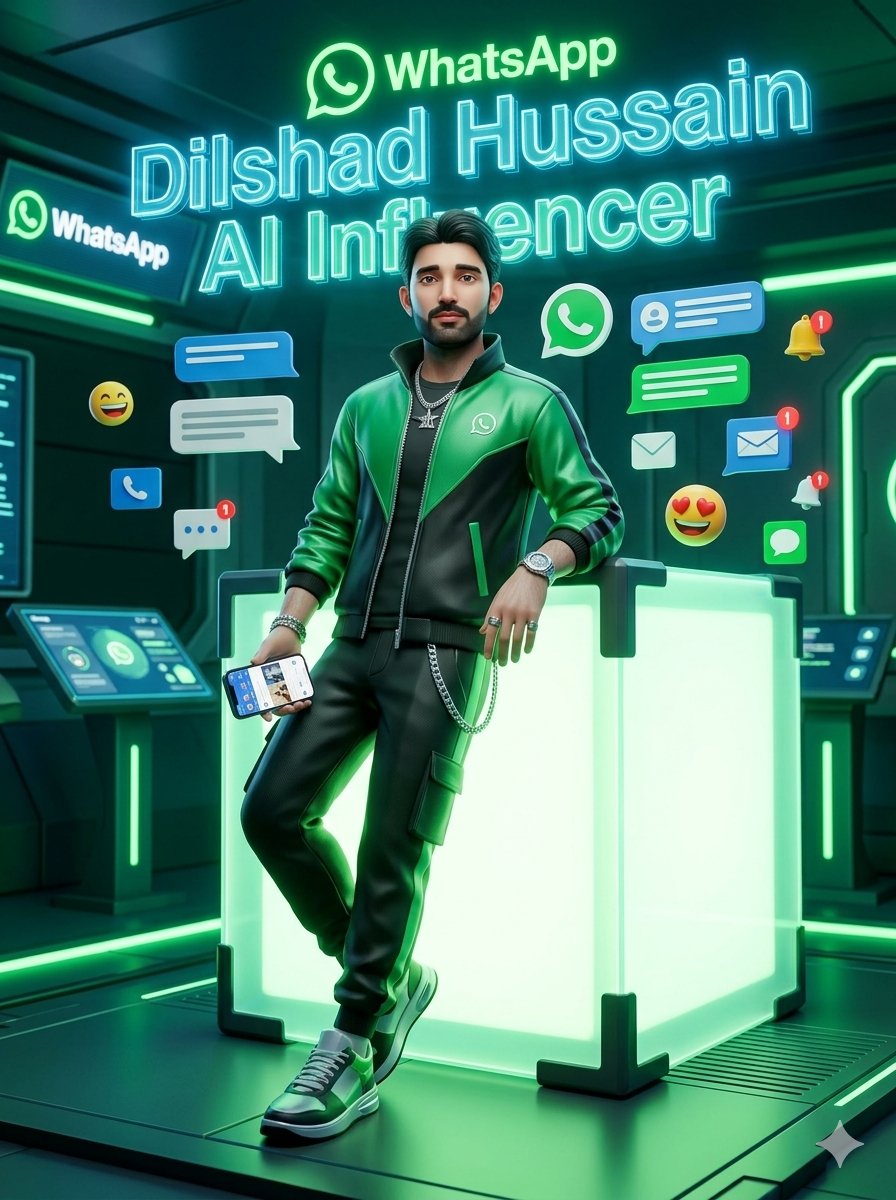
WhatsApp AI Influencer 3D Poster
A cinematic neon 3D poster of a confident young male influencer in a futuristic WhatsApp-themed digital communication environment.
This is a GPT Image 2 prompt case for Graphic & Poster. Use the copy-ready prompt below to generate similar visuals, and review Awesome GPT Image 2 Prompts attribution plus commercial-use rights before reuse.
Free 1K preview
Generate one preview image instantly, no sign-up required.
Prompt
Copy-ready prompt
Create a cinematic stylized 3D render in a futuristic WhatsApp-inspired digital communication hub. A confident young male AI influencer named {argument name="character name" default="Dilshad Hussain"} stands full-body in the center, leaning casually against a large glowing translucent cube with neon green internal light and black reinforced corner brackets. He wears a glossy green-and-black varsity-style jacket with a small WhatsApp logo on the chest, a black t-shirt, black jogger pants with a side cargo pocket and silver chain, green-and-white sneakers, a wristwatch, bracelets, rings, and layered silver necklaces. His pose is relaxed and charismatic: one elbow resting on the cube, one leg crossed in front, one hand holding a smartphone showing a social media/chat interface. Use a highly polished toy-like yet realistic 3D character style, dramatic teal and emerald rim lighting, reflective sci-fi floor panels, glowing green strips, and a dark high-tech room with wall monitors and control consoles.

Place bright holographic text above and behind him: the WhatsApp logo and word “WhatsApp” at the top, then a huge cyan neon outlined name reading “{argument name="headline name" default="Dilshad Hussain"}”, and below it “{argument name="subtitle text" default="AI Influencer"}”. Surround the character with exactly 13 floating communication elements: 1 large green WhatsApp icon, 1 left-side WhatsApp sign on a wall screen, 3 blue chat/message bubbles, 2 white chat/message bubbles, 2 blue envelope/message icons with red notification badges, 1 white envelope icon, 1 yellow bell with a red notification badge, 1 white bell with a red notification badge, and 2 emoji reactions, one laughing smiley and one heart-eyes smiley. Keep the composition vertical, poster-like, centered, energetic, and highly luminous, using emerald green, cyan, black, and dark teal as the dominant palette. Make the environment feel like a premium futuristic social media studio, with shallow depth of field and sharp neon highlights. Do not add extra people, do not add watermarks, and keep all visible text limited to WhatsApp, the name, and AI Influencer.
Prompt variables
Editable argument placeholders found in the prompt, with their default values.
Best for
- - Graphic & Poster visual exploration
- - Image generation and reference-image edits
- - Reusable briefs that keep source attribution visible
Change these parts
- - Subject, product, character, or scene
- - Aspect ratio, camera, lighting, and background
- - Brand, text, color, and output constraints
Recommended model and settings
- - Model: gpt-image-2
- - Input mode: Text to Image
- - Aspect ratio: source
- - Commercial status: review original source
How to use this prompt
- 1. Copy the prompt and preserve its structure for the first test.
- 2. Replace the subject, context, and publishing channel.
- 3. Change one camera, lighting, or style variable per iteration.
- 4. Inspect the output, source, text, and rights before reuse.
Limitations, source, and reuse cautions
- - Generated output is an editable draft, not factual, legal, or rights evidence.
- - Review the linked source, people, brands, logos, text, and third-party media before commercial use.
More cases in this category
Prioritized by category, input mode compatibility, quality, and lower risk.

Reuse and source notes
Use this prompt safely after previewing the case.
- 1.Copy the prompt or open it directly in Dovoo with the generation button.
- 2.Adjust variables, aspect ratio, and reference images for your own use case.
- 3.Before publishing or paid usage, verify source rights, attribution requirements, and brand or likeness risks.
Can I use this prompt commercially?
Commercial-use status is allowed. Review the original source, license, brand constraints, and legal requirements before paid usage.
Where does this case come from?
This case is imported from Awesome GPT Image 2 Prompts; keep attribution visible and check the source URL before reuse.