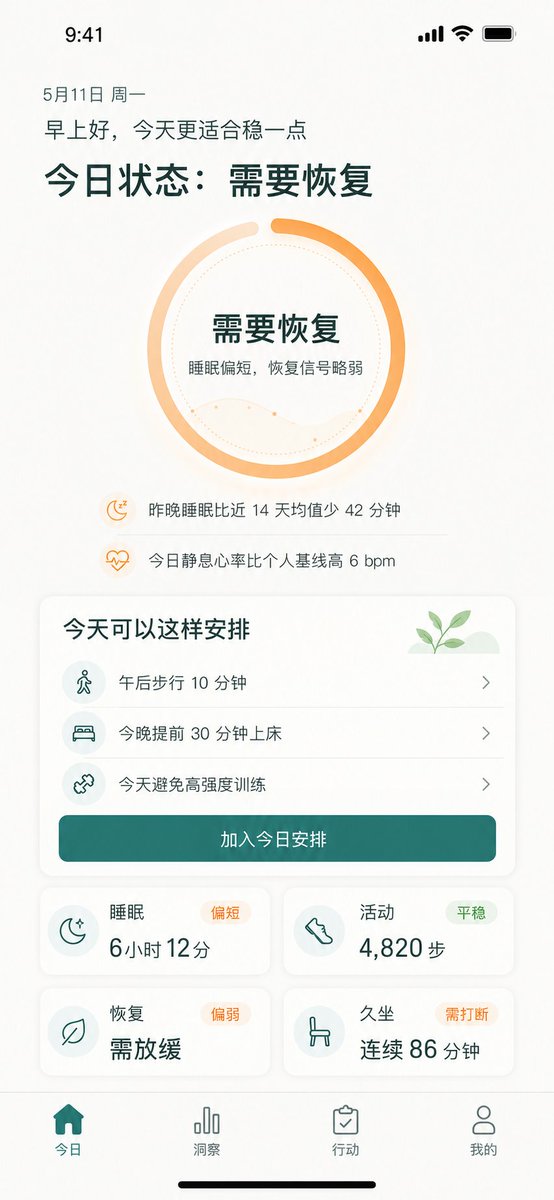
Chinese Wellness Recovery App UI
Generates a polished iPhone dashboard for a Chinese wellness app showing recovery status, suggested actions, metrics, and bottom navigation.
This is a GPT Image 2 prompt case for Product & Commercial. Use the copy-ready prompt below to generate similar visuals, and review Awesome GPT Image 2 Prompts attribution plus commercial-use rights before reuse.
Free 1K preview
Generate one preview image instantly, no sign-up required.
Prompt
Copy-ready prompt
{
  "type": "high-fidelity mobile health recovery dashboard UI mockup",
  "platform": "iPhone portrait screen, 9:41 status bar, white warm background, soft shadows, rounded cards, minimalist wellness app visual style",
  "language": "Simplified Chinese UI text",
  "theme": {
    "primary_color": "{argument name=\"primary color\" default=\"deep teal green\"}",
    "accent_color": "{argument name=\"accent color\" default=\"warm orange\"}",
    "background": "off-white with subtle beige texture",
    "typography": "clean modern sans-serif, bold large Chinese headings, lighter body text"
  },
  "screen": {
    "top_status_bar": "time 9:41 at top left, cellular signal, Wi-Fi, battery icons at top right",
    "date": "May 11th Monday",
    "greeting": "{argument name=\"greeting text\" default=\"Good morning, today is more suitable for being conservative.\"}",
    "main_headline": "{argument name=\"main status headline\" default=\"Today's status: Needs recovery\"}"
  },
  "hero_status_ring": {
    "position": "upper center",
    "shape": "large circular progress ring",
    "count": 1,
    "style": "thick orange gradient ring about 85 percent complete with a small gap at top, pale peach secondary arc, dotted inner circle, faint wavy line chart inside",
    "center_text": [
      "Needs recovery",
      "Sleep was slightly short, recovery signal is weak."
    ]
  },
  "insight_rows": {
    "position": "below ring",
    "count": 2,
    "items": [
      {
        "icon": "small orange moon with zzz",
        "text": "Slept 42 minutes less last night than your 14-day average"
      },
      {
        "icon": "small orange heart pulse",
        "text": "Your resting heart rate today is 6 bpm higher than your personal baseline"
      }
    ]
  },
  "schedule_card": {
    "position": "middle",
    "title": "Here's how you can plan your day",
    "decoration": "small green sprout illustration on pale green hill in top right",
    "count": 3,
    "items": [
      {
        "icon": "walking person in pale teal circle",
        "text": "Take a 10-minute walk this afternoon",
        "chevron": "right"
      },
      {
        "icon": "bed in pale teal circle",
        "text": "Go to bed 30 minutes earlier tonight",
        "chevron": "right"
      },
      {
        "icon": "dumbbell/cross training icon in pale teal circle",
        "text": "Avoid high-intensity training today",
        "chevron": "right"
      }
    ],
    "primary_button": "Add to today's schedule"
  },
  "metric_cards": {
    "position": "lower middle in 2 by 2 grid",
    "count": 4,
    "cards": [
      {
        "title": "Sleep",
        "status_badge": "Slightly short",
        "icon": "crescent moon with stars",
        "main_value": "6 hours 12 minutes"
      },
      {
        "title": "Activity",
        "status_badge": "Stable",
        "icon": "shoe/footprint",
        "main_value": "4,820 steps"
      },
      {
        "title": "Recover",
        "status_badge": "Slightly weak",
        "icon": "leaf",
        "main_value": "Slow down"
      },
      {
        "title": "Sedentary",
        "status_badge": "Needs to be interrupted",
        "icon": "chair",
        "main_value": "86 minutes continuously"
      }
    ]
  },
  "bottom_navigation": {
    "position": "bottom fixed tab bar",
    "count": 4,
    "tabs": [
      {
        "label": "Today",
        "icon": "filled home",
        "state": "active teal"
      },
      {
        "label": "Insight",
        "icon": "bar chart",
        "state": "inactive gray"
      },
      {
        "label": "Action",
        "icon": "clipboard check",
        "state": "inactive gray"
      },
      {
        "label": "My",
        "icon": "user outline",
        "state": "inactive gray"
      }
    ],
    "home_indicator": "black iPhone home indicator at very bottom"
  },
  "composition": "single mobile app screen mockup centered in portrait, generous spacing, readable Chinese text, soft rounded rectangles, subtle dividers between schedule rows, wellness recovery tracking product design suitable for demo presentation"
}
Prompt variables
Editable argument placeholders found in the prompt, with their default values.
Best for
- - Product & Commercial visual exploration
- - Image generation and reference-image edits
- - Reusable briefs that keep source attribution visible
Change these parts
- - Subject, product, character, or scene
- - Aspect ratio, camera, lighting, and background
- - Brand, text, color, and output constraints
Recommended model and settings
- - Model: gpt-image-2
- - Input mode: Text to Image
- - Aspect ratio: source
- - Commercial status: review original source
How to use this prompt
- 1. Copy the prompt and preserve its structure for the first test.
- 2. Replace the subject, context, and publishing channel.
- 3. Change one camera, lighting, or style variable per iteration.
- 4. Inspect the output, source, text, and rights before reuse.
Limitations, source, and reuse cautions
- - Generated output is an editable draft, not factual, legal, or rights evidence.
- - Review the linked source, people, brands, logos, text, and third-party media before commercial use.
More cases in this category
Prioritized by category, input mode compatibility, quality, and lower risk.

Reuse and source notes
Use this prompt safely after previewing the case.
- 1.Copy the prompt or open it directly in Dovoo with the generation button.
- 2.Adjust variables, aspect ratio, and reference images for your own use case.
- 3.Before publishing or paid usage, verify source rights, attribution requirements, and brand or likeness risks.
Can I use this prompt commercially?
Commercial-use status is allowed. Review the original source, license, brand constraints, and legal requirements before paid usage.
Where does this case come from?
This case is imported from Awesome GPT Image 2 Prompts; keep attribution visible and check the source URL before reuse.