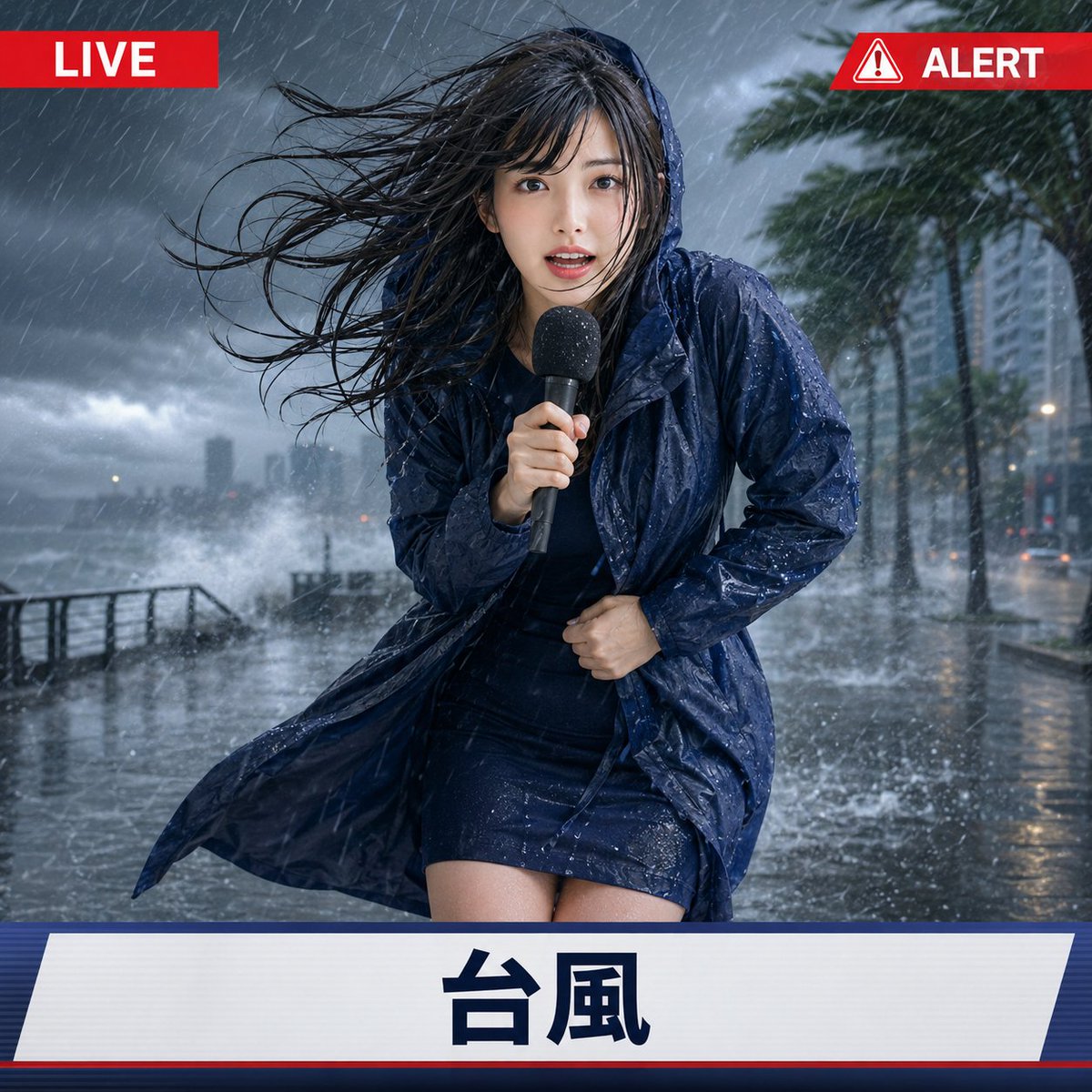
Extreme Weather TV Reporter System
A comprehensive instruction set for GPT Image 2 to generate fictional weather reporters during extreme events like typhoons or heatwaves while maintaining character consistency from a reference image.
This is a GPT Image 2 prompt case for Portrait & Character. Use the copy-ready prompt below to generate similar visuals, and review Awesome GPT Image 2 Prompts attribution plus commercial-use rights before reuse.
Free 1K preview
Generate one preview image instantly, no sign-up required.
Free text preview doesn’t preserve reference-image consistency.
Prompt
Copy-ready prompt
[Input Item] Reference image: 1, Weather type: Heatwave / Typhoon / Blizzard, Aspect ratio: Required (e.g. 1:1) [Recommended reference image] Please use images with clear depictions of character features, hairstyle, hair color, age, body type, and clothing style. Images showing the head to upper body or full body are recommended. Simple backgrounds are ideal. [Main instructions] Depict the person in the attached reference image as an outdoor reporter broadcasting live from an extreme weather scene in a fictional television broadcast. Faithfully maintain the features, hairstyle, hair color, eye impression, age, body type, atmosphere, and expression from the reference image, ensuring the person is recognizable. Reconstruct real-life images into high-quality realistic styles, and reconstruct anime or illustrations into images that maintain the original artistic style, lines, color scheme, and texture. Do not inherit the background, lighting, composition, or original pose from the reference image. Naturally adjust clothing to match the input weather while preserving the original colors and atmosphere as much as possible. The person is a local reporter holding a broadcast microphone and reporting to the camera. Depict them not just standing calmly, but in the moment of being battered by extreme weather and desperately continuing the broadcast. Make hair, clothing, facial expressions, pose, body tilt, hand movements, and carried items react naturally to the weather, making the person appear to be truly on location. Facial expressions should be exaggerated enough to convey the severity of the situation, but not become solely expressions of fear or pain. Make it a shocking live report that stands out on social media. However, this appeal should be expressed through the person's reaction and the power of the extreme weather, not through UI decorations. Overlay a simple fictional television broadcast UI on the screen. The UI should maintain the same shape and position across all weather types and should not have elaborate decorations, weather maps, complex numbers, or long text. At the top of the screen, place small, symmetrical UI elements on the left and right. The upper left corner should display the text “LIVE” in white within a red banner. The upper right corner should display a red and white warning triangle icon, along with a small “ALERT” white text banner of the same position, height, and design style as the upper left corner. Align the left and right UI elements with the top and edges, and adjust the width naturally according to the content. At the bottom of the screen, place a simple horizontal broadcast bar. In the bottom bar, display only the text that exactly matches the input weather type, in a large and clear font. If the input is “Heatwave”, display “猛暑”. If it is “Typhoon”, display “台風”. If it is “Blizzard”, display “猛吹雪”. The text is limited to “LIVE” and “ALERT” in the top UI and the weather type display in the bottom bar. Do not display any text other than the specified weather names, such as region names, station names, program names, real logos, corporate logos, or additional scrolling subtitles. In the background, do not display readable logos, advertisements, signboards, road sign text, descriptions, English characters, Japanese characters, or numbers. [Weather-specific expression] ■ Heatwave: Use a city street corner under the scorching summer sun as the background. Make it immediately clear that it is a dangerous heatwave, not just a normal sunny day. Make the road surface appear as bleached white, dry, matte, and non-glossy asphalt. Express the extreme dryness through subtle cracks, dry dust, sharply defined shadows, and slight heat haze visible on the road surface in the distance. Do not include wet road surfaces, puddles, flooding, mirror reflections, post-rain textures, splashes, fog, or a steamy appearance. The person should have a lot of sweat on their forehead and neck, a slightly flushed face, and be enduring the heat and strong light while reporting. One hand holds the microphone, and the other hand wipes sweat with a handkerchief or small towel. Hair is slightly disheveled due to the heat and appears flustered while continuing the report. Sweat should be primarily on the skin; do not make the hair or clothes look as if they have been rained on. Keep clothing basically dry. ■ Typhoon: Use an outdoor live scene with a dark sky, heavy rain, strong winds, splashing water, a wet road surface, and trees swaying violently as the background. Make the wind and rain sweep across the screen so that the intensity of the typhoon is immediately apparent. The person should be leaning their body while reporting, with their feet firmly planted. Hair is blown around by the strong wind, and clothing is wet and fluttering in the wind. One hand firmly grips the microphone, and the other hand supports the body or clothing. If necessary, naturally add simple rain gear or a hood that preserves the original clothing atmosphere. Do not use an umbrella. Keep the pose dynamic, but within a range where the face, hands, and microphone are easily visible on the news broadcast screen. ■ Blizzard: Use a winter street surrounded by heavy snow and strong winds as the background. The snow should be blowing horizontally and violently, with blurred visibility and a whiteout, and the road and surroundings covered in thick snow. Make it clear that this is not just normal snowfall, but a blizzard that makes it difficult to even stand. The person should be wearing heavy winter clothing, a scarf, gloves, and a hood if necessary, leaning forward and shivering from the cold. Snow should be attached to the hair, shoulders, and winter clothing, expressing that they are squinting and desperately continuing the broadcast. The color and impression of the winter clothing should naturally match the clothing and character atmosphere in the reference image. [Composition and finishing] Make the person the main subject of a mid-shot television broadcast composition, clearly visible from the top of the head to above the knees. Place the person in the center of the screen, and the composition should make the face, hands, microphone, pose reacting to the weather, the extreme weather in the background, the top UI, and the bottom UI easy to read. The size of the person should be naturally placed between the top and bottom UI and appear stable as a television broadcast screen. Avoid extreme wide angles, extreme promotional compositions, or compositions where the person occupies too much of the screen. Express the weather strongly and exaggeratedly, Show every face clearly with natural, detailed facial features. Do not depict blood, wounds, collapses, evacuees, or severe disaster damage; complete it as an exaggerated local broadcast with a sense of presence and a humorous appeal that stands out on social media. Do not let the UI bars or text overlap with the person, microphone, hands, or face. Depict the person's body, fingers, and microphone correctly, and do not generate duplicate people, different people, extra limbs, extra microphones, garbled text, meaningless characters, or real-world logos.
Best for
- - Portrait & Character visual exploration
- - Image generation and reference-image edits
- - Reusable briefs that keep source attribution visible
Change these parts
- - Subject, product, character, or scene
- - Aspect ratio, camera, lighting, and background
- - Brand, text, color, and output constraints
Recommended model and settings
- - Model: gpt-image-2
- - Input mode: Image to Image
- - Aspect ratio: source
- - Commercial status: review original source
How to use this prompt
- 1. Copy the prompt and preserve its structure for the first test.
- 2. Replace the subject, context, and publishing channel.
- 3. Change one camera, lighting, or style variable per iteration.
- 4. Inspect the output, source, text, and rights before reuse.
Limitations, source, and reuse cautions
- - Generated output is an editable draft, not factual, legal, or rights evidence.
- - Review the linked source, people, brands, logos, text, and third-party media before commercial use.
More cases in this category
Prioritized by category, input mode compatibility, quality, and lower risk.

Reuse and source notes
Use this prompt safely after previewing the case.
- 1.Copy the prompt or open it directly in Dovoo with the generation button.
- 2.Adjust variables, aspect ratio, and reference images for your own use case.
- 3.Before publishing or paid usage, verify source rights, attribution requirements, and brand or likeness risks.
Can I use this prompt commercially?
Commercial-use status is allowed. Review the original source, license, brand constraints, and legal requirements before paid usage.
Where does this case come from?
This case is imported from Awesome GPT Image 2 Prompts; keep attribution visible and check the source URL before reuse.