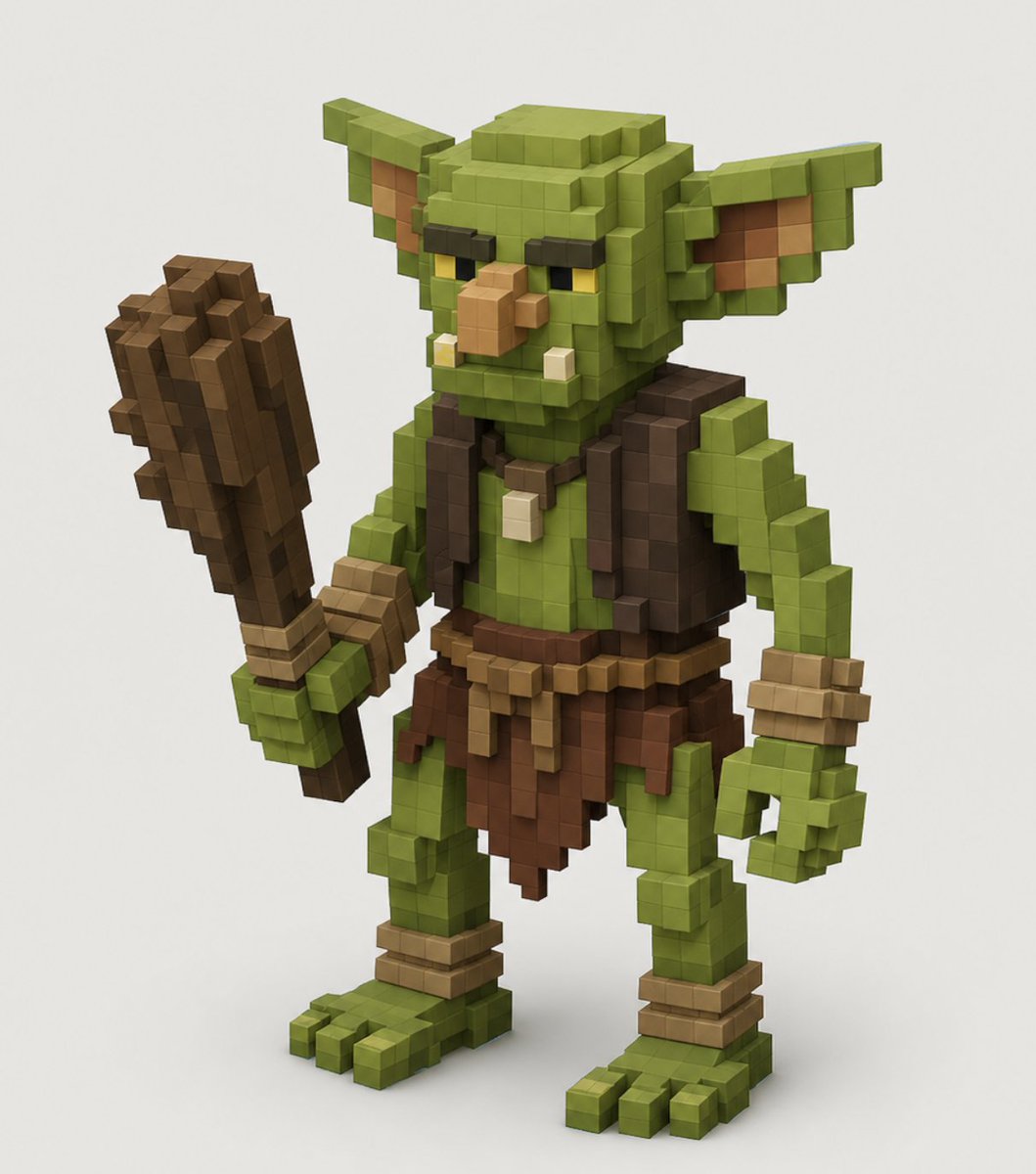
Voxel Goblin Warrior
A text prompt for generating a detailed Minecraft-style voxel goblin warrior character render for fantasy game art or collectible-style concepts.
This is a GPT Image 2 prompt case for Anime & Game. Use the copy-ready prompt below to generate similar visuals, and review Awesome GPT Image 2 Prompts attribution plus commercial-use rights before reuse.
Free 1K preview
Generate one preview image instantly, no sign-up required.
Prompt
Copy-ready prompt
Create a high-quality voxel art 3D render of a single fantasy goblin warrior character, centered on a clean off-white studio background. The character is built entirely from visible cube blocks in a Minecraft-like voxel style, with crisp grid-aligned geometry, soft ambient occlusion, and subtle studio shadows under the feet. Show the goblin in a three-quarter front view, standing upright with a slightly hunched, mischievous posture. The goblin has {argument name="skin color" default="olive green"} skin, a large square head, long pointed ears extending horizontally, dark heavy brow ridges, narrow yellow eyes, a protruding tan blocky nose, two small lower tusks, and a stern grumpy expression. Outfit details: a dark brown sleeveless vest, a brown ragged loincloth skirt, a simple belt with tan hanging strips, wrist wraps, ankle wraps, and a small bone or tooth pendant necklace. The left hand grips one large crude wooden club made of stacked brown voxel blocks, held upright beside the body; the right hand hangs open in a curled blocky claw shape. Use earthy colors, realistic voxel lighting, bevel-free cubic forms, detailed layered block construction, and a polished game-character collectible render look. No text, no watermark, no extra characters, no environment props beyond the ground shadow.Prompt variables
Editable argument placeholders found in the prompt, with their default values.
Best for
- - Anime & Game visual exploration
- - Image generation and reference-image edits
- - Reusable briefs that keep source attribution visible
Change these parts
- - Subject, product, character, or scene
- - Aspect ratio, camera, lighting, and background
- - Brand, text, color, and output constraints
Recommended model and settings
- - Model: gpt-image-2
- - Input mode: Text to Image
- - Aspect ratio: source
- - Commercial status: review original source
How to use this prompt
- 1. Copy the prompt and preserve its structure for the first test.
- 2. Replace the subject, context, and publishing channel.
- 3. Change one camera, lighting, or style variable per iteration.
- 4. Inspect the output, source, text, and rights before reuse.
Limitations, source, and reuse cautions
- - Generated output is an editable draft, not factual, legal, or rights evidence.
- - Review the linked source, people, brands, logos, text, and third-party media before commercial use.
More cases in this category
Prioritized by category, input mode compatibility, quality, and lower risk.
Reuse and source notes
Use this prompt safely after previewing the case.
- 1.Copy the prompt or open it directly in Dovoo with the generation button.
- 2.Adjust variables, aspect ratio, and reference images for your own use case.
- 3.Before publishing or paid usage, verify source rights, attribution requirements, and brand or likeness risks.
Can I use this prompt commercially?
Commercial-use status is allowed. Review the original source, license, brand constraints, and legal requirements before paid usage.
Where does this case come from?
This case is imported from Awesome GPT Image 2 Prompts; keep attribution visible and check the source URL before reuse.