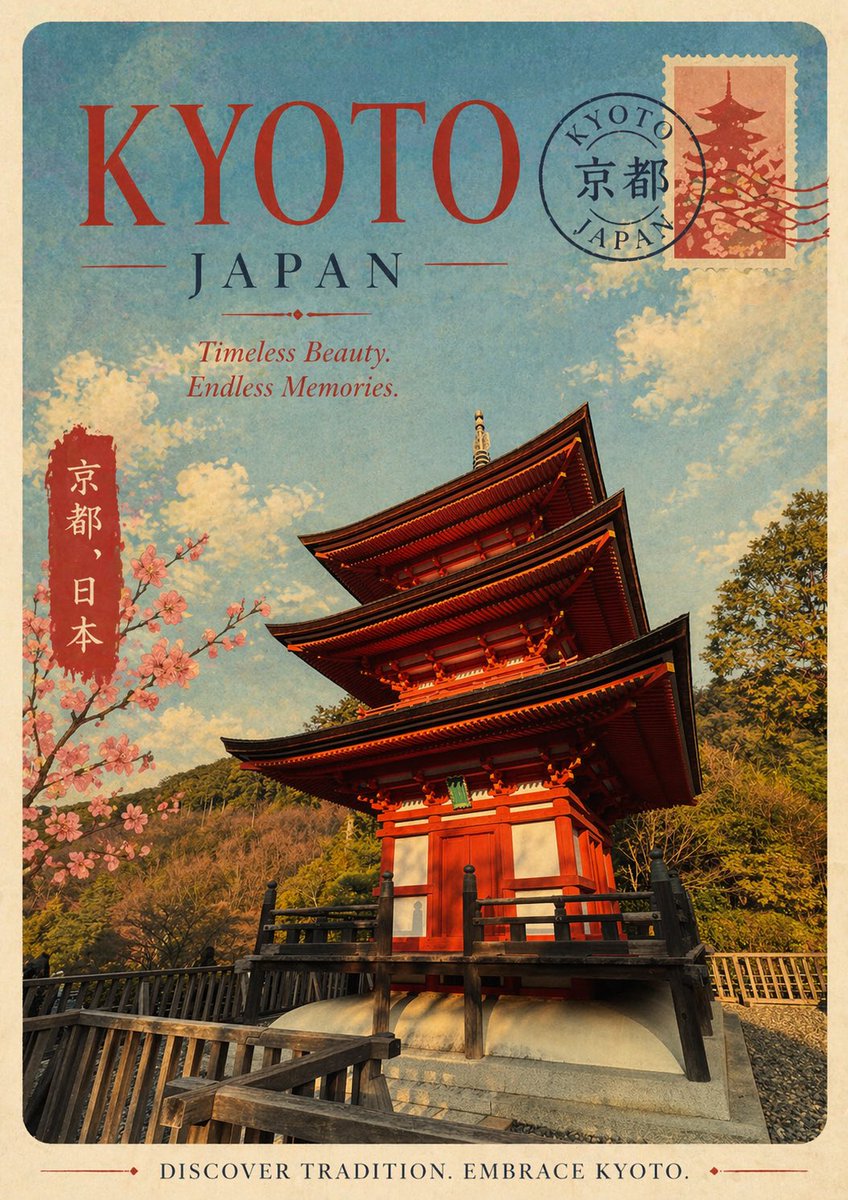
Vintage Kyoto Travel Poster
This prompt generates a retro-style Kyoto tourism poster, ideal for travel art prints, editorial covers, or destination-themed wall decor.
This is a GPT Image 2 prompt case for Graphic & Poster. Use the copy-ready prompt below to generate similar visuals, and review Awesome GPT Image 2 Prompts attribution plus commercial-use rights before reuse.
Free 1K preview
Generate one preview image instantly, no sign-up required.
Prompt
Copy-ready prompt
A retro travel poster themed around {argument name="destination name" default="KYOTO"} (Japan), designed in a nostalgic mid-20th century tourism style, featuring faded paper texture, slightly worn edges, and warm, aged tones. Utilize a vertical poster layout with rounded corners and a cream-colored border. Prominently display a large title {argument name="headline text" default="KYOTO"} at the top in oversized, elegant red serif font; centered below, feature “JAPAN” in deep blue serif font, accompanied by a slender decorative divider. Add an italicized tagline {argument name="tagline text" default="Timeless Beauty. Endless Memories."} below. The main visual should showcase a dynamic, low-angle perspective of a vibrant vermilion traditional Japanese five-story pagoda, with dark wooden eaves and black railings, standing on a stone base, and a wooden walkway in the foreground. The pagoda is surrounded by lush green, tree-covered hills, a bright blue sky, and soft cream-colored clouds. On the left side, include a vertical red label with white Japanese characters “Kyoto, Japan”. Simultaneously, a branch of blossoming cherry blossoms with clusters of pale pink flowers extends from the left side. In the upper right corner, add a stamp featuring a dark red silhouette of the pagoda, partially covered by a circular postmark reading “KYOTO JAPAN”, with the Chinese character “京都” at the center and several wavy postmark lines extending to the right. Add a centered, vintage footer tagline in serif capital letters: {argument name="footer text" default="DISCOVER TRADITION. EMBRACE KYOTO."}. The overall look should be romantic, collectible, and slightly worn, reminiscent of classic Japanese tourism prints from the 1950s or 60s.Prompt variables
Editable argument placeholders found in the prompt, with their default values.
Best for
- - Graphic & Poster visual exploration
- - Image generation and reference-image edits
- - Reusable briefs that keep source attribution visible
Change these parts
- - Subject, product, character, or scene
- - Aspect ratio, camera, lighting, and background
- - Brand, text, color, and output constraints
Recommended model and settings
- - Model: gpt-image-2
- - Input mode: Text to Image
- - Aspect ratio: source
- - Commercial status: review original source
How to use this prompt
- 1. Copy the prompt and preserve its structure for the first test.
- 2. Replace the subject, context, and publishing channel.
- 3. Change one camera, lighting, or style variable per iteration.
- 4. Inspect the output, source, text, and rights before reuse.
Limitations, source, and reuse cautions
- - Generated output is an editable draft, not factual, legal, or rights evidence.
- - Review the linked source, people, brands, logos, text, and third-party media before commercial use.
More cases in this category
Prioritized by category, input mode compatibility, quality, and lower risk.





Reuse and source notes
Use this prompt safely after previewing the case.
- 1.Copy the prompt or open it directly in Dovoo with the generation button.
- 2.Adjust variables, aspect ratio, and reference images for your own use case.
- 3.Before publishing or paid usage, verify source rights, attribution requirements, and brand or likeness risks.
Can I use this prompt commercially?
Commercial-use status is allowed. Review the original source, license, brand constraints, and legal requirements before paid usage.
Where does this case come from?
This case is imported from Awesome GPT Image 2 Prompts; keep attribution visible and check the source URL before reuse.