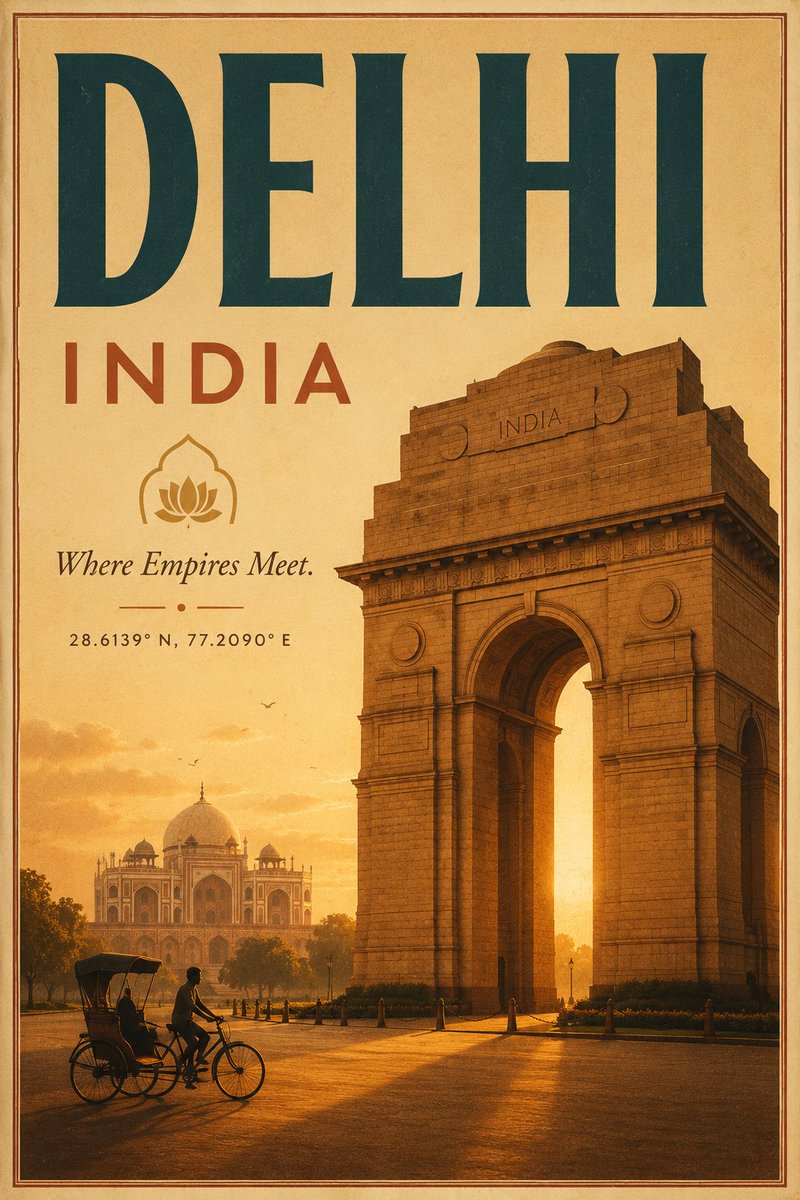
Vintage Delhi Travel Poster
Generates a nostalgic Art Deco tourism poster featuring Delhi landmarks, warm sunset colors, and customizable destination text.
This is a GPT Image 2 prompt case for Graphic & Poster. Use the copy-ready prompt below to generate similar visuals, and review Awesome GPT Image 2 Prompts attribution plus commercial-use rights before reuse.
Free 1K preview
Generate one preview image instantly, no sign-up required.
Prompt
Copy-ready prompt
Create a vintage Art Deco travel poster for {argument name="destination" default="Delhi"}, India, in a vertical 2:3 format. Use a warm aged-paper palette of saffron, ochre, sepia, burnt orange, and deep teal, with subtle film grain, distressed print texture, and a thin double-line border around the edges. The composition should have a huge bold serif headline at the top reading “{argument name="headline text" default="DELHI"}” in dark teal, with widely spaced red-orange text beneath reading “INDIA”. Below the title on the left, place a simple lotus icon inside an arched outline, then the italic tagline “{argument name="tagline" default="Where Empires Meet."}”, a small decorative divider with a centered dot, and the coordinates “{argument name="coordinates" default="28.6139° N, 77.2090° E"}”. The right half and lower center should feature a monumental, photorealistic but posterized India Gate at golden hour, towering in perspective with detailed stone blocks, arch shadows, and an “INDIA” inscription near the top. In the hazy left background, show Humayun’s Tomb or a Mughal-style domed monument among trees, softened by sunset atmosphere. In the foreground, include exactly one cycle rickshaw with exactly two visible people: one cyclist pedaling and one seated passenger, rendered as dark silhouettes on a glowing road. Add small birds in the sky, long warm shadows, and sunlit haze behind the arch. Keep the design elegant, nostalgic, and tourism-focused, with no modern cars, no extra landmarks, and no additional text beyond the specified poster lettering.Prompt variables
Editable argument placeholders found in the prompt, with their default values.
Best for
- - Graphic & Poster visual exploration
- - Image generation and reference-image edits
- - Reusable briefs that keep source attribution visible
Change these parts
- - Subject, product, character, or scene
- - Aspect ratio, camera, lighting, and background
- - Brand, text, color, and output constraints
Recommended model and settings
- - Model: gpt-image-2
- - Input mode: Text to Image
- - Aspect ratio: source
- - Commercial status: review original source
How to use this prompt
- 1. Copy the prompt and preserve its structure for the first test.
- 2. Replace the subject, context, and publishing channel.
- 3. Change one camera, lighting, or style variable per iteration.
- 4. Inspect the output, source, text, and rights before reuse.
Limitations, source, and reuse cautions
- - Generated output is an editable draft, not factual, legal, or rights evidence.
- - Review the linked source, people, brands, logos, text, and third-party media before commercial use.
More cases in this category
Prioritized by category, input mode compatibility, quality, and lower risk.
Reuse and source notes
Use this prompt safely after previewing the case.
- 1.Copy the prompt or open it directly in Dovoo with the generation button.
- 2.Adjust variables, aspect ratio, and reference images for your own use case.
- 3.Before publishing or paid usage, verify source rights, attribution requirements, and brand or likeness risks.
Can I use this prompt commercially?
Commercial-use status is allowed. Review the original source, license, brand constraints, and legal requirements before paid usage.
Where does this case come from?
This case is imported from Awesome GPT Image 2 Prompts; keep attribution visible and check the source URL before reuse.