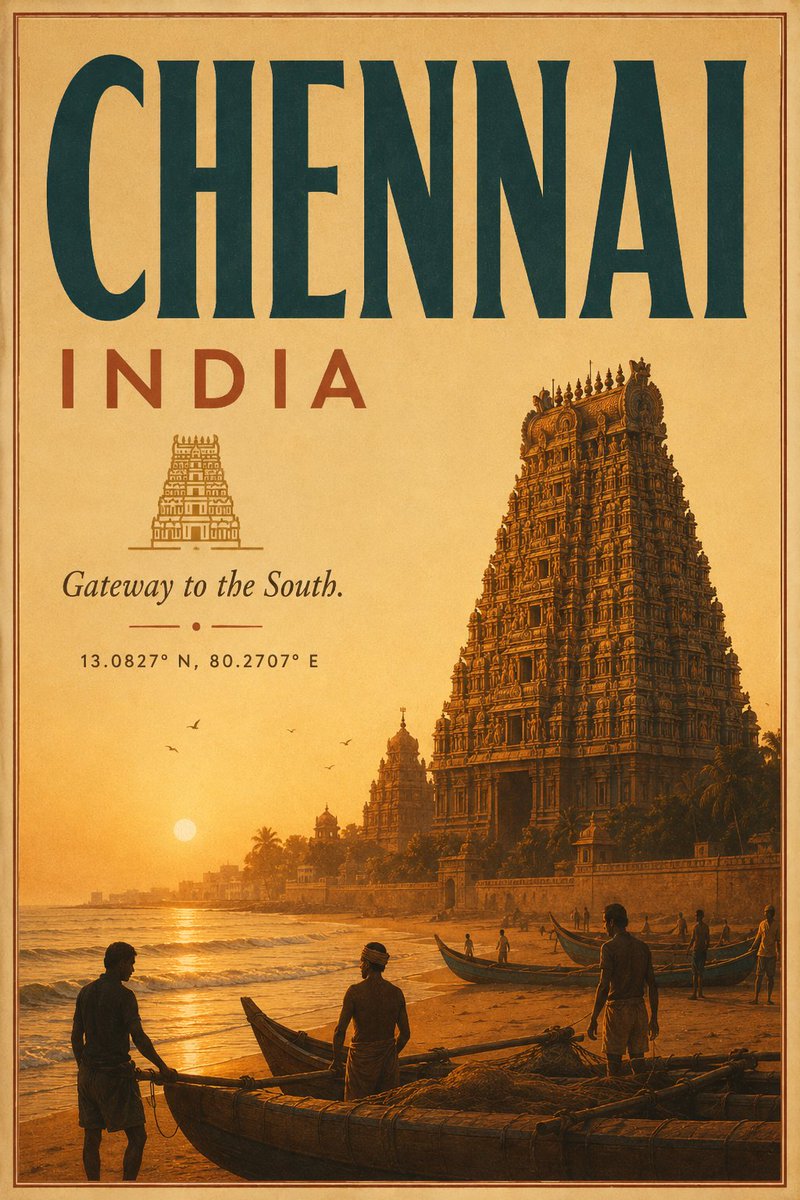
Vintage Chennai Travel Poster
A text-to-image prompt for generating a warm retro tourism poster of Chennai with temple architecture, beach fishermen, and classic travel typography.
This is a GPT Image 2 prompt case for 平面海报. Use the copy-ready prompt below to generate similar visuals, and review Awesome GPT Image 2 Prompts attribution plus commercial-use rights before reuse.
Prompt
Copy-ready prompt
目标:创作一张 {argument name="city name" default="CHENNAI"}(钦奈),{argument name="country label" default="INDIA"}(印度)的复古旅行海报,营造出 20 世纪初铁路旅游广告的氛围。

画布:竖版海报,2:3 纵横比,温暖的陈旧纸张背景,色调为赭石色、深褐色和日落橙。在边缘附近添加一个细的双线矩形边框,以柔和的红褐色印刷。

布局:顶部横跨巨大的大写标题 {argument name="city name" default="CHENNAI"},采用高挑的压缩板衬线字体,深青色油墨,占据海报顶部约四分之一的位置。在其下方左侧,放置较小的宽间距大写国家标签 {argument name="country label" default="INDIA"},颜色为焦红色。下方居中放置一个小型的线稿寺庙塔门图标,图标下方是斜体衬线字体的标语 {argument name="tagline" default="Gateway to the South."}。在标语下方添加一个微小的装饰性分隔符,包含两条短横线和一个居中的圆点,随后是小号等宽字体的坐标 {argument name="coordinates" default="13.0827° N, 80.2707° E"}。

主体场景:下三分之二展示了钦奈金色日落海滩,左侧为大海,低垂的太阳靠近地平线,波浪轻柔,湿润的沙滩呈现倒影,右侧是一座宏伟的南印度寺庙塔门。将寺庙渲染为极其精细的达罗毗荼风格雕刻塔楼,呈现深琥珀色和青铜色阴影,从海岸线墙上升起;在左中背景处增加两座较小的远景寺庙塔楼。添加棕榈树剪影和低矮的海岸长廊墙。

前景细节:包含确切 3 艘显眼的渔船:一艘横跨底部前景的大型木船,一艘停靠在中右侧沙滩上的窄船,以及另一艘位于右侧水线附近的船。包含确切 6 个可见的人物:左侧和中心前景大船旁有两个渔民剪影,右侧前景站立着一名渔民,中景处船只旁有三个较小的人物。在海上方的天空中添加确切 5 只小鸟。

视觉风格:石版画风格的复古旅行海报插画,柔和的颗粒感,微妙的纸张纹理,青色、焦赭色、赭石色和深褐色的有限油墨调色板。强烈的空气透视感,戏剧性的温暖日落光影,清晰的海报排版,无现代物体,无照片级写实感,无水印。
Prompt variables
Editable argument placeholders found in the prompt, with their default values.
More cases in this category
Prioritized by category, input mode compatibility, quality, and lower risk.
Reuse and source notes
Use this prompt safely after previewing the case.
- 1.Copy the prompt or open it directly in Dovoo with the generation button.
- 2.Adjust variables, aspect ratio, and reference images for your own use case.
- 3.Before publishing or paid usage, verify source rights, attribution requirements, and brand or likeness risks.
Can I use this prompt commercially?
Commercial-use status is allowed. Review the original source, license, brand constraints, and legal requirements before paid usage.
Where does this case come from?
This case is imported from Awesome GPT Image 2 Prompts; keep attribution visible and check the source URL before reuse.