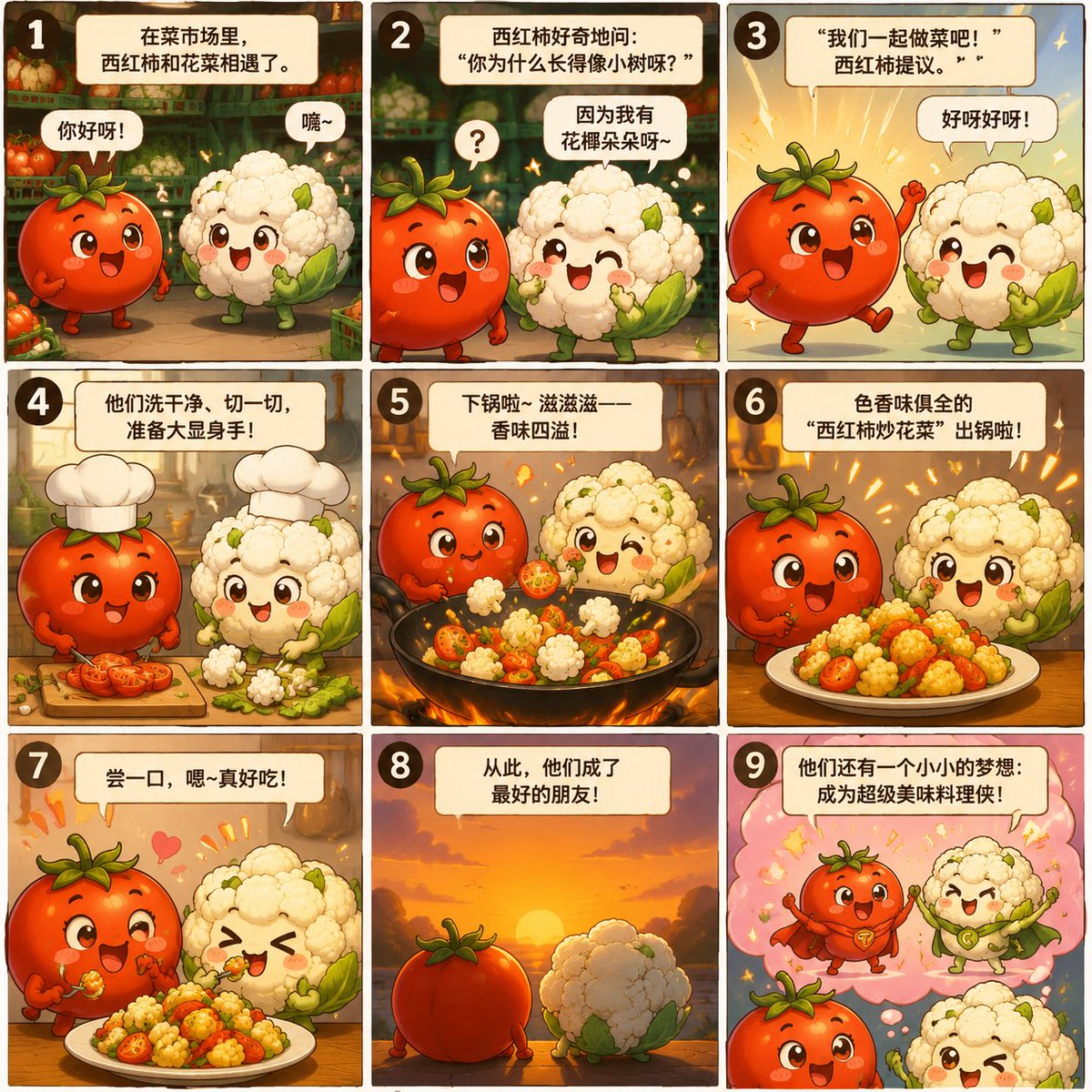
Nine-Panel Vegetable Anime Comic
Creates a cute nine-panel children's anime comic by turning tomato and cauliflower reference photos into an educational mini story.
This is a GPT Image 2 prompt case for Anime & Game. Use the copy-ready prompt below to generate similar visuals, and review Awesome GPT Image 2 Prompts attribution plus commercial-use rights before reuse.
Free 1K preview
Generate one preview image instantly, no sign-up required.
Free text preview doesn’t preserve reference-image consistency.
Prompt
Copy-ready prompt
Using REFERENCE_0 as the cauliflower character material and REFERENCE_1 as the tomato character material, transform ordinary market produce into a cute children's anime story manga. Personify a red tomato and a white cauliflower as expressive, Q-version friends, giving them faces, arms, legs, and vibrant expressions while retaining their recognizable vegetable shapes and colors. Create a warm 3x3 storyboard grid with 9 numbered rounded-corner panels, using comfortable market/kitchen lighting and featuring speech bubbles and narration boxes, presented in a refined picture book anime style. The story should depict them meeting at the market, becoming friends, washing and preparing ingredients, cooking together in a pot, making a colorful stir-fry of tomato and cauliflower, tasting the delicious food, and finally ending with a dream of becoming little super chef heroes. Please include the following 9 panel Chinese texts as visible titles/dialogue: {argument name="nine panel Chinese story text" default="a tomato and cauliflower meeting in a vegetable market, becoming friends, cooking together, and creating a delicious dish"}. The overall tone should be cheerful and educational, suitable for young children, and utilize bright colors, sparkles, hearts, and soft, cinematic lighting. Use the reference images only as inspiration for the ingredients; do not retain the original photo backgrounds unless reconstructed as a warm, illustrated-style market.Prompt variables
Editable argument placeholders found in the prompt, with their default values.
Best for
- - Anime & Game visual exploration
- - Image generation and reference-image edits
- - Reusable briefs that keep source attribution visible
Change these parts
- - Subject, product, character, or scene
- - Aspect ratio, camera, lighting, and background
- - Brand, text, color, and output constraints
Recommended model and settings
- - Model: gpt-image-2
- - Input mode: Image to Image
- - Aspect ratio: source
- - Commercial status: review original source
How to use this prompt
- 1. Copy the prompt and preserve its structure for the first test.
- 2. Replace the subject, context, and publishing channel.
- 3. Change one camera, lighting, or style variable per iteration.
- 4. Inspect the output, source, text, and rights before reuse.
Limitations, source, and reuse cautions
- - Generated output is an editable draft, not factual, legal, or rights evidence.
- - Review the linked source, people, brands, logos, text, and third-party media before commercial use.
More cases in this category
Prioritized by category, input mode compatibility, quality, and lower risk.
Reuse and source notes
Use this prompt safely after previewing the case.
- 1.Copy the prompt or open it directly in Dovoo with the generation button.
- 2.Adjust variables, aspect ratio, and reference images for your own use case.
- 3.Before publishing or paid usage, verify source rights, attribution requirements, and brand or likeness risks.
Can I use this prompt commercially?
Commercial-use status is allowed. Review the original source, license, brand constraints, and legal requirements before paid usage.
Where does this case come from?
This case is imported from Awesome GPT Image 2 Prompts; keep attribution visible and check the source URL before reuse.