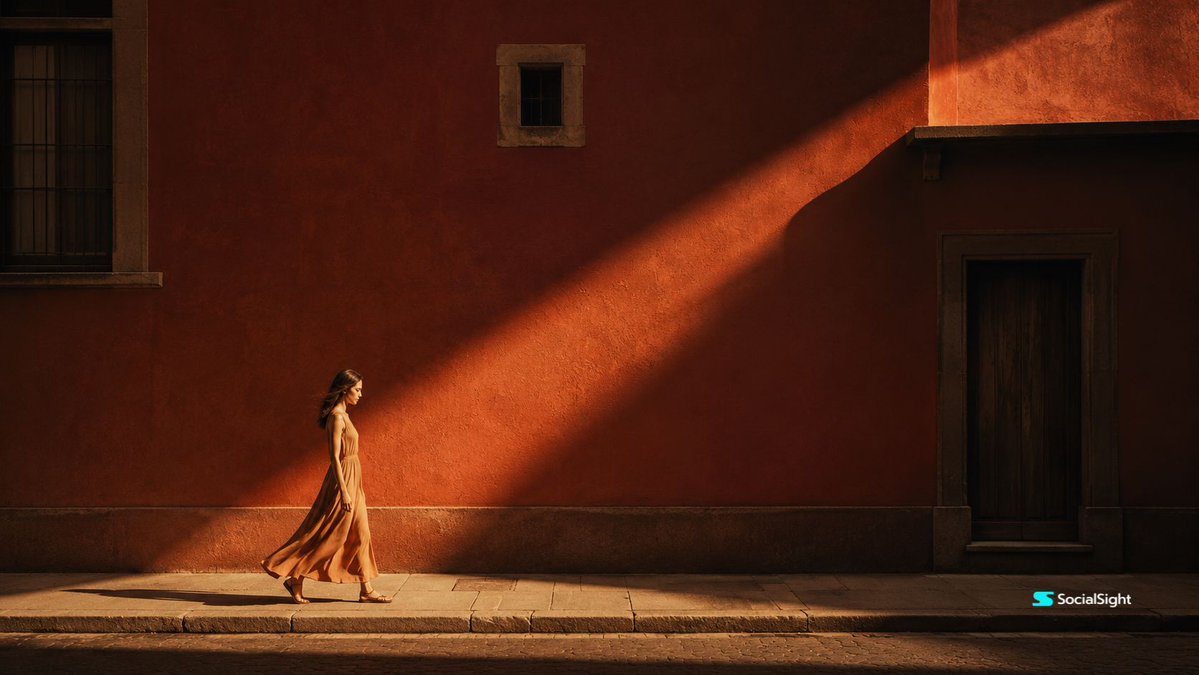
Cinematic Editorial Urban Golden Hour
An editorial photography prompt for urban street scenes featuring a solitary woman walking by a textured terracotta wall during the golden hour.
This is a GPT Image 2 prompt case for Portrait & Character. Use the copy-ready prompt below to generate similar visuals, and review Awesome GPT Image 2 Prompts attribution plus commercial-use rights before reuse.
Free 1K preview
Generate one preview image instantly, no sign-up required.
Prompt
Copy-ready prompt
Cinematic editorial photography of a {argument name="street type" default="quiet urban street"} during {argument name="time of day" default="golden hour"}. A single {argument name="subject" default="young woman in a flowing sleeveless beige orange dress"} walks slowly from left to right along a stone sidewalk beside a {argument name="wall type" default="massive terracotta red plaster wall"}. The woman is positioned in the lower-left third of the frame, captured in side profile, calm and introspective, with her dress gently moving as she walks. A dramatic diagonal beam of warm golden sunlight cuts across the red wall from upper right to lower left, creating strong geometric light and shadow contrast. The architecture is minimal and elegant, with dark window frames, a small upper window, a recessed wooden doorway on the right, textured plaster wall, stone curb, and quiet empty street foreground. Warm amber lighting, deep soft shadows, muted terracotta color palette, cinematic film grain, realistic textures, premium art-house film still mood, poetic solitude, sophisticated composition, 35mm lens, wide 16:9 frame, natural realistic photography, no text, no logo, no extra people.Prompt variables
Editable argument placeholders found in the prompt, with their default values.
Best for
- - Portrait & Character visual exploration
- - Image generation and reference-image edits
- - Reusable briefs that keep source attribution visible
Change these parts
- - Subject, product, character, or scene
- - Aspect ratio, camera, lighting, and background
- - Brand, text, color, and output constraints
Recommended model and settings
- - Model: gpt-image-2
- - Input mode: Text to Image
- - Aspect ratio: source
- - Commercial status: review original source
How to use this prompt
- 1. Copy the prompt and preserve its structure for the first test.
- 2. Replace the subject, context, and publishing channel.
- 3. Change one camera, lighting, or style variable per iteration.
- 4. Inspect the output, source, text, and rights before reuse.
Limitations, source, and reuse cautions
- - Generated output is an editable draft, not factual, legal, or rights evidence.
- - Review the linked source, people, brands, logos, text, and third-party media before commercial use.
More cases in this category
Prioritized by category, input mode compatibility, quality, and lower risk.

Reuse and source notes
Use this prompt safely after previewing the case.
- 1.Copy the prompt or open it directly in Dovoo with the generation button.
- 2.Adjust variables, aspect ratio, and reference images for your own use case.
- 3.Before publishing or paid usage, verify source rights, attribution requirements, and brand or likeness risks.
Can I use this prompt commercially?
Commercial-use status is allowed. Review the original source, license, brand constraints, and legal requirements before paid usage.
Where does this case come from?
This case is imported from Awesome GPT Image 2 Prompts; keep attribution visible and check the source URL before reuse.