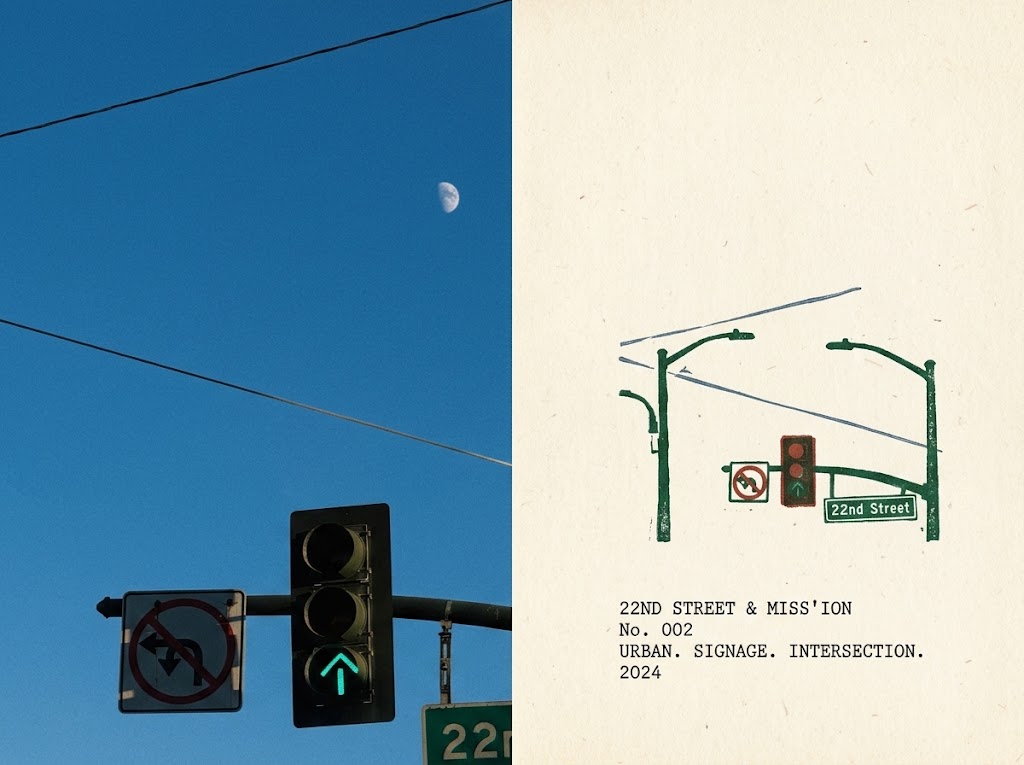
Urban Intersection Photo and Sketch Diptych
Generates a split-panel zine-style urban intersection memory combining a realistic street photo with a minimalist illustrated catalog note.
This is a GPT Image 2 prompt case for Illustration & Art. Use the copy-ready prompt below to generate similar visuals, and review Awesome GPT Image 2 Prompts attribution plus commercial-use rights before reuse.
This prompt is designed for multiple reference images. We will open Dovoo with the prompt and the available preview image; add the remaining references in Dovoo before generating.
Free 1K preview
Generate one preview image instantly, no sign-up required.
Free text preview doesn’t preserve reference-image consistency.
Prompt
Copy-ready prompt
Goal: Create a diptych poster capturing the memory of a city intersection, with a realistic photograph on the left and a minimalist illustration field note on the right, with the title revolving around {argument name="intersection name" default="22ND STREET & MISS'ION"}.

Canvas: 4:3 horizontal image, vertically divided in half. The left half is a realistic, cropped street photograph; the right half is an illustration page on off-white textured paper. No border.

Left Photo Section: Show a clear, deep blue daytime sky, with a pale crescent moon visible in the upper-middle-right panel. Include exactly 2 overhead wires spanning the sky: one near the top, angled upwards to the right, and another crossing the middle, angled downwards to the right. The bottom edge is cropped to include a set of city traffic lights: exactly 1 black vertical three-light signal, with the bottom light illuminated with a teal-colored upward arrow, and the top and middle circular lights off; exactly 1 square “No Left Turn/No U-Turn” type prohibition sign on the left, with a red circle and slash over a black turning arrow; and a partial view of a green street name sign on the lower right edge, showing only “22…” at the beginning. The photo should have a handheld shooting and slight zoom feel, with natural sunlight and realistic shadows.

Right Illustration Section: Use warm cream paper with subtle texture, speckles, and fine fibers. Draw the same intersection in a sparse screen printing or intaglio style using dark green, soft red, black, and gray. Include exactly 2 green traffic light poles (one on the left, one on the right), connected by overhead arms. Include exactly 1 small traffic signal box with 3 stacked red/yellow/green circles, exactly 1 small no-turn sign, exactly 1 green street sign labeled {argument name="street sign text" default="22nd Street"}, and exactly 3 thin gray overhead wires drawn behind and above the traffic lights. The illustration should be simple, slightly imperfect, and have a lithographic texture.

Right Panel Text Content: Below the illustration, place a small typewriter-style title left-aligned. Use exactly 4 lines of monospace black text: Line 1: {argument name="caption line one" default="22ND STREET & MISS'ION"}; Line 2: {argument name="catalog number" default="No. 002"}; Line 3: “URBAN. SIGNAGE. INTERSECTION.”; Line 4: {argument name="year" default="2024"}. Keep the apostrophes/specific spellings in the default titles exactly as they are.

Visual Style: Editorial travel memory magazine, simulating street photography paired with a simple urban signage sketch. The right side should look like a printed memento card or catalog page; the left side should maintain a photographic feel. Use restrained colors, plenty of negative space, and a nostalgic weekend recording atmosphere.

Constraints: Maintain a precise vertical split; do not add people, cars, buildings, extra signs, extra titles, logos, or watermarks. All visible text, except for the cropped “22…” portion on the photo side, is limited to the specified street signs and the four lines of title.
Prompt variables
Editable argument placeholders found in the prompt, with their default values.
Best for
- - Illustration & Art visual exploration
- - Image generation and reference-image edits
- - Reusable briefs that keep source attribution visible
Change these parts
- - Subject, product, character, or scene
- - Aspect ratio, camera, lighting, and background
- - Brand, text, color, and output constraints
Recommended model and settings
- - Model: gpt-image-2
- - Input mode: Multi Image to Image
- - Aspect ratio: source
- - Commercial status: review original source
How to use this prompt
- 1. Copy the prompt and preserve its structure for the first test.
- 2. Replace the subject, context, and publishing channel.
- 3. Change one camera, lighting, or style variable per iteration.
- 4. Inspect the output, source, text, and rights before reuse.
Limitations, source, and reuse cautions
- - Generated output is an editable draft, not factual, legal, or rights evidence.
- - Review the linked source, people, brands, logos, text, and third-party media before commercial use.
More cases in this category
Prioritized by category, input mode compatibility, quality, and lower risk.




Reuse and source notes
Use this prompt safely after previewing the case.
- 1.Copy the prompt or open it directly in Dovoo with the generation button.
- 2.Adjust variables, aspect ratio, and reference images for your own use case.
- 3.Before publishing or paid usage, verify source rights, attribution requirements, and brand or likeness risks.
Can I use this prompt commercially?
Commercial-use status is allowed. Review the original source, license, brand constraints, and legal requirements before paid usage.
Where does this case come from?
This case is imported from Awesome GPT Image 2 Prompts; keep attribution visible and check the source URL before reuse.