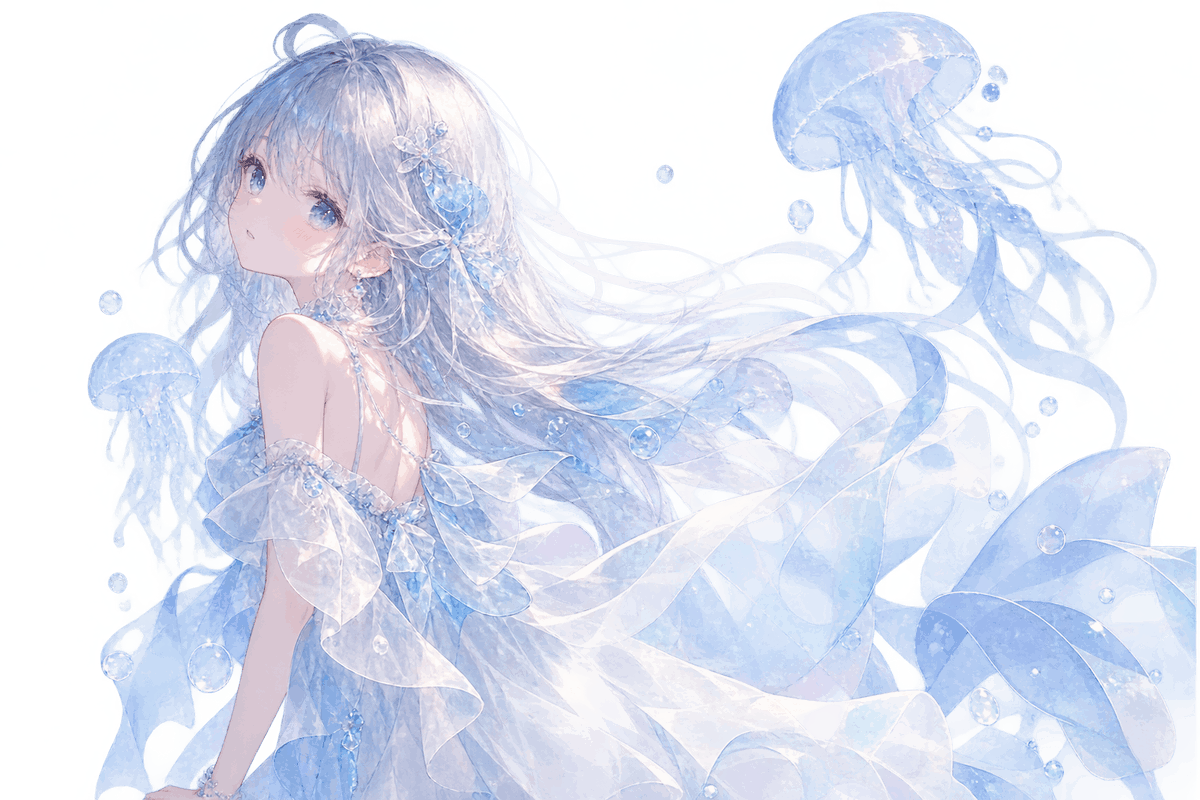
Transparent Jellyfish Princess
Generates a transparent-background anime illustration of an ethereal blue jellyfish princess with translucent fabric, bubbles, and jellyfish companions.
This is a GPT Image 2 prompt case for Anime & Game. Use the copy-ready prompt below to generate similar visuals, and review Awesome GPT Image 2 Prompts attribution plus commercial-use rights before reuse.
Free 1K preview
Generate one preview image instantly, no sign-up required.
Prompt
Copy-ready prompt
Create a delicate anime-style illustration on a fully transparent background: a dreamy underwater {argument name="character name" default="young jellyfish princess"} floating diagonally from lower left toward upper right, shown from the back and three-quarter profile while looking over her shoulder with soft blue eyes and a calm wistful expression. She has extremely long flowing {argument name="hair color" default="silver-white hair with pale icy blue tint"}, fine wispy strands, a small top bun, and translucent blue floral hair ornaments. Her outfit is an ethereal off-shoulder {argument name="dress color" default="pale ice-blue and white"} gown made of semi-transparent chiffon, layered ruffles, watery ribbons, and glassy fabric that overlaps visibly with preserved alpha transparency; include pearl-like beads, tiny crystalline highlights, and glossy wet reflections. Surround her with exactly 3 translucent blue jellyfish: one large jellyfish in the upper right with trailing tentacles, one medium jellyfish along the left side behind her shoulder, and one smaller jellyfish at the lower left. Add exactly 12 clear air bubbles of different sizes scattered around the hair, dress, and jellyfish. Use a luminous watercolor-anime rendering style, soft pastel blues, pearly whites, subtle lavender shadows, fine line art, sparkling highlights, and a fragile aquatic fantasy mood. The image must be a transparent PNG-style cutout with no solid background, no text, no border, and no watermark; keep all fabric, jellyfish, hair ribbons, and bubbles visibly semi-transparent rather than opaque.Prompt variables
Editable argument placeholders found in the prompt, with their default values.
Best for
- - Anime & Game visual exploration
- - Image generation and reference-image edits
- - Reusable briefs that keep source attribution visible
Change these parts
- - Subject, product, character, or scene
- - Aspect ratio, camera, lighting, and background
- - Brand, text, color, and output constraints
Recommended model and settings
- - Model: gpt-image-2
- - Input mode: Text to Image
- - Aspect ratio: source
- - Commercial status: review original source
How to use this prompt
- 1. Copy the prompt and preserve its structure for the first test.
- 2. Replace the subject, context, and publishing channel.
- 3. Change one camera, lighting, or style variable per iteration.
- 4. Inspect the output, source, text, and rights before reuse.
Limitations, source, and reuse cautions
- - Generated output is an editable draft, not factual, legal, or rights evidence.
- - Review the linked source, people, brands, logos, text, and third-party media before commercial use.
More cases in this category
Prioritized by category, input mode compatibility, quality, and lower risk.
Reuse and source notes
Use this prompt safely after previewing the case.
- 1.Copy the prompt or open it directly in Dovoo with the generation button.
- 2.Adjust variables, aspect ratio, and reference images for your own use case.
- 3.Before publishing or paid usage, verify source rights, attribution requirements, and brand or likeness risks.
Can I use this prompt commercially?
Commercial-use status is allowed. Review the original source, license, brand constraints, and legal requirements before paid usage.
Where does this case come from?
This case is imported from Awesome GPT Image 2 Prompts; keep attribution visible and check the source URL before reuse.