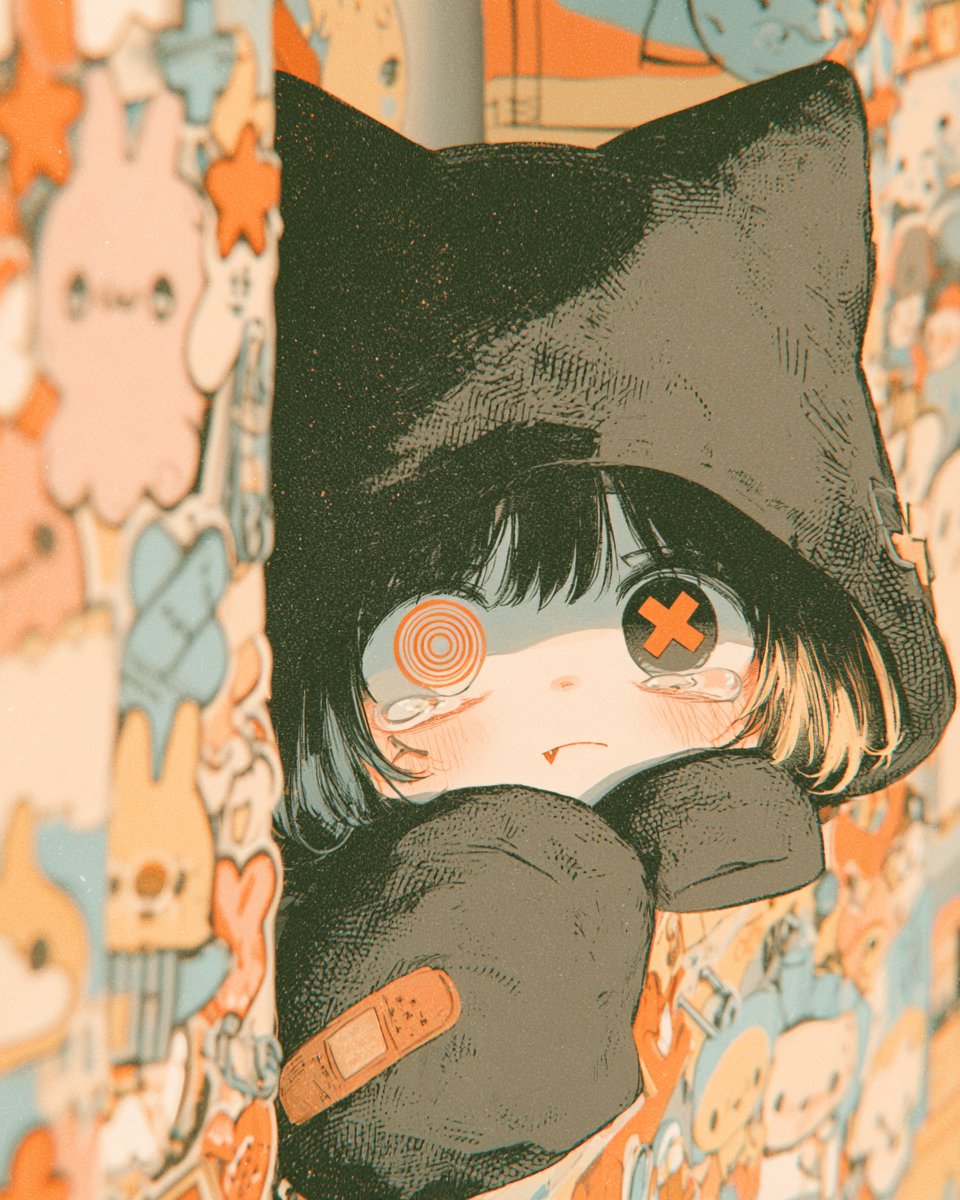
Gothic Kawaii Cat-Girl Curtain Peek
A close-up gothic-kawaii anime illustration of a tearful cat-hooded girl peeking through patterned curtains, ideal for character art or moody AI art generation.
This is a GPT Image 2 prompt case for Anime & Game. Use the copy-ready prompt below to generate similar visuals, and review Awesome GPT Image 2 Prompts attribution plus commercial-use rights before reuse.
Free 1K preview
Generate one preview image instantly, no sign-up required.
Prompt
Copy-ready prompt
Create a vertical close-up anime illustration of a small shy gothic cat-girl peeking out from between two hanging curtains covered in cute pastel character patterns. The character has a black cat-eared hood with tall pointed ears, short messy {argument name="hair color" default="black hair with pale orange-tipped strands"}, very pale skin, flushed cheeks, and a tiny fang visible in a worried pout. Her eyes are mismatched: the left eye is an orange concentric spiral target, and the right eye is a dark button-like eye with a large orange X. She has watery tears pooled under both eyes and a sleepy, anxious expression. Her oversized black sleeves or mitten-like paws are held up in front of her mouth and chest, one paw showing exactly one orange adhesive bandage patch. Frame her tightly from head to upper body, centered in the narrow gap between the curtains, with the curtains blurred in the foreground on both sides. The curtain pattern should include many small cute doodle characters in cream, peach, orange, and muted blue, including ghosts, rabbits, skulls, stars, hearts, and candy shapes, but no readable text. Use a warm nostalgic color palette of {argument name="accent color" default="orange"}, cream, muted teal-blue, charcoal black, and faded peach. Render in detailed Japanese manga/anime style with fine ink hatching, halftone grain, subtle paper texture, soft bloom, shallow depth of field, vintage film dust, and slightly overexposed warm lighting. Mood: cute, melancholic, sleepy, and eerie, like a bedtime gothic-kawaii snapshot. No watermark, no signature, no extra characters.Prompt variables
Editable argument placeholders found in the prompt, with their default values.
Best for
- - Anime & Game visual exploration
- - Image generation and reference-image edits
- - Reusable briefs that keep source attribution visible
Change these parts
- - Subject, product, character, or scene
- - Aspect ratio, camera, lighting, and background
- - Brand, text, color, and output constraints
Recommended model and settings
- - Model: gpt-image-2
- - Input mode: Text to Image
- - Aspect ratio: source
- - Commercial status: review original source
How to use this prompt
- 1. Copy the prompt and preserve its structure for the first test.
- 2. Replace the subject, context, and publishing channel.
- 3. Change one camera, lighting, or style variable per iteration.
- 4. Inspect the output, source, text, and rights before reuse.
Limitations, source, and reuse cautions
- - Generated output is an editable draft, not factual, legal, or rights evidence.
- - Review the linked source, people, brands, logos, text, and third-party media before commercial use.
More cases in this category
Prioritized by category, input mode compatibility, quality, and lower risk.
Reuse and source notes
Use this prompt safely after previewing the case.
- 1.Copy the prompt or open it directly in Dovoo with the generation button.
- 2.Adjust variables, aspect ratio, and reference images for your own use case.
- 3.Before publishing or paid usage, verify source rights, attribution requirements, and brand or likeness risks.
Can I use this prompt commercially?
Commercial-use status is allowed. Review the original source, license, brand constraints, and legal requirements before paid usage.
Where does this case come from?
This case is imported from Awesome GPT Image 2 Prompts; keep attribution visible and check the source URL before reuse.