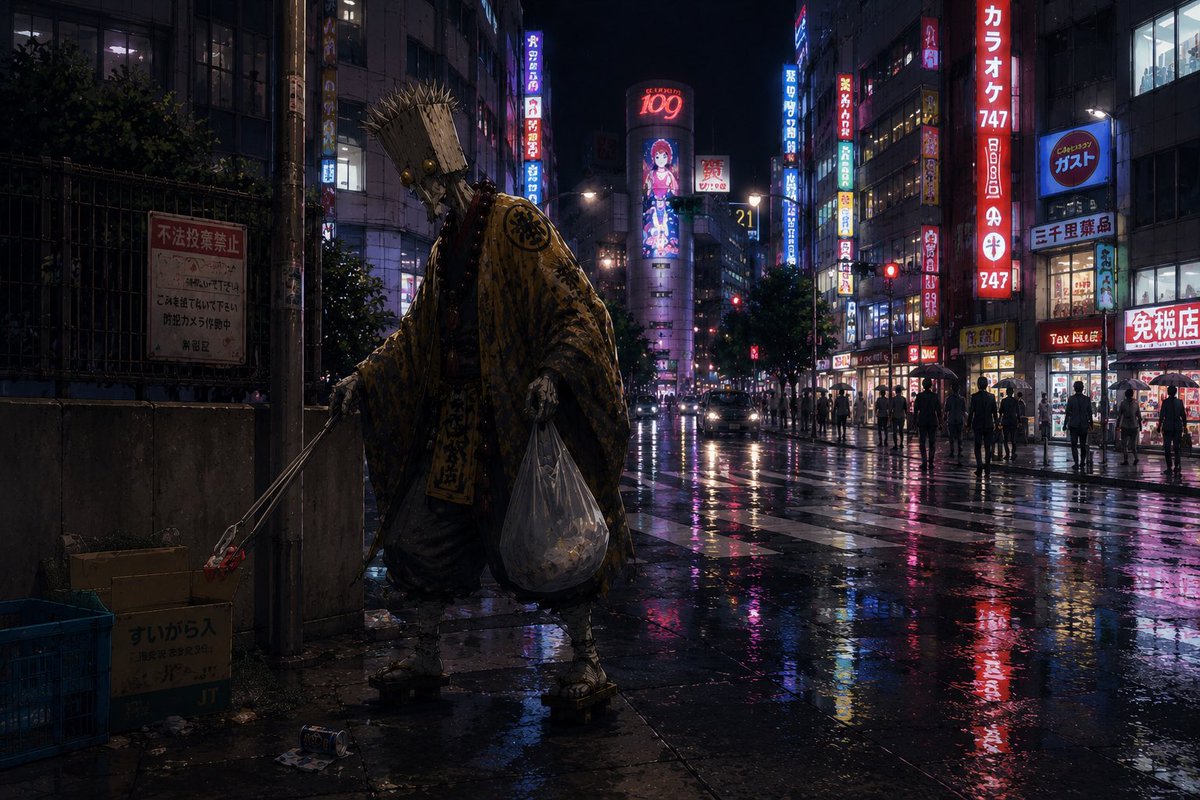
Ascetic Monk Cleaning Neon Tokyo
Generates a cinematic rainy Japanese nightlife street scene featuring a hermit-like monk collecting trash among neon pachinko and karaoke signs.
This is a GPT Image 2 prompt case for Landscape & Nature. Use the copy-ready prompt below to generate similar visuals, and review Awesome GPT Image 2 Prompts attribution plus commercial-use rights before reuse.
Free 1K preview
Generate one preview image instantly, no sign-up required.
Prompt
Copy-ready prompt
Create a cinematic, photorealistic night scene in a dense Japanese entertainment district after rain, with wet asphalt reflecting neon signs in pink, red, blue, and yellow. In the left foreground, show one mysterious wandering ascetic monk or hermit, seen from behind, wearing a heavy tattered patterned golden-brown robe, straw sandals, a rope belt, and a tall bundled straw hat or woven pilgrim headpiece that hides the face. The monk is doing street cleanup before entering the nightlife district: he holds one long metal litter picker in the left hand, grasping one piece of red trash near an open cardboard box, and carries one large transparent plastic garbage bag in the right hand filled with collected litter. Include exactly four prominent cleanup-related foreground objects: one cardboard box with Japanese writing, one blue plastic crate, one posted warning sign on a fence, and scattered small trash on the pavement. The background is a deep urban canyon of buildings with many glowing vertical Japanese signs, pachinko and karaoke-style storefronts, pedestrians with umbrellas and silhouettes, car headlights, traffic lights, and a large central billboard with a stylized anime girl and the number 109. Mood: contemplative, surreal, and slightly humorous, as if a saintly hermit is accumulating virtue before gambling. Use {argument name="city district" default="Kabukicho-like Tokyo nightlife street"}, {argument name="main character" default="wandering ascetic monk"}, {argument name="robe color" default="tattered golden-brown"}, {argument name="weather" default="rainy night after a storm"}, and {argument name="neon sign theme" default="pachinko, karaoke, tax-free shops, and anime billboards"}. Ultra-detailed realistic textures, moody low-key lighting, reflective puddles, wide-angle street photography composition, 16:9 aspect ratio, gritty cinematic color grading, no clean fantasy glow, no cartoon style.Prompt variables
Editable argument placeholders found in the prompt, with their default values.
Best for
- - Landscape & Nature visual exploration
- - Image generation and reference-image edits
- - Reusable briefs that keep source attribution visible
Change these parts
- - Subject, product, character, or scene
- - Aspect ratio, camera, lighting, and background
- - Brand, text, color, and output constraints
Recommended model and settings
- - Model: gpt-image-2
- - Input mode: Text to Image
- - Aspect ratio: source
- - Commercial status: review original source
How to use this prompt
- 1. Copy the prompt and preserve its structure for the first test.
- 2. Replace the subject, context, and publishing channel.
- 3. Change one camera, lighting, or style variable per iteration.
- 4. Inspect the output, source, text, and rights before reuse.
Limitations, source, and reuse cautions
- - Generated output is an editable draft, not factual, legal, or rights evidence.
- - Review the linked source, people, brands, logos, text, and third-party media before commercial use.
More cases in this category
Prioritized by category, input mode compatibility, quality, and lower risk.

Reuse and source notes
Use this prompt safely after previewing the case.
- 1.Copy the prompt or open it directly in Dovoo with the generation button.
- 2.Adjust variables, aspect ratio, and reference images for your own use case.
- 3.Before publishing or paid usage, verify source rights, attribution requirements, and brand or likeness risks.
Can I use this prompt commercially?
Commercial-use status is allowed. Review the original source, license, brand constraints, and legal requirements before paid usage.
Where does this case come from?
This case is imported from Awesome GPT Image 2 Prompts; keep attribution visible and check the source URL before reuse.