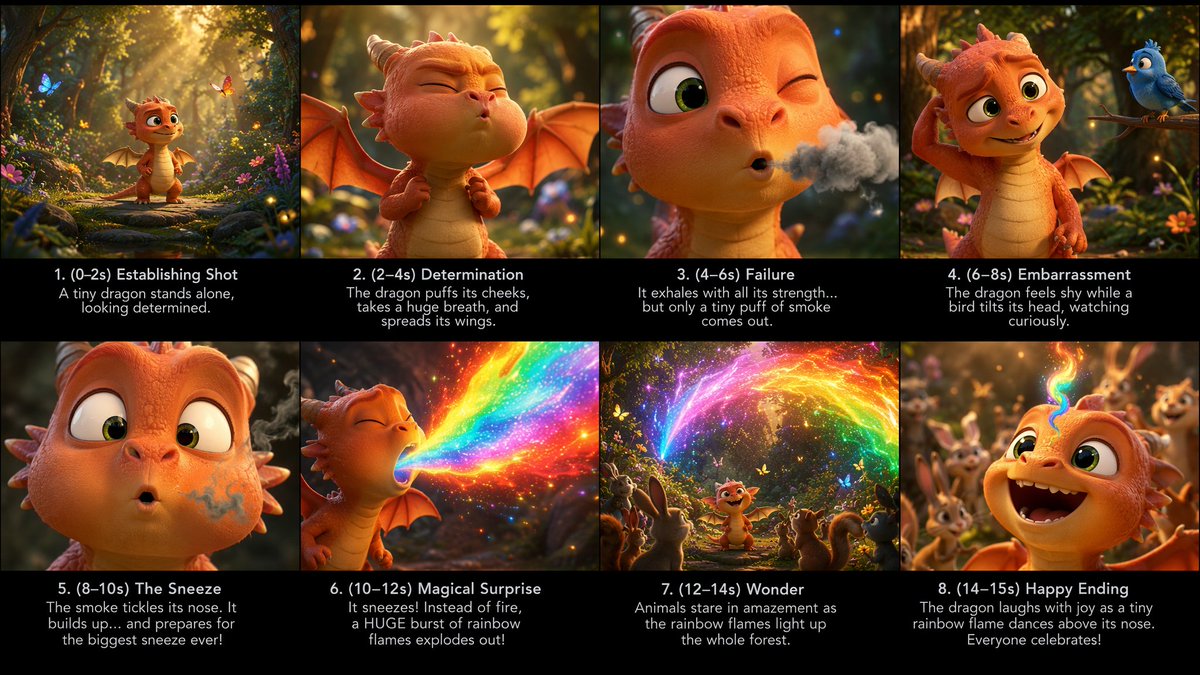
Tiny Dragon Rainbow Flame Storyboard
A cinematic eight-panel animated storyboard showing a baby dragon accidentally sneezing rainbow flames in an enchanted forest.
This is a GPT Image 2 prompt case for Illustration & Art. Use the copy-ready prompt below to generate similar visuals, and review Awesome GPT Image 2 Prompts attribution plus commercial-use rights before reuse.
Free 1K preview
Generate one preview image instantly, no sign-up required.
Prompt
Copy-ready prompt
Goal: Create a polished cinematic storyboard sheet for a short animated fantasy scene about {argument name="character name" default="a tiny dragon"} discovering an unexpected magical ability.

Canvas: Wide 16:9 storyboard board, eight panels arranged in a clean 4-by-2 grid. Each panel has a vivid image area on top and a black caption strip beneath it. Use thin black dividers between panels. Overall look: high-end 3D animated family-film style, warm forest lighting, shallow depth of field, expressive character acting, glowing particles, lush flowers, moss, butterflies, and soft golden sunbeams.

Main subject details: The main character is a cute small orange baby dragon with a cream belly, big green eyes, tiny horns, small bat wings, rounded snout, soft scales, and childlike proportions. The story takes place in an enchanted woodland clearing full of flowers, mossy stones, firefly-like sparkles, and friendly animals. The dragon is trying to breathe fire, but instead creates {argument name="magical breath effect" default="rainbow flame"}.

Layout and exact panel count: Use exactly 8 storyboard panels, numbered 1 through 8, with these visible captions and actions:

Panel 1 caption: “1. (0–2s) Establishing Shot” with subcaption “A tiny dragon stands alone, looking determined.” Image: wide establishing shot of the dragon standing on a forest path in a glowing magical clearing, butterflies and flowers around it.

Panel 2 caption: “2. (2–4s) Determination” with subcaption “The dragon puffs its cheeks, takes a huge breath, and spreads its wings.” Image: medium close-up of the dragon squeezing its eyes shut, cheeks inflated, wings open, preparing dramatically.

Panel 3 caption: “3. (4–6s) Failure” with subcaption “It exhales with all its strength… but only a tiny puff of smoke comes out.” Image: close-up of one winking eye and puckered mouth releasing a small gray smoke cloud.

Panel 4 caption: “4. (6–8s) Embarrassment” with subcaption “The dragon feels shy while a bird tilts its head, watching curiously.” Image: the dragon scratches its head sheepishly while a cute blue bird perches on a branch nearby.

Panel 5 caption: “5. (8–10s) The Sneeze” with subcaption “The smoke tickles its nose. It builds up… and prepares for the biggest sneeze ever!” Image: extreme close-up of the dragon’s face, wide eyes, smoky swirl around its nostril, about to sneeze.

Panel 6 caption: “6. (10–12s) Magical Surprise” with subcaption “It sneezes! Instead of fire, a HUGE burst of rainbow flames explodes out!” Image: side view of the dragon sneezing a massive sparkling rainbow blast, bright saturated colors, glittering embers.

Panel 7 caption: “7. (12–14s) Wonder” with subcaption “Animals stare in amazement as the rainbow flames light up the whole forest.” Image: wider shot with the dragon in the center, surrounded by exactly 5 visible woodland animals watching in awe: a rabbit, a squirrel, a deer-like fawn, a hedgehog, and a small bird. Rainbow fire arcs above them through the trees.

Panel 8 caption: “8. (14–15s) Happy Ending” with subcaption “The dragon laughs with joy as a tiny rainbow flame dances above its nose. Everyone celebrates!” Image: joyful close-up of the dragon laughing open-mouthed, eyes sparkling, tiny rainbow flame curling above its nose, cheering forest animals blurred behind.

Visual style: Cinematic 3D animation, cute Pixar-like character appeal, detailed scales and soft skin texture, warm orange-and-gold lighting, magical rainbow glow, volumetric sun rays, bokeh, expressive faces, high production value, family-friendly tone.

Text constraints: Keep all captions in English exactly as written. Use clean white sans-serif text centered on each black caption strip. Maintain legibility. Do not add extra panels, logos, watermarks, UI elements, or unrelated text.
Prompt variables
Editable argument placeholders found in the prompt, with their default values.
Best for
- - Illustration & Art visual exploration
- - Image generation and reference-image edits
- - Reusable briefs that keep source attribution visible
Change these parts
- - Subject, product, character, or scene
- - Aspect ratio, camera, lighting, and background
- - Brand, text, color, and output constraints
Recommended model and settings
- - Model: gpt-image-2
- - Input mode: Text to Image
- - Aspect ratio: source
- - Commercial status: review original source
How to use this prompt
- 1. Copy the prompt and preserve its structure for the first test.
- 2. Replace the subject, context, and publishing channel.
- 3. Change one camera, lighting, or style variable per iteration.
- 4. Inspect the output, source, text, and rights before reuse.
Limitations, source, and reuse cautions
- - Generated output is an editable draft, not factual, legal, or rights evidence.
- - Review the linked source, people, brands, logos, text, and third-party media before commercial use.
More cases in this category
Prioritized by category, input mode compatibility, quality, and lower risk.


Reuse and source notes
Use this prompt safely after previewing the case.
- 1.Copy the prompt or open it directly in Dovoo with the generation button.
- 2.Adjust variables, aspect ratio, and reference images for your own use case.
- 3.Before publishing or paid usage, verify source rights, attribution requirements, and brand or likeness risks.
Can I use this prompt commercially?
Commercial-use status is allowed. Review the original source, license, brand constraints, and legal requirements before paid usage.
Where does this case come from?
This case is imported from Awesome GPT Image 2 Prompts; keep attribution visible and check the source URL before reuse.