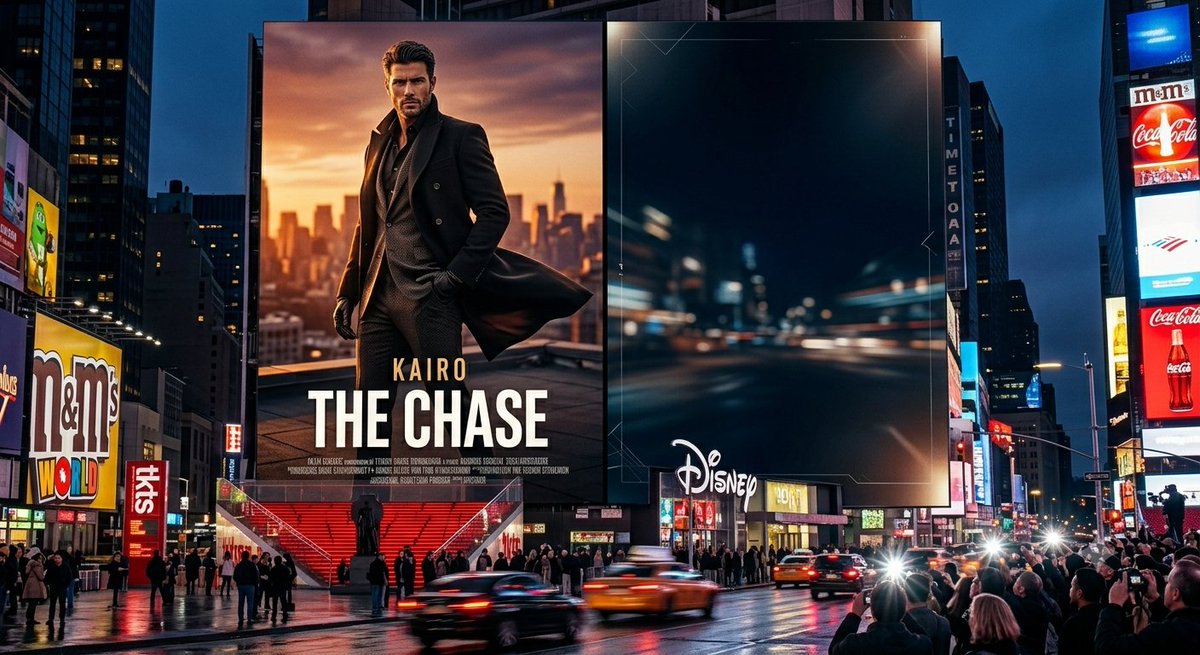
Times Square Movie Billboard Scene
A photorealistic Times Square night scene featuring a custom action movie poster billboard beside a dark branded digital billboard.
This is a GPT Image 2 prompt case for Landscape & Nature. Use the copy-ready prompt below to generate similar visuals, and review Awesome GPT Image 2 Prompts attribution plus commercial-use rights before reuse.
Free 1K preview
Generate one preview image instantly, no sign-up required.
Prompt
Copy-ready prompt
Goal: Create a photorealistic cinematic nighttime scene of Times Square in New York, centered on two enormous adjacent digital billboards above a busy wet street.

Canvas: Wide 16:9 landscape image, street-level perspective, realistic lens compression, high dynamic range, glossy rain-soaked pavement reflecting neon lights, deep blue evening sky between skyscrapers.

Main layout: The composition has exactly 2 dominant central billboards. Billboard 1 on the left is a movie-poster-style ad for {argument name="movie title" default="THE CHASE"}, with the smaller actor/name text {argument name="character name" default="KAIRO"} above the title. It shows a stylish faceless male action hero in a long black coat and dark suit, standing on a rooftop at sunset with an orange city skyline behind him; the coat flares in the wind, and small fake production-credit text runs along the bottom. Billboard 2 on the right is a dark, mostly empty premium ad screen showing a blurred high-speed night city road with blue-black tones, subtle thin geometric HUD-like corner lines, and a white {argument name="brand logo text" default="Disney"} logo near the lower-left area.

Surrounding visible signage: Include exactly 6 notable secondary advertising/sign elements around the central billboards: a large M&M's World sign on the left, a vertical red TKTS sign near the left-center stairs, a vertical TIMES SQUARE-style sign on a building between the main billboards and the right tower, a red Coca-Cola bottle billboard on the far right, a white M&M's sign above it, and a bright blue rectangular billboard at the upper-right corner.

Street and crowd details: Show a dense crowd of pedestrians and tourists gathered along sidewalks and plaza edges, some holding phones toward the billboards. Include exactly 4 prominent moving vehicles in the foreground street: two yellow taxis, one dark sedan, and one blurred vehicle streak, all with motion blur and headlight flares. Red TKTS stairs and a small statue silhouette appear beneath the left billboard.

Visual style: Ultra-realistic commercial photography mixed with blockbuster advertising, sharp architecture, vivid neon reflections, cinematic contrast, realistic Times Square scale, no cartoon styling.

Constraints: Keep the left poster title large and readable, preserve the faceless censored-looking face on the poster character, do not add extra central billboards, do not add watermarks, and avoid legible long blocks of text other than the specified ad words.
Prompt variables
Editable argument placeholders found in the prompt, with their default values.
Best for
- - Landscape & Nature visual exploration
- - Image generation and reference-image edits
- - Reusable briefs that keep source attribution visible
Change these parts
- - Subject, product, character, or scene
- - Aspect ratio, camera, lighting, and background
- - Brand, text, color, and output constraints
Recommended model and settings
- - Model: gpt-image-2
- - Input mode: Text to Image
- - Aspect ratio: source
- - Commercial status: review original source
How to use this prompt
- 1. Copy the prompt and preserve its structure for the first test.
- 2. Replace the subject, context, and publishing channel.
- 3. Change one camera, lighting, or style variable per iteration.
- 4. Inspect the output, source, text, and rights before reuse.
Limitations, source, and reuse cautions
- - Generated output is an editable draft, not factual, legal, or rights evidence.
- - Review the linked source, people, brands, logos, text, and third-party media before commercial use.
More cases in this category
Prioritized by category, input mode compatibility, quality, and lower risk.

Reuse and source notes
Use this prompt safely after previewing the case.
- 1.Copy the prompt or open it directly in Dovoo with the generation button.
- 2.Adjust variables, aspect ratio, and reference images for your own use case.
- 3.Before publishing or paid usage, verify source rights, attribution requirements, and brand or likeness risks.
Can I use this prompt commercially?
Commercial-use status is allowed. Review the original source, license, brand constraints, and legal requirements before paid usage.
Where does this case come from?
This case is imported from Awesome GPT Image 2 Prompts; keep attribution visible and check the source URL before reuse.