Thermal Receipt Table Lamp Poster
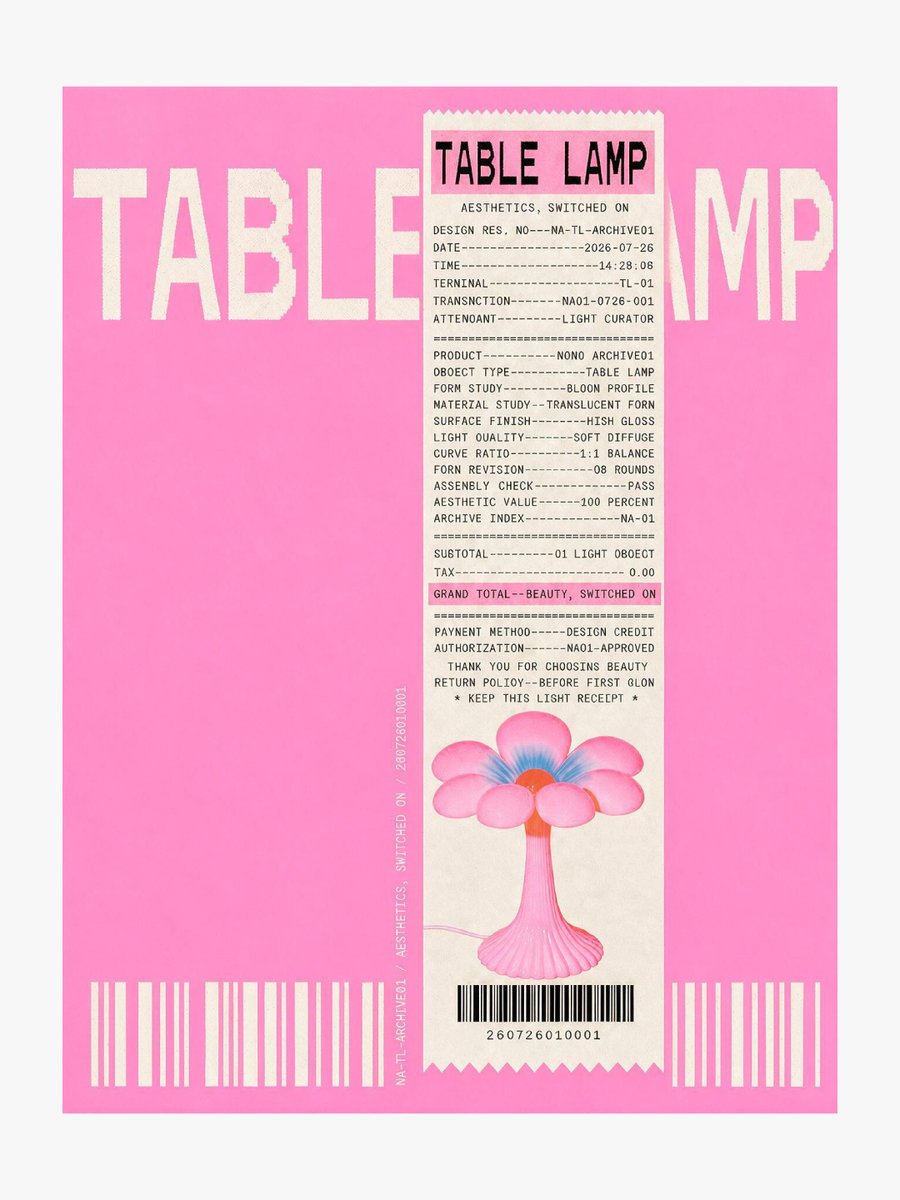
A hot-pink editorial poster design that uses oversized cropped typography and a thermal receipt layout to advertise a playful flower-shaped table lamp.
This is a GPT Image 2 prompt case for Graphic & Poster. Use the copy-ready prompt below to generate similar visuals, and review Awesome GPT Image 2 Prompts attribution plus commercial-use rights before reuse.
Free 1K preview
Generate one preview image instantly, no sign-up required.
Prompt
Copy-ready prompt
Goal: Create a bold experimental product poster for a design-object announcement, combining an extreme cropped typography background with a thermal receipt layout overlay.

Canvas: Vertical poster, 4:5 aspect ratio, off-white outer margin around a saturated hot-pink rectangular field. Use a clean print-design composition with slight risograph/thermal-paper grain and subtly imperfect ink edges.

Layout: Place one huge cream-white uppercase background title reading {argument name="product name" default="TABLE LAMP"}, spanning nearly the full width across the upper third; crop the letters heavily at the left and right edges so the title feels oversized and partially hidden. Center-right, overlay exactly one tall narrow cream thermal receipt running from near the top to near the bottom, with zigzag torn edges at the top and bottom. Add one thin vertical microtext line beside the receipt, rotated 90 degrees, reading like an archive/design ID. Along the bottom of the pink field place exactly two separate cream barcode blocks, one at bottom left and one at bottom right. The receipt itself contains exactly one black barcode near its bottom.

Receipt details: The receipt header has a large condensed black title {argument name="receipt header" default="TABLE LAMP"}. Under it, include the subtitle “AESTHETICS, SWITCHED ON”. Fill the receipt with monospaced thermal-printer text, dashed divider lines, and pseudo-transaction metadata. Include design-spec lines such as design registration number, date, time, terminal, transaction, attendant, product, object type, form study, material study, surface finish, light quality, curve ratio, form revision, assembly check, aesthetic value, archive index, subtotal, tax, payment method, authorization, thank-you note, return policy, and “KEEP THIS LIGHT RECEIPT”. Highlight exactly one line in a translucent pink marker strip: “GRAND TOTAL--BEAUTY, SWITCHED ON”.

Subject image on receipt: At the lower half of the receipt, print exactly one cute glossy flower-shaped table lamp illustration with a pink fluted pedestal stem, six rounded pink petals, a blue inner glow, a small orange-red circular center, and a thin pale power cord trailing left. Keep it centered above the receipt barcode.

Typography and style: Use condensed bold sans-serif for the massive background title, monospaced receipt type for all receipt text, black ink on warm cream paper, and a fashionable editorial graphic-design aesthetic. Main colors are {argument name="background color" default="hot pink"}, cream white, black, soft pink, blue, and orange-red. The image should feel like a modern poster generated from the structural idea of a thermal-paper receipt, not a realistic store receipt photo.

Constraints: Use exactly 3 visible barcodes total: 2 large background barcode blocks and 1 receipt barcode. Use exactly 1 receipt, exactly 1 product illustration, and exactly 1 highlighted grand-total line. Do not add people, logos, watermarks, QR codes, extra products, or extra receipts.
Prompt variables
Editable argument placeholders found in the prompt, with their default values.
Best for
- - Graphic & Poster visual exploration
- - Image generation and reference-image edits
- - Reusable briefs that keep source attribution visible
Change these parts
- - Subject, product, character, or scene
- - Aspect ratio, camera, lighting, and background
- - Brand, text, color, and output constraints
Recommended model and settings
- - Model: gpt-image-2
- - Input mode: Text to Image
- - Aspect ratio: source
- - Commercial status: review original source
How to use this prompt
- 1. Copy the prompt and preserve its structure for the first test.
- 2. Replace the subject, context, and publishing channel.
- 3. Change one camera, lighting, or style variable per iteration.
- 4. Inspect the output, source, text, and rights before reuse.
Limitations, source, and reuse cautions
- - Generated output is an editable draft, not factual, legal, or rights evidence.
- - Review the linked source, people, brands, logos, text, and third-party media before commercial use.
More cases in this category
Prioritized by category, input mode compatibility, quality, and lower risk.






Reuse and source notes
Use this prompt safely after previewing the case.
- 1.Copy the prompt or open it directly in Dovoo with the generation button.
- 2.Adjust variables, aspect ratio, and reference images for your own use case.
- 3.Before publishing or paid usage, verify source rights, attribution requirements, and brand or likeness risks.
Can I use this prompt commercially?
Commercial-use status is allowed. Review the original source, license, brand constraints, and legal requirements before paid usage.
Where does this case come from?
This case is imported from Awesome GPT Image 2 Prompts; keep attribution visible and check the source URL before reuse.