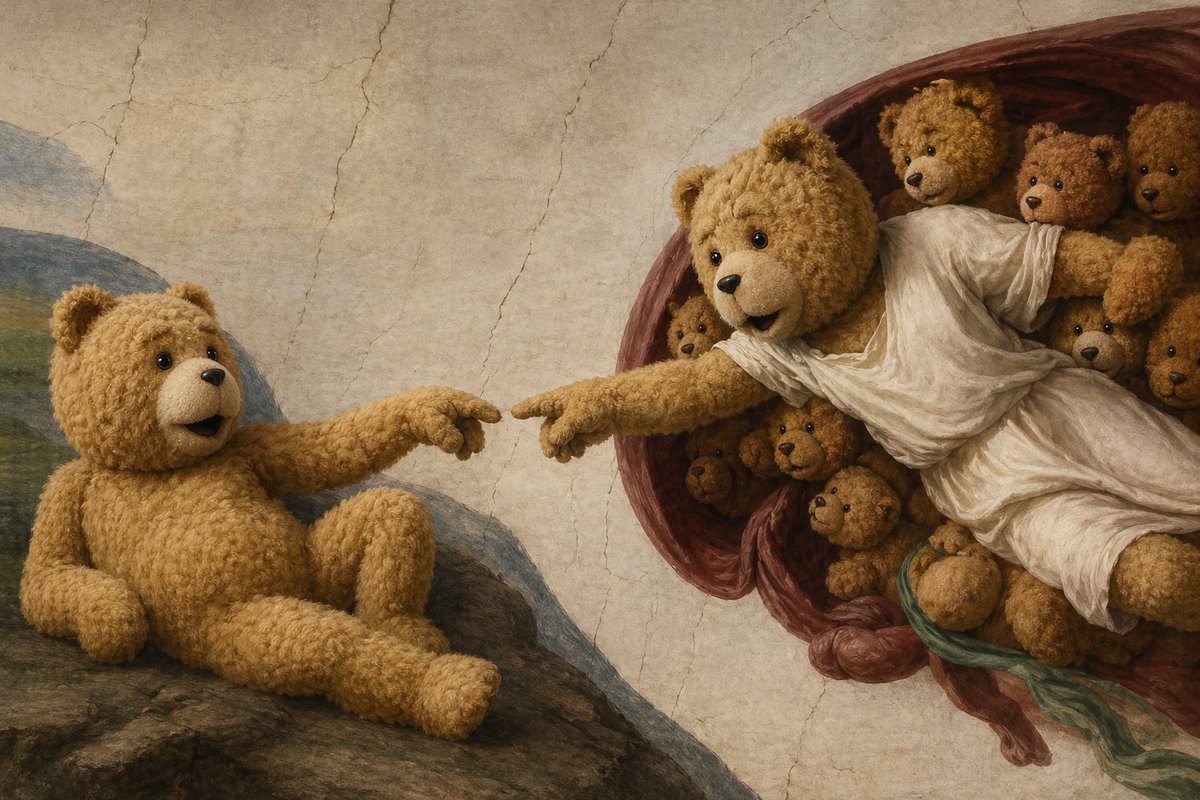
Teddy Bear Creation Fresco
A humorous Renaissance-style parody image of The Creation of Adam in which teddy bears replace every figure, ideal for whimsical art prompts and viral social-media visuals.
This is a GPT Image 2 prompt case for Illustration & Art. Use the copy-ready prompt below to generate similar visuals, and review Awesome GPT Image 2 Prompts attribution plus commercial-use rights before reuse.
Free 1K preview
Generate one preview image instantly, no sign-up required.
Prompt
Copy-ready prompt
A whimsical high-detail oil-painting parody of Michelangelo’s Creation of Adam, but all human figures are replaced by teddy bears. On the left, a single plush teddy bear sits reclined on a rocky slope, posed like Adam, with soft golden-brown curly fur, round ears, shiny black eyes, a small dark nose, and a slightly open mouth. Its left arm supports its body while its right arm stretches outward, index paw extended toward the other bear. On the right, a larger central teddy bear posed like God emerges from a deep reddish-burgundy swirling mantle, wearing a flowing white draped robe, leaning forward with one outstretched arm and pointed paw reaching toward the left bear, almost touching fingertips. Surrounding the robed bear inside the mantle are 8 additional smaller teddy bears clustered tightly together, peeking from different angles like attendant figures. The composition exactly echoes the iconic near-touching hands scene, with the gap between fingertips centered. Use a cracked fresco wall background in warm beige tones, muted Renaissance palette, soft directional light, realistic fabric folds, detailed plush texture, subtle shadows, and a museum-quality painted surface. Blend classical Renaissance fresco aesthetics with charming surreal humor, keeping the scene elegant rather than cartoonish.
Best for
- - Illustration & Art visual exploration
- - Image generation and reference-image edits
- - Reusable briefs that keep source attribution visible
Change these parts
- - Subject, product, character, or scene
- - Aspect ratio, camera, lighting, and background
- - Brand, text, color, and output constraints
Recommended model and settings
- - Model: gpt-image-2
- - Input mode: Text to Image
- - Aspect ratio: source
- - Commercial status: review original source
How to use this prompt
- 1. Copy the prompt and preserve its structure for the first test.
- 2. Replace the subject, context, and publishing channel.
- 3. Change one camera, lighting, or style variable per iteration.
- 4. Inspect the output, source, text, and rights before reuse.
Limitations, source, and reuse cautions
- - Generated output is an editable draft, not factual, legal, or rights evidence.
- - Review the linked source, people, brands, logos, text, and third-party media before commercial use.
More cases in this category
Prioritized by category, input mode compatibility, quality, and lower risk.




Reuse and source notes
Use this prompt safely after previewing the case.
- 1.Copy the prompt or open it directly in Dovoo with the generation button.
- 2.Adjust variables, aspect ratio, and reference images for your own use case.
- 3.Before publishing or paid usage, verify source rights, attribution requirements, and brand or likeness risks.
Can I use this prompt commercially?
Commercial-use status is allowed. Review the original source, license, brand constraints, and legal requirements before paid usage.
Where does this case come from?
This case is imported from Awesome GPT Image 2 Prompts; keep attribution visible and check the source URL before reuse.