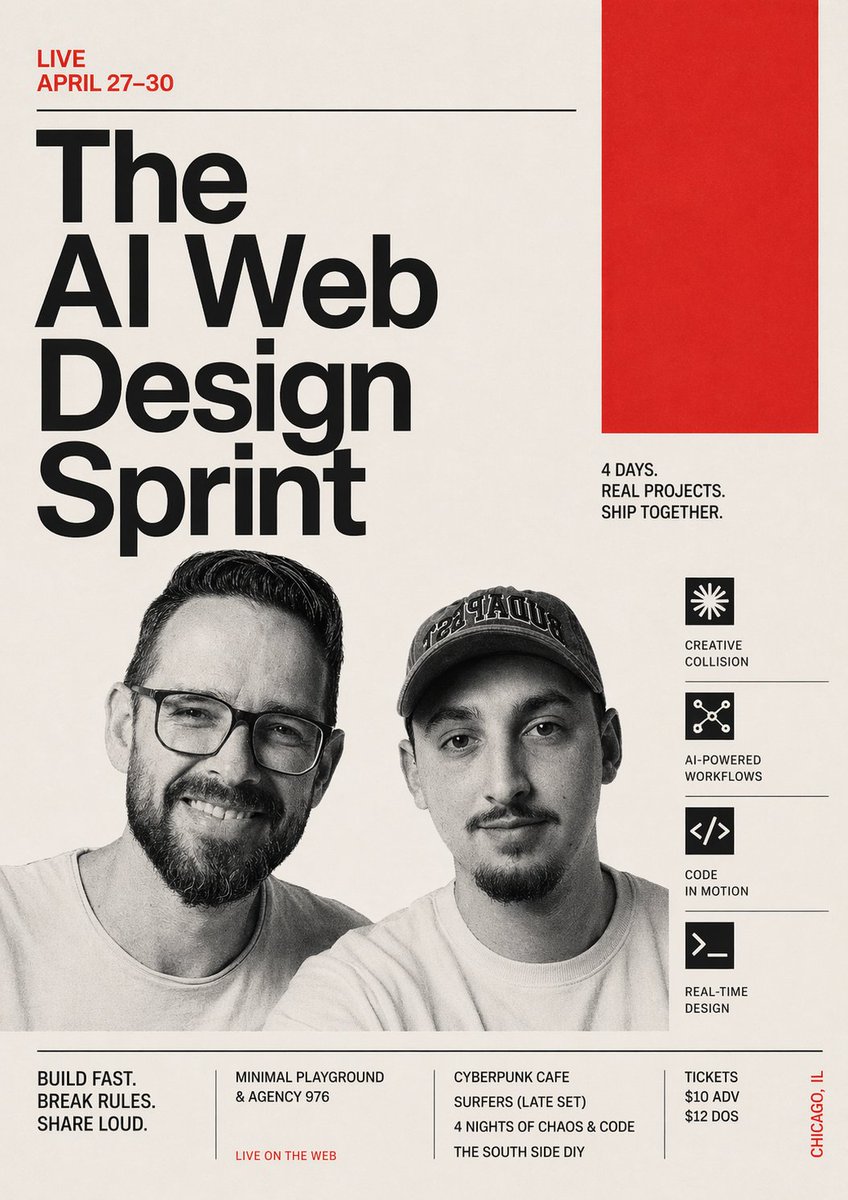
Swiss Poster for AI Web Design Sprint
A bold editorial event poster for a live AI and web design sprint, ideal for conference promotion, creative tech events, and social media announcements.
This is a GPT Image 2 prompt case for Graphic & Poster. Use the copy-ready prompt below to generate similar visuals, and review Awesome GPT Image 2 Prompts attribution plus commercial-use rights before reuse.
Free 1K preview
Generate one preview image instantly, no sign-up required.
Prompt
Copy-ready prompt
Create a bold Swiss-modernist event poster for a live AI and web design sprint, portrait orientation, with a warm off-white paper background, stark black typography, and vivid red accent blocks. The composition is asymmetrical and editorial, with a strong grid and generous negative space. In the top left, place a small red uppercase line of text reading {argument name="date text" default="LIVE APRIL 27–30"}, followed by a thin horizontal black rule stretching toward the right. Below it, set an oversized stacked headline in ultra-bold black sans serif, left aligned, reading {argument name="headline text" default="The AI Web Design Sprint"}, broken across 4 lines with dramatic scale so the words dominate the left half of the poster. In the upper right quadrant, add 1 large solid red rectangle as a graphic block. Beneath that red block, place a compact black uppercase subhead in 3 lines: {argument name="tagline text" default="4 DAYS. REAL PROJECTS. SHIP TOGETHER."}. In the lower middle, include 2 cropped grayscale portrait photos of men from the chest up, side by side, documentary style, slightly overlapping the typography area; the left man has dark slicked-back hair and a short beard, the right man wears a dark baseball cap with embroidered lettering and has facial hair. Obscure both faces with 2 vertical soft-edged gray censor rectangles centered over each face. Along the right side, create a vertical feature column with 4 black square icons, each separated by thin horizontal divider lines and paired with uppercase labels. The 4 items are: a starburst icon with the label "CREATIVE COLLISION", a connected-nodes icon with the label "AI-POWERED WORKFLOWS", a code brackets icon with the label "CODE IN MOTION", and a terminal prompt icon with the label "REAL-TIME DESIGN". Near the bottom, add a full-width footer separated by a thin horizontal black rule. Inside the footer, create 4 text blocks divided by slim vertical lines: block 1 says "BUILD FAST. BREAK RULES. SHARE LOUD.", block 2 lists "MINIMAL PLAYGROUND & AGENCY 976" with a small red line beneath reading "LIVE ON THE WEB", block 3 lists "CYBERPUNK CAFE SURFERS (LATE SET)" and below it "4 NIGHTS OF CHAOS & CODE" and then "THE SOUTH SIDE DIY", block 4 lists ticket info as "TICKETS $10 ADV $12 DOS". On the far lower right edge, add vertical red text reading {argument name="location text" default="CHICAGO, IL"}. Use a clean neo-grotesk typeface similar to Helvetica or Akzidenz-Grotesk, heavy weight for the headline, condensed uppercase for supporting text, crisp alignment, subtle paper texture, and a high-contrast black-red-cream palette. The overall look should feel like a contemporary design-conference poster mixed with punk tech culture and brutalist editorial branding.Prompt variables
Editable argument placeholders found in the prompt, with their default values.
Best for
- - Graphic & Poster visual exploration
- - Image generation and reference-image edits
- - Reusable briefs that keep source attribution visible
Change these parts
- - Subject, product, character, or scene
- - Aspect ratio, camera, lighting, and background
- - Brand, text, color, and output constraints
Recommended model and settings
- - Model: gpt-image-2
- - Input mode: Text to Image
- - Aspect ratio: source
- - Commercial status: review original source
How to use this prompt
- 1. Copy the prompt and preserve its structure for the first test.
- 2. Replace the subject, context, and publishing channel.
- 3. Change one camera, lighting, or style variable per iteration.
- 4. Inspect the output, source, text, and rights before reuse.
Limitations, source, and reuse cautions
- - Generated output is an editable draft, not factual, legal, or rights evidence.
- - Review the linked source, people, brands, logos, text, and third-party media before commercial use.
More cases in this category
Prioritized by category, input mode compatibility, quality, and lower risk.






Reuse and source notes
Use this prompt safely after previewing the case.
- 1.Copy the prompt or open it directly in Dovoo with the generation button.
- 2.Adjust variables, aspect ratio, and reference images for your own use case.
- 3.Before publishing or paid usage, verify source rights, attribution requirements, and brand or likeness risks.
Can I use this prompt commercially?
Commercial-use status is allowed. Review the original source, license, brand constraints, and legal requirements before paid usage.
Where does this case come from?
This case is imported from Awesome GPT Image 2 Prompts; keep attribution visible and check the source URL before reuse.