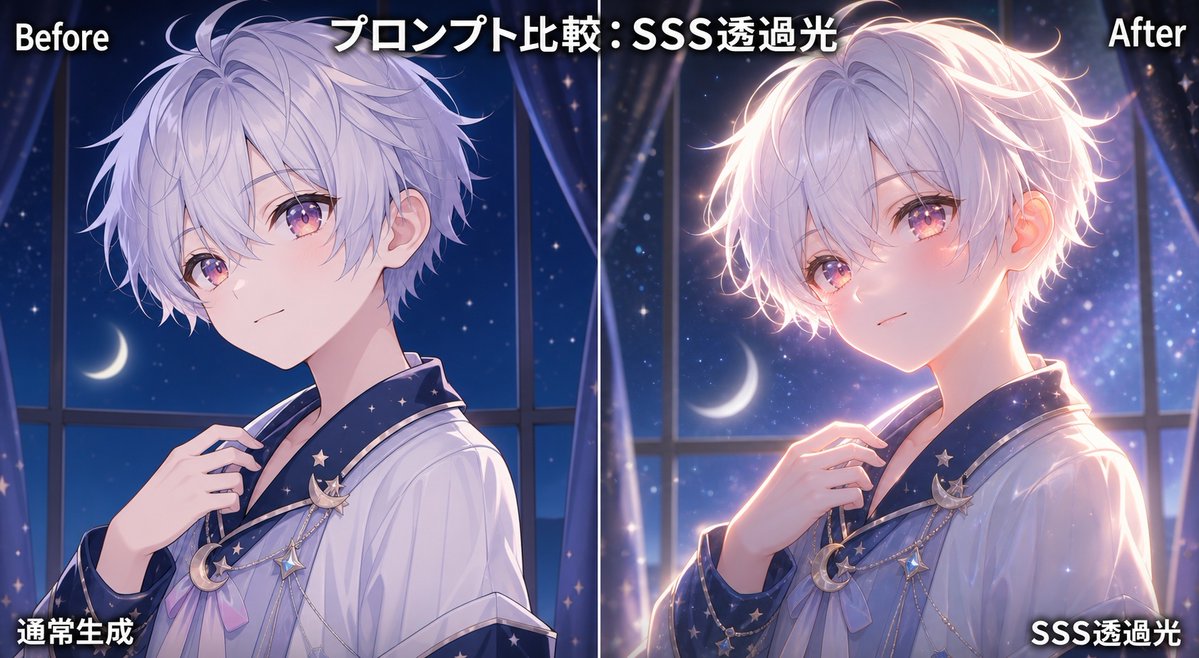
SSS Translucent Light Comparison
Creates a two-panel anime before-and-after comparison graphic showing how subsurface-scattering translucent light improves depth and glow.
This is a GPT Image 2 prompt case for 动漫游戏. Use the copy-ready prompt below to generate similar visuals, and review Awesome GPT Image 2 Prompts attribution plus commercial-use rights before reuse.
Prompt
Copy-ready prompt
目标:创建一个并排的动漫插画对比图,演示次表面散射(SSS)透光效果。在两个垂直面板中展示同一角色:左侧为普通版本,右侧为增强后的发光版本。

画布:宽屏 16:9 社交媒体对比图,约 1200×675 像素,由一条细垂直白线从中间精确平分。使用深蓝色夜间色调,在左侧“Before”(对比前)和右侧“After”(对比后)的光影之间形成强烈对比。

布局:两个等大的面板。左上角标签为白色粗体文字“Before”,带有黑色阴影。顶部中央标题为“プロンプト比較:SSS透過光”,使用带有深色描边的大号白色粗体日文。右上角标签为白色粗体文字“After”,带有黑色阴影。左下角说明文字为“通常生成”,右下角说明文字为“SSS透過光”,均为带有黑色阴影的白色粗体日文。保留 5 个文本元素:1 个“Before”标签、1 个日文标题、1 个“After”标签、1 个左下角日文说明和 1 个右下角日文说明。

主体细节:两个面板中均展示同一位年轻动漫男孩,半身肖像,四分之三侧身,略微朝左,身材苗条,皮肤白皙,留着蓬松的浅紫色银发,发丝柔软,耳朵可见,颈部和手部精致,身穿宽松的白色长袍或睡衣式衬衫,领口带有深海军蓝星形图案。胸前添加天体饰品:共 3 个可见的悬挂饰物,包括一枚新月胸针、一个小星星挂件和一条垂下的链条细节。他的右手轻轻握住胸前的领口。两个面板中,面部均被一个位于头部中心的不透明方形隐私遮挡块遮住;左侧使用柔和的淡紫灰色方块,右侧使用更温暖的粉紫色方块。

背景:两个面板均展示相同的梦幻卧室/窗户夜景:高大的窗框、深海军蓝星空、角色身后可见的新月、透明窗帘、细小的闪光和柔和的虚化效果。左侧面板应感觉更冷、更平淡、光感较弱。右侧面板应感觉更具电影感和高级感,带有温暖的轮廓光和发光粒子。

光影对比:左侧面板为普通生成,带有柔和的冷月光、柔和的阴影、极少的透光感,头发边缘基本为哑光,耳朵和脸颊不发光。右侧面板增加了戏剧性的 SSS 透光效果:温暖的粉橙色光线仿佛从背后穿过耳朵、脸颊区域、指尖和头发边缘,在头发周围形成光晕轮廓,皮肤上有温暖的光晕,肩膀和手部有明亮的轮廓,且更具深度。在不改变角色姿势的前提下,强调右侧的透明度、立体感和高质量的动漫渲染。

视觉风格:高端日本动漫插画,柔和的绘画感渲染,干净的线条,亮丽的头发高光,梦幻的蓝紫色夜间氛围,微妙的魔法闪光效果,清晰易读的排版,适合 AI 艺术教程帖子的精致对比图。

可自定义变量:使用 {argument name="headline text" default="プロンプト比較:SSS透過光"},{argument name="character description" default="留着蓬松浅紫色银发的年轻动漫男孩"},{argument name="left caption" default="通常生成"},{argument name="right caption" default="SSS透過光"} 以及 {argument name="lighting effect" default="穿过脸颊、耳朵和头发边缘的温暖次表面散射透光效果"}。

约束:保持两个角色肖像的姿势和服装几乎完全一致。包含 2 个遮盖面部的大方块,每个面板各一个。不要添加额外的面板、额外的说明文字、水印、Logo 或无关物体。
Prompt variables
Editable argument placeholders found in the prompt, with their default values.
More cases in this category
Prioritized by category, input mode compatibility, quality, and lower risk.
Reuse and source notes
Use this prompt safely after previewing the case.
- 1.Copy the prompt or open it directly in Dovoo with the generation button.
- 2.Adjust variables, aspect ratio, and reference images for your own use case.
- 3.Before publishing or paid usage, verify source rights, attribution requirements, and brand or likeness risks.
Can I use this prompt commercially?
Commercial-use status is allowed. Review the original source, license, brand constraints, and legal requirements before paid usage.
Where does this case come from?
This case is imported from Awesome GPT Image 2 Prompts; keep attribution visible and check the source URL before reuse.