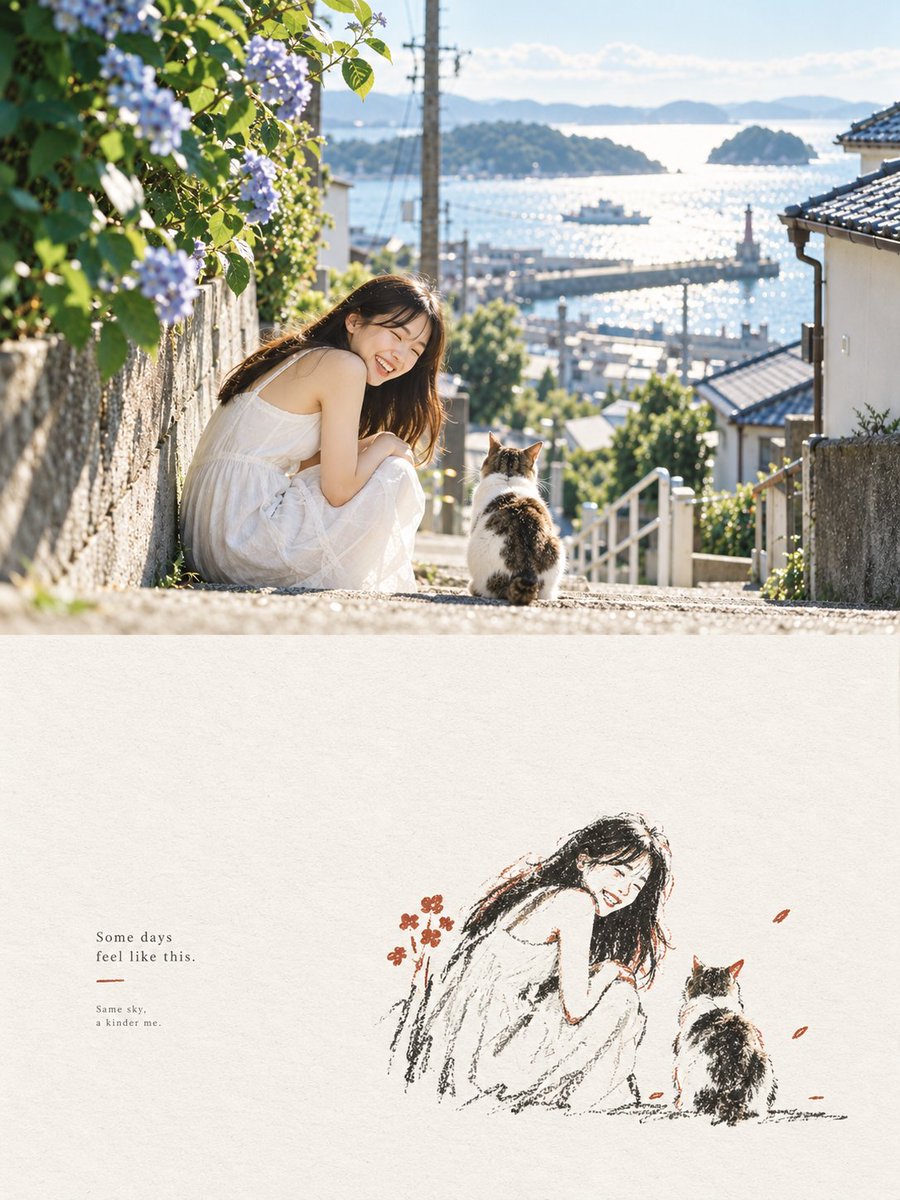
Seaside Photo and Charcoal Sketch Poster
Generates a serene vertical diptych combining a sunny coastal lifestyle photo with a minimalist charcoal sketch and poetic caption.
This is a GPT Image 2 prompt case for Graphic & Poster. Use the copy-ready prompt below to generate similar visuals, and review Awesome GPT Image 2 Prompts attribution plus commercial-use rights before reuse.
Free 1K preview
Generate one preview image instantly, no sign-up required.
Prompt
Copy-ready prompt
Create a vertical editorial poster split into 2 stacked panels. Top panel: a bright, dreamy realistic photograph of a young woman with long dark hair wearing a loose white sleeveless summer dress, sitting on sunlit stone steps on a steep seaside town street. She is turned toward the camera, smiling warmly, with 1 calico cat sitting beside her facing away toward the harbor. The street slopes down between old Japanese-style houses with tiled roofs, white railings, stone walls, utility poles, greenery, and blooming pale purple hydrangeas on the left foreground. In the background, show a sparkling blue inland sea with small islands, a harbor pier, tiny boats, soft distant mountains, and a clear pale blue sky. Use golden morning sunlight, backlit highlights, shallow depth of field, natural lens flare, airy coastal atmosphere, and a nostalgic Japanese travel-photography aesthetic. Bottom panel: large off-white handmade paper texture with a minimalist charcoal-and-colored-pencil sketch recreation of the same scene placed slightly right of center: exactly 2 figures, the smiling seated woman in a white dress and the calico cat facing the sea, drawn with loose black carbon-pencil strokes, sparse warm brown and muted red accents, and a few small red-orange petals or flowers. On the left side of the bottom panel, add small serif text reading exactly: “Some days\nfeel like this.” then a short thin muted red underline, then smaller text reading exactly: “Same sky,\na kinder me.” Keep the top half photographic and the bottom half hand-drawn, with generous negative space, soft grain, elegant magazine layout, calm healing mood, no extra people, no watermark. Customizable elements: {argument name="main subject" default="young woman with long dark hair in a loose white sleeveless summer dress"}, {argument name="animal companion" default="calico cat"}, {argument name="location" default="sunlit Japanese seaside town overlooking a harbor and islands"}, {argument name="main quote" default="Some days\nfeel like this."}, {argument name="small caption" default="Same sky,\na kinder me."}Prompt variables
Editable argument placeholders found in the prompt, with their default values.
Best for
- - Graphic & Poster visual exploration
- - Image generation and reference-image edits
- - Reusable briefs that keep source attribution visible
Change these parts
- - Subject, product, character, or scene
- - Aspect ratio, camera, lighting, and background
- - Brand, text, color, and output constraints
Recommended model and settings
- - Model: gpt-image-2
- - Input mode: Text to Image
- - Aspect ratio: source
- - Commercial status: review original source
How to use this prompt
- 1. Copy the prompt and preserve its structure for the first test.
- 2. Replace the subject, context, and publishing channel.
- 3. Change one camera, lighting, or style variable per iteration.
- 4. Inspect the output, source, text, and rights before reuse.
Limitations, source, and reuse cautions
- - Generated output is an editable draft, not factual, legal, or rights evidence.
- - Review the linked source, people, brands, logos, text, and third-party media before commercial use.
More cases in this category
Prioritized by category, input mode compatibility, quality, and lower risk.

Reuse and source notes
Use this prompt safely after previewing the case.
- 1.Copy the prompt or open it directly in Dovoo with the generation button.
- 2.Adjust variables, aspect ratio, and reference images for your own use case.
- 3.Before publishing or paid usage, verify source rights, attribution requirements, and brand or likeness risks.
Can I use this prompt commercially?
Commercial-use status is allowed. Review the original source, license, brand constraints, and legal requirements before paid usage.
Where does this case come from?
This case is imported from Awesome GPT Image 2 Prompts; keep attribution visible and check the source URL before reuse.